


Touch The Girl! - Mobile version Beta test (ended)
Beta test was ended. Thank you so much for your cooperation!
Restarted.
I'll conduct a beta test for Touch The Girl! - Mobile version. I'd appreciate your participation! This is a browser game, so you can't download it. Please access the site from your smartphone.
Notes:
This is simply a port of Touch The Girl! - Soft version(free demo) to mobile devices, so the touch areas are small and may be unresponsive. You may need to use a stylus. I plan to improve the screen size and UI in the future.
This version is designed for touch controls, so Hold Mode is not available.
If a bug occurs and you're unable to proceed, please reload the page. For the Standalone Mode described below, please completely close the app using app switcher and then restart it.
There’s no reason to do it, but you can also access it with a PC browser. However, please make sure to enable hardware acceleration of your browser. If it’s disabled, CPU usage may skyrocket. Also, in my environment, both Chrome and Firefox encountered Ruffle (Flash runtime engine) errors during high-load scenes. I generally don't recommend running this on a PC browser.
Known Issues:
Touch-guide isn't working at all. (Due to no mouse-over state.)
When the face turns, a brief afterimage may appear. This is likely a glitch or quirk of Ruffle. It may occur with other scenes as well, so please let me know if you find similar issues.
The text in the “Personal Data” field does not display properly.
Thanks for your understanding.
Standalone Mode:
As mentioned previous post, using your browser’s standalone mode hides the URL bar and allows you playing in full-screen. (Note: This does not work on Firefox for iOS.)
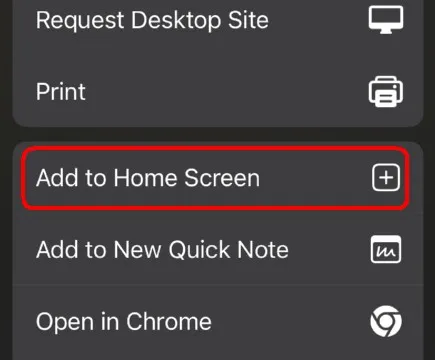
Tap the icon above. (On Chrome for Android, tap the three-dot menu icon in the upper-right corner.)
Tap "Add to Home Screen".
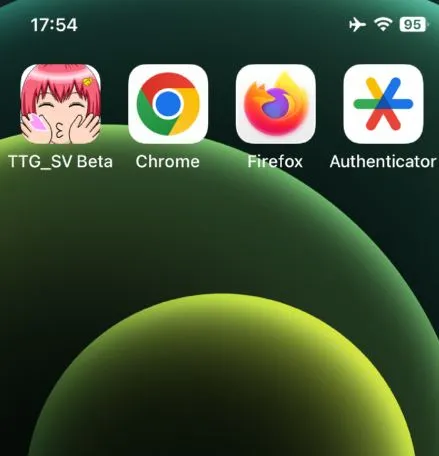
An icon will be added to the home screen, and you'll be able to launch it directly like an app.
That's all. Please access the site below using a browser on Android smartphone or iPhone. I don't recommend using any other devices. Please make sure JavaScript is enabled. (It's enabled by default.)
Please let me know if you find any issues or bugs (or anything looks like them), also welcome reports that it works. Please also include your device, OS, and browser.
Thanks for your cooperation!
Comments (27)
No puedo entrar a la versión de Movil
Sorry, beta test has already ended. Thanks for your cooperation!
Hello Swatex:) I entered the url to test the mobile version on my phone, but couldn't enjoy playing at all because of lagging It respond to my touch after few seconds, not like version for computer that respond to my click or dragging almost simultaneously My phone is 'Galaxy jump 4(Samsung, android)', hope you help me for coping with the problem on someday~
Hi, thanks as always, and sorry for any inconvenience. Currently, GPU load is quite high, so that’s a possibility, but it might be strange for a new model like Jump4 to be that slow. First, I’ll figure out how to pinpoint the cause. Thanks for info.
Hi. Is this still meant to be working? I'm on android, chrome and after the loading screen, it just goes black
Hi, thank you so much for your support and sorry for any inconvenience. After accessing the URL, it should proceed as follows: progress bar -> brief black screen -> “Loading...” in orange text -> game starts. Where is it getting stuck? Also, are you using the latest versions of Android and Chrome? Thanks for your cooperation.
Looking good over here on iOS. It’s neat, but the soft version and the control wonk with touch is just driving me to plop the desktop version on my handheld machine so I can get at everything. Ruffle is the best shit to ever happen to this market though. Yasher Koach.
Hi, thanks for your report! For iOS, this is currently the only solution, but if not limited to smartphones, I agree it’s the best choice. First, I’ll focus on improving the UI, like making the buttons larger.
非常不错!!!按照您提供的流程,我成功在iPad Air上运行了mobile版本!!我使用的是谷歌浏览器,很期待完整版上线移动设备,想请问一下大概什么时候可以在移动设备上玩到完整版本呢?感觉还是在移动设备上会更加方便一些~^ ^
Thank you so much for your report! I'll release the Complete version for mobile in the near future, though it'll be a beta version for now. Thanks for your patience.
Sorry that my comment doesn't relate to the TTG mobile version or its testing, but I hope you and your loved ones are okay. Just heard about the earthquake and everything, so 😐 seemingly there won't be any tsunami, to that's VERY good news. Stay safe, Sawatex. Greetings from the other country that understands Japan's seismic activity a little too well 🇯🇵🇨🇱
Thank you so much for your concern and kindness as always! I've no problem. ^^
Thank you!! Seriously this is awesome! My only issue is im not sure how to open the game full-screen so I dont have my url and browser stuff taking up space at the top of the screen
It probably doesn't mean much since my phones as top of the line as they come but it runs excellently for me even better then most ruffle extensions it honestly ran better then it did on my shitty old laptop. Super thankful to you creator. If I had the skill and knowledge too this is the exact game id wanna make so im really glad youre around to do it!
I just noticed today that Touch guide isn't working at all. This is because there is no mouse-over state.
Is it normal for the downloading screen to take a bit of time? [Edit note]: also it finally downloaded - All I get is a black screen? I'm currently using an android A53 5G model and used Google Chrome
The black screen after Downloading screen is unavoidable. It seems that Ruffle is performing some operation. During the following "Loading" screen, the audio files are being loaded. Once the game screen appears, all files have finished downloading.
Since yesterday, the progress bar was stuck at 0% and the game temporarily couldn't launch. It's fixed now. Sorry for the inconvenience.
Please include your device, OS, and browser when reporting. Thanks for your cooperation!
I can't sadly load the game :(
Sorry for any inconvenience. Could you tell me your device, OS and browser?
Congratulations for your efforts, but the PC version is the real OG
You’re right, I agree with you on that.
Extremely lagged on my device
Really? Could you tell me your device, OS, and browser?
👍 its work
Thanks for quick report!