
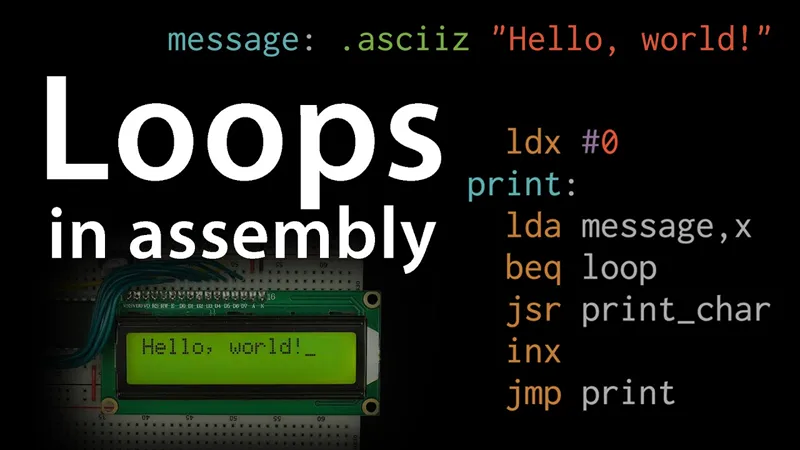
How assembly language loops work
Here's the next in the 6502 series. As always, any feedback is appreciated before this goes public this weekend.
In other news, it's been an incredibly busy month for me. This video nearly didn't happen this month. Much of my time was spent helping out behind the scenes with 3blue1brown's lockdown math livestreams. I highly recommend checking them out (and trying to catch them live if you can). It's been a lot of fun helping to produce those.
Also, in case you missed it, I recently appeared in a video on Smarter Every Day talking about flocking algorithms. I recommend checking that out too
And in case that doesn't give you enough to watch, I also had a random cameo appearance in the latest standupmaths video on punch cards. I added nothing of value to the video other than fodder for the comment section to ask why I was there... But it's otherwise a great video.
Anyhow, thanks as always for your continued support and any feedback on this video.
-Ben
Comments (35)
I'm new to assembly, so here goes e beginer's question. If we change this part of code: ldx #0 print: lda message,x beq loop jsr print_char inx jmp print To this: ldx message print: lda x beq loop jsr print_char inx jmp print So X register contains exact address of character. Will this work? In fact we could print character from X register directly. Or increment A register directly, and print from A register without using X register at all. Which would make the code even more simple. Am I correct?
I'm wondering if there may be a small error in the lcd_wait subroutine? Will the latching of the data from the LCD occur on the falling edge of the Enable signal, but here the data is being read while Enable is still high? i.e. Should the read of busy use the same sequence for PORTA as the other commands i.e. store 0, store EN, store 0 and use a RW, EN | RW, RW before reading the busy data? I'm using an OLED instead of an LCD, but my datasheet says the busy data is latched on falling edge of EN.
Hey, about those lock down maths videos, he sometimes gives a stern look off camera in the early episodes when something goes wrong. Is that an inside joke, or is he just getting a little frustrated?
Maybe checking the busy flag causes a flush of some kind in the LCD and not doing it relies on a timeout?
I hadn't considered that, but that could make a lot of sense.
Excellent, thanks Ben....... some more playing during lockdown here in the UK.....
~5.2 hours of video to successfully write a "Hello World" program... Awesome!
A different scope on this video. Is there a feature on the scope you used that did not exist on the earlier videos using, I think, Rigol scopes?
Oh, are they “hardware” loops? Seems like software to me…
Thank you Ben.
Well, that was timely. I teach a Machine Architecture course, and one of things I'm doing is to hook up an LCD display to an Arduino. We just finished working on controlling the display directly rather than through the LiquidCrystal class, and the next step is to replace the digitalRead() and digitalWrite() calls with direct assembly language. At that point, I'm sure I'll be talking to the display faster than the 37us required between commands, so I'll need to be checking the busy flag. I could probably figure it all out on my own, but it's always nice to have a known working implementation I can look at in case things don't work. Thanks for that.
Great video (as always). But I encountered a little problem with this code : when you load 0 to the X register, why don't you write ldx #0 (as for lda #...). ? I first wrote ldx 0 but it just did nothing, or random characters... When I write ldx #0, it works like a charm.
I think (and I'm learning this with you) is that when you say "ldx 0" you're using the "absolute" addressing mode--that is, your "ldx" instruction uses the hex "AE", which means "load the value from *address* 0". Which is garbage, because nothing in the program writes anything to the RAM at zero. When you tell the assembler "ldx #0", you're using the "immediate" addressing mode, for which the machine code is "A2" in hex, and says "load the *value* 0".
Maybe think of BNE as "Branch if Not Empty". :-D
I noticed a small mistake. When you're showing the timing of the 750x NOP program on the scope you're saying that it's 1500ms, but it's 1500us. In some earlier scene you stated the timing correctly. Small detail but for a beginner might be confusing.
Ugh. Thanks for catching that. I don't think I can quickly re-record that segment. I guess I'll drop in some text on the screen :( Still better than nothing, so thanks for catching it!
Thanks for the new video, it was great! I'd suggest one addition: turn the message-printing loop into a subroutine that can be called with a pointer to a message, eg: lda message jsr printMessage and then you could store multiple messages in the program and print one and then another after a small delay. ("Hello, world!" ... "Learn more, eater.net/6502")
I'm working on accomplishing the same thing. The problem is that you need two 8-bit words to store the address. Might work to put the high byte in X and the low byte in Y. Then you can increment Y as you loop. Haven't tried it yet, but plan to soon.
Great video as always. Two minor comments:1. LDA sets both Z and N flags. I'm not sure why you're not doing a BPL after the LDA PORTB rather than and AND and BNE. Perhaps you thought this would give you opportunity to explain more? Many chips use the high bit for the most common flag so that you can efficiently check negative/positive - so this is a common code pattern.
Second minor comment is that the recording of your voice on the first time you switch to a code view (0:59) has a different EQ than the rest of the video. Not sure that's worth fixing, but I noticed immediately that it didn't quite sound like you.
Couldn't you have also used the ASL instruction (arithmetic shift left) to test the busy flag? If there's a 1 in the leftmost bit, it gets shifted into the Carry flag, which you can also branch on.
There are a few ways you could arrive at the same result. The route you choose mostly depends on how you want the information. For example, in my first attempt at reading my DPAD+Ok (5) button inputs, I read PORTA then ROL the bits off one at a time and do a BCC on each carry bit to identify which button is being pressed. Each method of figuring your branches will have their own cost in instruction time. Ben's shown method is extremely simple and to the point to looking at just this one bit, resulting in the least number of cycles to get where we want to be.
Thanks for another fantastic video. I managed to do most of this step myself before the video came out. I'm pleased that my code ended up almost identical to yours. I'd suggest that it might be good to clean up the final code to have something more like a println() function rather than everything in what passes for a main(), but that's probably a lot of work for not much gain if you're not going to continue the series any further. If you do continue this project, I'd love to see some stuff on interrupts, timers, and maybe even other 6502-compatable peripherals. Would be fantastic to figure out how to make this drive your home-made video card too!
I too was able to do most of these steps before the video. The biggest thing I learned was the .asciiz keyword. Beforehand I used lots of .byte definitions and a fixed predetermined message length to control my loop. This way is much cleaner and easier to maintain.
I think at 10:39 it'd be good to clarify what a branch instruction is fundamentally. from what I understood in this video, I guess it's like a jump-to-subroutine but without using the stack?
Branch instructions basically just change the address in the Instruction Pointer to point to the address being branched to, depending on some condition.
Ah, this is cool. When I was a kid I wrote code to simulate flocking after a phone call with Disney for a job working on their computer animation. They had referenced the wildebeest scene in Lion King and said I'd be working on flocking (among other things). So after that phone call I decided to see if I could simulate it. Came up with basically the Boids algorithm (slightly different) before I knew what it was. Didn't get the job, but ended up working with Craig Reynolds at my recent job.
When I was 14 I too re-invented the boids algorithm, but it never did work quite as well as the real thing. At that age I hadn't really connected it to the concept of emergent behavior, so I kept adding kludges on top of kludges to get it to work. It was horribly slow on my 486 but it kinda worked.
Thanks Ben, well done on the 3Blue1Brown tech. The video content is good and well explained. Only a small niggle, there is approx. 30 seconds of black screen at the end of the video, It just seems a bit odd.
Love the mic-drop at the end
Awesome work! To see that you're at the point of not worrying about the computer working, aiming on writing code for it and then run it on breadboards is just very satisfying.
fyi: there are a couple seconds of black screen at the end
Thanks. I guess that was just an issue with exporting the draft. The final video will have the credits and end screen and such at the end.
Great work! This was very similar to what I came up with , I can add some optimization on checking the z flag. Enjoyed how you put the scope on to measure the performance. I'm guessing the next video is gonna me on interrupts? The end felt very series ending, maybe could use a cliffhanger interrupt pun ;)
I saw you with Matt and Grant in the 1401 lab. My head nearly exploded... was a bit disappointed I didn't see CuriousMarc though...