

How to install Skull and Bones patches (SB-Patches)
While I've been out, I've been getting several questions about this, so thought I'd just write a good ol little walkthrough to help guide new users through it.
DO NOTE, USING SB PATCH REQUIRES THAT YOU OWN THE GAME ON STEAM, IT DOES NOT INCLUDE THE FULL GAME, TRYING TO INSTALL THIS TO ANY OTHER FOLDER WILL NOT WORK!
Using HS2 as an example here, but the same should go for AIS and KKP.
1. Download
Now, on the download site, you will have the option between two packs, one marked Normal Ed (This one contains only plugins and a bare minimum to get your game uncensored and running well. If you JUST want to get the game uncensored, this is the one you want.) and Full Ed (This includes everything in the Normal Ed plus the sideloader modpack, adding additional content to the game. Clothing, Hairstyles, Skinstyles, Accessories etc)
Once you've decided which variant you're going with, you can select to download using Magnet (BitTorrent), Google Drive or Mega.
Magnet is HIGHLY recommended.
If you use Mega or Magnet, skip step 2 and proceed to step 3.
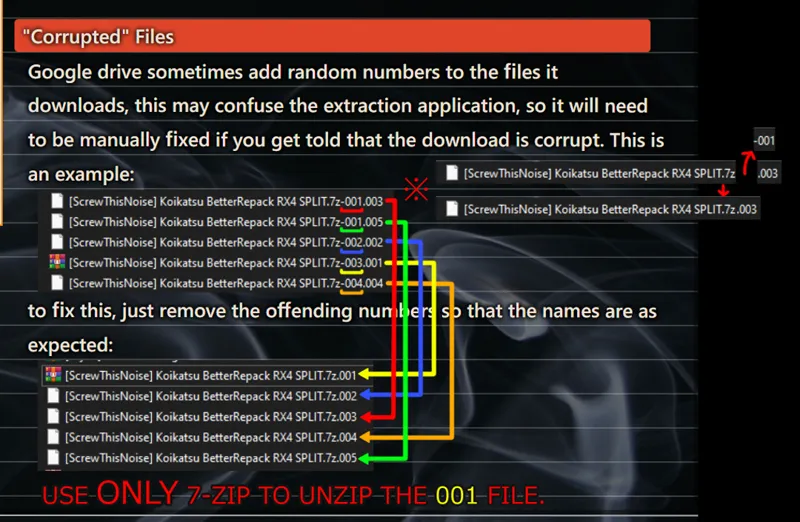
2. Google Drive weirdness
Now, google drive loves to do weird stuff, basically it likes adding -00x at the end of the filename. This may have to be cleaned up before you're able to extract it. Credit to JD#7975 on the discord for improving on my explanation from https://betterrepack.com/install/#gdrive.
Due to download limits from these services, I am forced to cut the archives into 3.5GB pieces, thus why google drive and mega has split files, while the torrent one doesn't.
3. Unzipping the patch
You can find a list of recommended applications on https://betterrepack.com/install/, but in short, 7zip is used to make these files, so that's the recommended application to extract the contents. You may use other solutons, such as WinRAR or any other, but if you're facing problems extracting, I highly recommend you stick with 7zip. It's a free app and is of high repute.
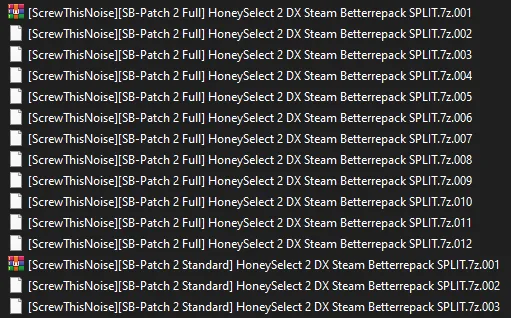
Once you have your Archival application installed, go to the folder where you have the files, and confirm that they have the EXACT same name as shown bellow (both the Standard and the Full edition is depicted together, you likely just have one of them):
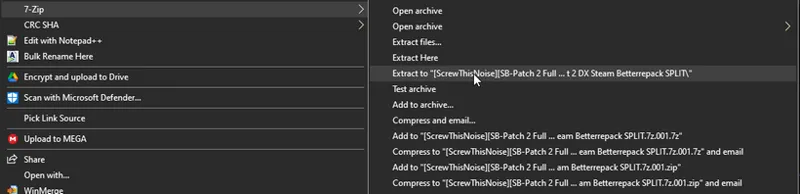
From there, right click on the 001 file (or the first one if you don't show file extensions for known file types, 001 should be associated with 7zip or whatever archival app you're using, so that may not show a number at the end at all.) and press as shown bellow.
This will lead to you getting a new folder named the same as the archive, open it to find two files (If you downloaded via mega or gdrive, you may get a single .7z file, extract that as well as shown over):
04. Installation
The exact files varies on which edition you downloaded, Standard gives you the upper two files, while full gives you the lower two files. Run the exe you got.
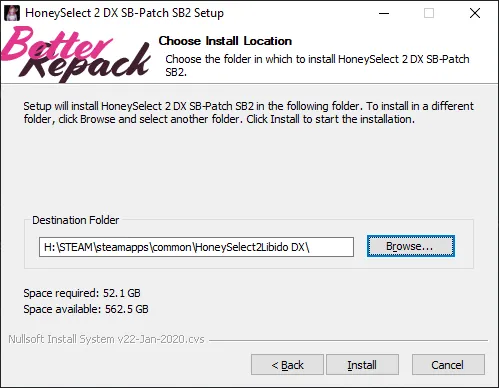
After pressing next on the initial screen you should get the following:
Make sure that points to the steam installation directory for the game.
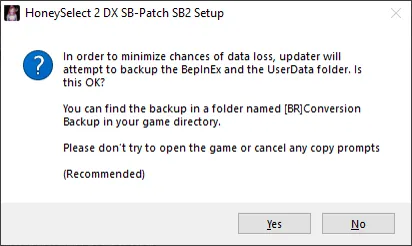
Once the install starts, you will be asked if you want to backup your UserData and BepInEx folder (if they exist). This will copy your existing UserData and BepInEx folder to a folder named `[BR]Conversion` for backup purposes, just to make absolutely sure you don't lose any saves, characters or anything you've made in the game.
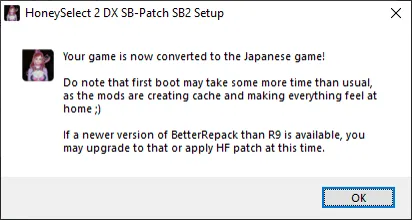
When you've answered to that, the installer will deal with the rest until it's done, at which point you will get the following message:
05. Completion
Now, having done all of the above, you should be golden. Just start the game from Steam as normal, or open the `Initial Settings.exe` file in the game folder, and you'll be presented with start options. You should immediately see that the launcher has been changed to one with far more options than the vanilla launcher.
Do note that during first boot, the game will be caching mods, and making sure everything is in order, so it may seemingly hang a bit on a white screen as this is going on. Just give it some time. This should take far shorter time on subsequent loads.
Hope you all have the very best of fun! \o.o/