



Being a DIK - Walkthrough/Cheat mod
Game Developer: DrPinkCake
Game Version: 0.12.1
Mod Features:
Added hints to dialogue that gives points and highlighted the dialogue that gives the best outcome green
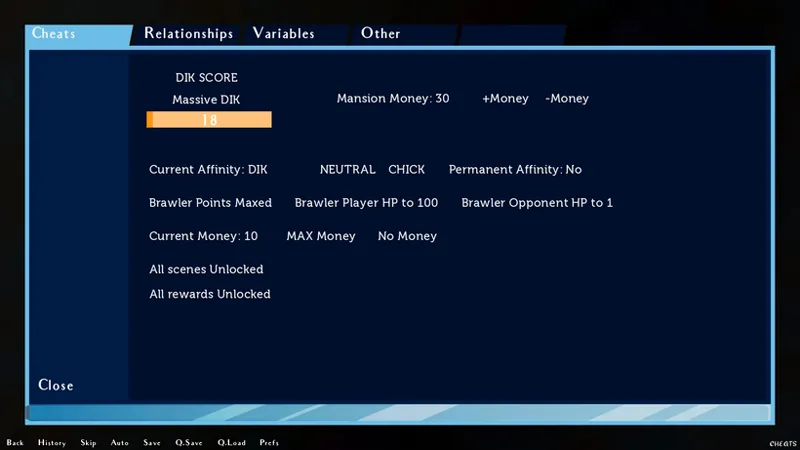
Cheat menu in bottom right screen
Added a Help button in top right during some freeroams
Added a few more scenes to the gallery
Scene Changes:
Can pick all choices during Episode 2 DIK party
Episode 5 can pick both Maya and Josy path
Episode 6 Can view all scenes where there are multiple options
Installation:
PC:
Drag and drop the folder "game" from the mod into your Being a DIK folder
MAC:
Unzip the mod -> Right click Being a DIK -> Click "Show Package Contents" -> Open the "Contents/Resources/autorun" folder -> Hold the Option key and drag the folder named "game" from the mod into the "autorun" folder -> Click merge
Season 1 & 2:
Download: MEGA PIXELDRAIN
Season 3:
Download: MEGA PIXELDRAIN
Cheat button not visible fix: MEGA
Comments (168)
I think the mod stopped working. It crashes my game before I even get to the main menu.
same problem
Gme (episode 3) flat out doesnt work with this mod installed. Loived your mods for a long time but this one is a swing and a miss at this stage.
hay Scrappy i love your patch you are the best but i am having an issue when season 10 starts up it cant find the images after the recap do you by chance have ant pointers for me to fix the issue. anyways thanks again for everything
Can we get a version of this mod that scales to 4K? Right now the UI is all over the place.
will there be a steam version this doesn't seem to be working for steam atleast
how do I add this to the steam version, since now steam has S1,2 & 3
being a dik season 3 from steam cant use the mod it doesnt work
Being a dik on steam can't use your mod to unlock the gallery ,need help
I get as far as the exam in ep12 but theres a glitch and can't do anything on the screen. Sage path if makes any difference
try turning off mini-games before the exam starts and turn it back on after the exam is done.
can you update this for the newest release?
Support for 0.12.1 would be great
It’s doesn’t work the worst won’t start
Any plans to support 0.12.1?
This shit don't work for Ep 12
I cant seem to get it running for some reason. it throws code error every single time i press the cheats button
New mod doesn't work for Episode 12
Excellent thanks for the quick turnaround on the Mod, do any of you know what can cause the black screen (text still visible) during some of the scenes?
TYSM!
Is this all of th4e mods being fixed or just the new one?
The Chem Lab Skip Cheat button stays after the lab scene is over. If you click it, it will revert back to the end of the lab and give you the default 95. That is the only thing that I have found so far. Other than that, awesome work as always.
Is there a patch to skip the puzzle box I tried the previous ones but now I can't leave the room after first free roam in EP12 and box is stuck without opening other half of side 3 once I completed it all.
👍👌🔥
yo scraps when the episode 12 gonna come out
any update on ep12 mod
ep12 update ?
Hows the update for episode 12 going?
Buenas. Saben si hay forma de poner el mod en español? Cuando pongo el mod me cambia los diálogos de los personajes a ingles
I have the latest patches (and the save_fixer) in Season 1-2, but now loading any save causes a crash and reverts back to the very beginning.
This includes fresh restarts with your mods
Sadly the "Unlock all Scenes" and "Unlock all Rewards" option in Season 3 dont work at all. I klick it nothing happends.
Hi, I've got a problem. Can anyone help?? [code] I'm sorry, but an uncaught exception occurred. While running game code: File "game/scripts/freeroam/episode9/ep9_freeroam_diks1.rpy", line 126, in script $ mphone_scene_to_chat("Zoey",text_message_screen_list) File "game/scripts/freeroam/episode9/ep9_freeroam_diks1.rpy", line 126, in $ mphone_scene_to_chat("Zoey",text_message_screen_list) File "game/scripts/new_phone/apps/chat_app/mphone_chat_func.rpy", line 141, in mphone_scene_to_chat mphone_chat_history_list[x][3].append(i[3]) IndexError: list index out of range
pleas help how to open the menu please
Hello can anyone provide start scene of episode 8 save file, it keeps crashing on phone after episode 7 ends.
mod doesn't work for season 3 can anyone help?
Season 3 keeps on crashing with the cheat mod and I don't know why. It worked before when I did not have season 1 & 2 cheat mod installed but now it crashes when I have all three seasons cheat mods installed.
MY GOAT! saved my save file, was about to nuke everything due to the fkn mod trap, thank you bro
Thank you very much for the update!
hey guys i downloaded the game from steam with both s2 dlc and s3 dlc how do i add it to the game
Hey scrappy can u check something? Im using the lastest mod but somehow in episode 9 at Haunted mansion and at the last free roam the "view another scene" option is gone In the last free roam, The task show u a lot of choice, but somehow the only choice is sarah&melanie and josy&maya, the rest of the choice is gone(quinn, lily&nicole, jill, sage, bella) making me unable to pick nicole lily path The scene only lead u josy&maya Im pretty sure the previous version had no problem at all
Thank you so much for the update! ♥
It keeos saying this for all fonts. is there a way to fix it I'm sorry, but an uncaught exception occurred. While running game code: Exception: Could not find font u'fonts/Museo500.otf'. -- Full Traceback ------------------------------------------------------------ Full traceback: File "renpy/common/_layout/screen_main_menu.rpym", line 28, in script python hide: File "renpy/ast.py", line 928, in execute renpy.python.py_exec_bytecode(self.code.bytecode, self.hide, store=self.store) File "renpy/python.py", line 2245, in py_exec_bytecode exec(bytecode, globals, locals) File "renpy/common/_layout/screen_main_menu.rpym", line 28, in python hide: File "renpy/common/_layout/screen_main_menu.rpym", line 35, in _execute_python_hide ui.interact() File "renpy/ui.py", line 298, in interact rv = renpy.game.interface.interact(roll_forward=roll_forward, **kwargs) File "renpy/display/core.py", line 3315, in interact repeat, rv = self.interact_core(preloads=preloads, trans_pause=trans_pause, pause=pause, pause_start=pause_start, **kwargs) File "renpy/display/core.py", line 3834, in interact_core self.draw_screen(root_widget, fullscreen_video, (not fullscreen_video) or video_frame_drawn) File "renpy/display/core.py", line 2555, in draw_screen renpy.config.screen_height, File "render.pyx", line 492, in renpy.display.render.render_screen File "render.pyx", line 263, in renpy.display.render.render File "renpy/display/layout.py", line 824, in render surf = render(child, width, height, cst, cat) File "render.pyx", line 170, in renpy.display.render.render File "render.pyx", line 263, in renpy.display.render.render File "renpy/display/transition.py", line 368, in render top = render(self.new_widget, width, height, st, at) File "render.pyx", line 170, in renpy.display.render.render File "render.pyx", line 263, in renpy.display.render.render File "renpy/display/layout.py", line 824, in render surf = render(child, width, height, cst, cat) File "render.pyx", line 170, in renpy.display.render.render File "render.pyx", line 263, in renpy.display.render.render File "renpy/display/layout.py", line 824, in render surf = render(child, width, height, cst, cat) File "render.pyx", line 170, in renpy.display.render.render File "render.pyx", line 263, in renpy.display.render.render File "renpy/display/screen.py", line 688, in render child = renpy.display.render.render(self.child, w, h, st, at) File "render.pyx", line 170, in renpy.display.render.render File "render.pyx", line 263, in renpy.display.render.render File "renpy/display/layout.py", line 824, in render surf = render(child, width, height, cst, cat) File "render.pyx", line 170, in renpy.display.render.render File "render.pyx", line 263, in renpy.display.render.render File "renpy/display/layout.py", line 1254, in render st, at) File "render.pyx", line 170, in renpy.display.render.render File "render.pyx", line 263, in renpy.display.render.render File "renpy/display/layout.py", line 985, in render surf = render(d, rw, height - y, cst, cat) File "render.pyx", line 170, in renpy.display.render.render File "render.pyx", line 263, in renpy.display.render.render File "renpy/display/layout.py", line 1254, in render st, at) File "render.pyx", line 170, in renpy.display.render.render File "render.pyx", line 263, in renpy.display.render.render File "renpy/display/layout.py", line 824, in render surf = render(child, width, height, cst, cat) File "render.pyx", line 170, in renpy.display.render.render File "render.pyx", line 263, in renpy.display.render.render File "renpy/display/layout.py", line 1027, in render surf = render(d, width - x, rh, cst, cat) File "render.pyx", line 170, in renpy.display.render.render File "render.pyx", line 263, in renpy.display.render.render File "renpy/display/layout.py", line 985, in render surf = render(d, rw, height - y, cst, cat) File "render.pyx", line 170, in renpy.display.render.render File "render.pyx", line 263, in renpy.display.render.render File "renpy/display/behavior.py", line 791, in render rv = super(Button, self).render(width, height, st, at) File "renpy/display/layout.py", line 1254, in render st, at) File "render.pyx", line 170, in renpy.display.render.render File "render.pyx", line 263, in renpy.display.render.render File "renpy/text/text.py", line 2096, in render virtual_layout = Layout(self, width, height, renders, drawable_res=False, size_only=True) File "renpy/text/text.py", line 639, in __init__ glyphs = ts.glyphs(s, self) File "renpy/text/text.py", line 248, in glyphs fo = font.get_font(self.font, self.size, self.bold, self.italic, 0, self.antialias, self.vertical, self.hinting, layout.oversample) File "renpy/text/font.py", line 702, in get_font face = load_face(fn) File "renpy/text/font.py", line 643, in load_face raise Exception("Could not find font {0!r}.".format(orig_fn)) Exception: Could not find font u'fonts/Museo500.otf'. Windows-10-10.0.26100 Ren'Py 7.4.10.2178 Being a DIK 0.8.3 Mon Sep 8 20:07:13 2025 ```
Conseguiu arrumar?
So, do I have to download the game first, before downloading the scrappy mod? I played the regular version but want to use the scrappy mod. I downloaded the mod and I added it to my regular game file but the game doesn't launch. What am I missing?
This works wonderfully on my pc, does anyone know if it will work on my steam deck?
It works on the steam deck perfectly
Looks like I can't play from from ep 10, in my instance my game just crash when I get to the start of the halloween party where Tommy and Jacob is talking anyway to prevent this? works fine without scrappy installed though
The hints are all over the place. I keep getting hints for people who aren't even in that scene. +1 Maya when Maya isn't involved in any way. Sandy scene where there's no Sandy scene etc.
Did you upgrade and use the new fixed version that addressed that? Just redownloaded Season 3's link, it should have a fix2 to it.
Has this been updated to include an "All Girls Path" for Episode 11 yet?
is anyone having issues where the variables in the mod don't seem to be changing anything correctly? Ill put in there that i haven't done anything with someone but it still acts like we've had every interaction.
it dosent work for me it says this . While running game code: File "game/scripts/base/screens.rpy", line 21, in script style default: File "game/scripts/base/screens.rpy", line 21, in script style default: File "game/scripts/base/screens.rpy", line 23, in language gui.language AttributeError: 'StoreModule' object has no attribute 'language' -- Full Traceback ------------------------------------------------------------ Full traceback: File "renpy/bootstrap.py", line 331, in bootstrap renpy.main.main() File "renpy/main.py", line 550, in main renpy.game.context().run(node) File "game/scripts/base/screens.rpy", line 21, in script style default: File "game/scripts/base/screens.rpy", line 21, in script style default: File "renpy/ast.py", line 2692, in execute self.apply() File "renpy/ast.py", line 2675, in apply value = renpy.python.py_eval(expr) File "renpy/python.py", line 2276, in py_eval return py_eval_bytecode(code, globals, locals) File "renpy/python.py", line 2269, in py_eval_bytecode return eval(bytecode, globals, locals) File "game/scripts/base/screens.rpy", line 23, in language gui.language AttributeError: 'StoreModule' object has no attribute 'language' Windows-10-10.0.22621 Ren'Py 7.4.10.2178 Thu Jun 19 01:16:03 2025
can someone help?
if epidode 12 for this game will be like v0.11.1 DR.PinkCake will lose a lot of followers
im on episode 11 windows and the cheats wont work because the game won't load due to "modified game files" something the developer added, is there a workaround this, does anyone else have this problem
It seems nobody else finds that once the S3 mod is added nothing seems to work on the cube puzzle. I have tried to follow the tips on YT but nothing works. Is it even needed???
no all route mod? i really like that mod, cos i want to date all the girls, episode 10 mods is so good, but i dont like this mod because it made me choose 1 path, maybe update the mod please
Just played Seasons 1,2, and 3 (upto E11), mods work great. It would be great to have a path to Zoey... Also, In Season 3, could there be a cheat for unlimited math tools or skip with 100%? Also, Brawler Mode - increasing brawler status or points would be handy as well..
Tried to install for ep 11.1 and get the following when trying to launch. I'm sorry, but an uncaught exception occurred. Before loading the script. ValueError: unsupported pickle protocol: 5 -- Full Traceback ------------------------------------------------------------ Full traceback: File "renpy/bootstrap.py", line 331, in bootstrap renpy.main.main() File "renpy/main.py", line 417, in main renpy.loader.index_archives() File "renpy/loader.py", line 244, in index_archives index = handler.read_index(f) File "renpy/loader.py", line 129, in read_index index = loads(zlib.decompress(infile.read())) ValueError: unsupported pickle protocol: 5 Windows-10-10.0.19041 Ren'Py 7.4.10.2178
Never mind. I think I put the season 1/2 in there instead of season 3. Seems to be working now. Sorry!
So I have tried 4 times and the game refuses to launch..
I did a 3 separate fresh downloads, steam version - won't work. I copy the game folder and it is launching at all..
Downloaded the season 1 and 2 mod but every time there is a scene there is a black screen. Anyone know how to fix?
Cant get around the developer cheat detected page?
Episode 11 doesn't support multiple paths (at least not for me). Will that be updated in the future? I wonder how that would work with the ski trip...
so, no more party money cheat for the christmas party? dammm... that was a usefull one
Rooster does not work. There an error when clicking on it.
Hey scrappy, is this episode 11 that would work for android?
The Brawler is crashing when trying to fight Dawe (after first hit so can't spoof with 1hp cheat). Is that due to the mod or a bug in the game files. Don't want to bring it up on DPC's patreon as have heard he has a habit of blocking people who use mods/cheats.
Yo bro did you finally get a fix for that?.. Coz i got the same issue
hey, do you think you could add a Heather variable too? It would be fantastic to get that elena scene without playing the whole game again. And big thanks for releasing the update so fast ;D
Everytime i try to use the cheats it shows up with an error screen any idea what i did wrong?
After an hour or so I could finally play it and that is completely thanks to you! Thank you very much for your efforts into making this game even greater!
Thank you for the updated Chapter 3 mod!! Keep up the great work!
When I put the game folder and overwrite the existing folder the game won't load
what are the cheater points?
They're how many times you kissed/touched/perved on girls whose routes you're not on. The only place they've come into play (as far as I can see, not done every route yet) is on Sage's route where having it above 4 locks you out of a scene.
do i still need 10.1 because i lost mine and cannot find 10.1 patch online just 11.1
is this the full mod or just a crash fix?
The full mod
well, saw it was already posted elsewhere, but figured i could pay 2 bucks for the fast turnaround. you the man.
or woman, or...well you get it, thanks
ROCK STAR! Thanks Again Scrappy for such a Quick Turn-Around and the update to version 0.11.1 for Season 3. All the Bes!
Thanks Scrappy. Did you remove the 'increase party budget' feature? Or am i missing someting
I think he did, I cant find it either
thanks for the hard work <3
Thanks for the 0.11 Update. Came here on a hunch, saw the update and thought you deserved the support.
when will be the new Mod update there?
Hey there, I cant play episode 11 without this mod deflecting all the bullshit anti-cheat stuff the developer put into the basegame. A *fast* update to this would be extremely appreciated and worth a donation. Thank you :)
we need an update
Hey, when using the mod, at the end of episode 8 it always selects "Others" as well as your decision. The final screen then shows "You chose Sage/Jill/etc" and "You chose that no girl you were dating are good". I don't know the long term effects besides a scene with Jakob in Episode 10 triggering twice
Will you update it when episode 11 comes out?
Scrappy is pretty good on updating when new ep's come out.
hey scrappy, audrey-bold font cannot be found, all choices answer are error. please update to version 14 Nov 2022
so apparently a modded save brings it to a crash at the start of episode 9 with vampire Tommy. Is there a way to fix this without clearing all your files and reinstalling and starting a vanilla run thru?
i don´t find how to run the game
Great Mod! Works perfect on PC, but unfortunately it does NOT work on Mac
Noticed a bug with the Maya version of the GS class in Ep6. If you select all correct answers, it tells you at the end you got 120% (plus whatever study bonus) and apparently doesn't count as a 'perfect class'. No idea if the number of perfect classes will ever be relevant (beyond the achievement) but thought you should know.
Figured out the solution on my own, just need to get two wrong answers to get it down to 100% again.
Hi Scrappy, and here too: It's about your fantastic mod for Being a Dik. Can you add the variable in episode 8 that Quinn's path doesn't close when you choose Jill. That would be great. Not quite as important, but also great: and can you perhaps set it in episode 5 so that you can go to Maya and Josi and in parallel to Cathy. Then you wouldn't lose any of the ladies until the end of episode 10 and you wouldn't need a thousand different save states for episode 11.
You know you can just uncheck that variable before the scenes start right, in the cheats menu, got to variables and alter the variables in question, putting them back after the scene (same as in Ep6 where you need to not be in Maya and Josy's relationship to be able to start quinn path), in Ep5, just disable the M&J path (I think you need to do this on both their pages) before choosing the option 'Offer to drive her home' and the Cathy path should be unlockable, similarly set Jill's path to disabled (technically setting it to not getting her Ep7 Lewd scene is the trigger so make sure that is also set to 'off') when you get the note in the top left that Quinn will reject you and it should continue no problem. Was actually just coming to check comments to see if the S3 multi-path was working again as was about to finally do a save file with all paths active (It tends to corrupt at the beginning of each new episode until Scrappy updates his own mod as opposed to the ones which strictly speaking follow DPC's own code which sometimes are good to go, so most of my saves are still one path only) and didn't want to bother if I could only do first 2 seasons so your question actually answered my own. Thanks.
Does anyone know how to make a "Cheat" button appear when playing a game using Joiplay?
Just got a mac, and wanted to reinstall season 1-2 I was able to install the mod on my windows version of the game no problem. However on the mac when I launch the game it says "mod not installed correctly". I followed the steps opening the games contents placing the game folder in autorun and merging but no luck. I'v also tried unarchiver to unzip game and made sure versions matched 8.3 from DPK and 8.3fix2 from scrappy. Any help or suggestions?
same issue, anyone know how to fix it??
what about android? and can anyone give me downloable main game link?? :))
Hi I copied the "game" folder into my BaD directory and replaced all files. When I enter the game it says ScrappyMode installed, the walkthrough works fine, but the Gallery is still all locked. I deleted the original gallery rpc and rpyc files and the problem stays. How can I solve this?
Hey man i love your mod, im not sure if ther has been a fix but i cant talk to sage at the end of the cleaning? i am unable to interact with her. I even did an unmodded playthrough and nada. Any fixes boys?
The Unlock all scenes button doesnt seem to be working??
Can someone help me get rid of this? I genuinely can't stand it crashing non stop.
I want to pledge, but I don't know if it'll work on version v0.10.1 *saaad*
I want to pledge, but I don't know if it'll work on version v0.10.1 *saaad*
hello to you! I still have the problem where the conversation with the doctor ends in a crash either I don’t know installed the mod and someone could tell me how to do it or I have to delete the files of the game and reinstall after?
The cheat button is not showing, how to fix it?
Drag and drop the folder "game" from the mod into your Being a DIK folder Did NOT work on Steam
The Unlock all scenes button doesnt seem to be working??
Is anyone also stuck before sage?
Just get the new file it crashes because you have the save installed from previous version
PRETTY PLEASE UPDATE :XD
PRETTY PLEASE UPDATE. So I continue with out the game crashing after the first scene in episode 10.
Update pls bro i need you
bro pls update i need you
Dear Scrappy, you're our only hope!! (to play ep 10 without it crashing.. even with fresh saves D: )
Pls updated for episode 10
Will you update this for episode 10?
Hi Scrappy where do you add the mod exactly
EDIT: FIXED NOW! Completely broken, I'm afraid. Massive issues, starting with missing fonts, missing pictures and crashing when trying to activate...
First did you install the right version? The Season 1&2 mod is for 0.8.3 version of the game while Season 3 is for 0.9.1 version. Second did you install it correctly by dragging the folder "game" from the mod into you Being a DIK folder where the folders renpy,lib and game are. If you have a "game" folder inside the Being a DIK/game you installed it wrong so delete that folder and install correctly
bro you have the best mod in the whole community, the mod of sancho it's not worthy of your work.
Hi Scrappy I have a bug on episode 9 of being a dik I don't know if it comes from the mod or not. At the end of the second free room I have the dialogues with Jill's relationship and then Bella's and it's dialogues repeat to infinity can you help me??
i use the mod at last chose timeing,the game cant run code [code] I'm sorry, but an uncaught exception occurred. While running game code: File "game/season2/scripts/update8.rpy", line 11178, in script menu: File "game/header.rpy", line 282, in menu_override File "game/season2/scripts/update8.rpy", line 11179, in "Mod: Both" if wt_all_scenes: NameError: name 'wt_all_scenes' is not defined -- Full Traceback ------------------------------------------------------------ Full traceback: File "game/season2/scripts/update8.rpy", line 11178, in script menu: File "renpy/ast.py", line 1688, in execute choice = renpy.exports.menu(choices, self.set, args, kwargs, item_arguments) File "game/header.rpy", line 282, in menu_override File "renpy/python.py", line 2276, in py_eval return py_eval_bytecode(code, globals, locals) File "renpy/python.py", line 2269, in py_eval_bytecode return eval(bytecode, globals, locals) File "game/season2/scripts/update8.rpy", line 11179, in "Mod: Both" if wt_all_scenes: NameError: name 'wt_all_scenes' is not defined Windows-10-10.0.19041 Ren'Py 7.4.10.2178 Being a DIK 0.8.3 Tue Dec 20 04:59:26 2022 [/code] someone know whathappend and how to repair?
All Hail Scrappy!!!
You’re doing the Lords work again
Have you got a mod for s1 + 2 to use directional buttons on Android to brawl
https://mega.nz/file/nVxCxZbb#wZ_aKREQj_CKvV098Kmkk2mkxVAbXjrqGZOfh_kk8ig These aren't made by me and I haven't tested them so I don't know if this is what you need
Help! In "Being a Dik" season 1 I go to my first English class. The mod gives me the words I need to type in but I am unable to type anything in on the line. Is there a way to fix this?
Tried to install it, couldn't find any kind of help. the traceback says While running game code: File "game/scripts/misc/custom_functions.rpy", line 1249, in File "game/scripts/misc/custom_functions.rpy", line 1014, in updatePersistentRenderCount TypeError: 'NoneType' object is not iterable -- Full Traceback ------------------------------------------------------------ Full traceback: File "renpy/bootstrap.py", line 331, in bootstrap renpy.main.main() File "renpy/main.py", line 550, in main renpy.game.context().run(node) File "scripts/misc/custom_functions.rpyc", line 1249, in script File "scripts/misc/custom_functions.rpyc", line 1249, in script File "renpy/ast.py", line 928, in execute renpy.python.py_exec_bytecode(self.code.bytecode, self.hide, store=self.store) File "renpy/python.py", line 2245, in py_exec_bytecode exec(bytecode, globals, locals) File "game/scripts/misc/custom_functions.rpy", line 1249, in File "game/scripts/misc/custom_functions.rpy", line 1014, in updatePersistentRenderCount TypeError: 'NoneType' object is not iterable
I downloaded the Steam fix to get through the crash of Ep 5 - 6. Now it's crashing at Ep 6- 7
my game crashing after episode 6, Idk why, before 6 episode everything worked perfectly
+, same, played a new game through episode 1-5. When starting episode 6 right after "previously on being dik" game crashed every time without any messages. (Steam version)
I moved the file and even deleted the game file and put the new one in it and I get a bunch of errors.
What was the error message?
I startet a new game. The ingame walkthrough and solutions for mini games in classes doesn't work for episodes 1 & 2. Could it be, because I decompiled the files with UnRen-0.91? I also enabled console and developer menu, quick save and quick load, force skipping of unseen content and rollback. Cheat menu works perfectly.
Unrening probably overwrote my mod files. Reinstall my mod then try it again
2D art question is there a way to unlock the different versions of these?
The unlock rewards in the cheat menu unlocks them
Games crashes when loading any of my 4 saves from the same spot, this did work at one time as I was able to make to make separate final saves one for each but now any of my saves at the question of which one to choose for good in chapter 8 gives this: I'm sorry, but an uncaught exception occurred. While running game code: File "renpy/common/00action_file.rpy", line 462, in __call__ renpy.load(fn) Exception: Couldn't find a place to stop rolling back. Perhaps the script changed in an incompatible way? -- Full Traceback ------------------------------------------------------------ Full traceback: File "renpy/common/_layout/screen_main_menu.rpym", line 28, in script python hide: File "renpy/ast.py", line 928, in execute renpy.python.py_exec_bytecode(self.code.bytecode, self.hide, store=self.store) File "renpy/python.py", line 2245, in py_exec_bytecode exec(bytecode, globals, locals) File "renpy/common/_layout/screen_main_menu.rpym", line 28, in python hide: File "renpy/common/_layout/screen_main_menu.rpym", line 35, in _execute_python_hide ui.interact() File "renpy/ui.py", line 298, in interact rv = renpy.game.interface.interact(roll_forward=roll_forward, **kwargs) File "renpy/display/core.py", line 3315, in interact repeat, rv = self.interact_core(preloads=preloads, trans_pause=trans_pause, pause=pause, pause_start=pause_start, **kwargs) File "renpy/display/core.py", line 4155, in interact_core rv = root_widget.event(ev, x, y, 0) File "renpy/display/layout.py", line 1100, in event rv = i.event(ev, x - xo, y - yo, cst) File "renpy/display/transition.py", line 48, in event return self.new_widget.event(ev, x, y, st) # E1101 File "renpy/display/layout.py", line 1100, in event rv = i.event(ev, x - xo, y - yo, cst) File "renpy/display/layout.py", line 1100, in event rv = i.event(ev, x - xo, y - yo, cst) File "renpy/display/screen.py", line 727, in event rv = self.child.event(ev, x, y, st) File "renpy/display/layout.py", line 1100, in event rv = i.event(ev, x - xo, y - yo, cst) File "renpy/display/layout.py", line 1313, in event rv = super(Window, self).event(ev, x, y, st) File "renpy/display/layout.py", line 273, in event rv = d.event(ev, x - xo, y - yo, st) File "renpy/display/layout.py", line 1100, in event rv = i.event(ev, x - xo, y - yo, cst) File "renpy/display/layout.py", line 1313, in event rv = super(Window, self).event(ev, x, y, st) File "renpy/display/layout.py", line 273, in event rv = d.event(ev, x - xo, y - yo, st) File "renpy/display/layout.py", line 1100, in event rv = i.event(ev, x - xo, y - yo, cst) File "renpy/display/layout.py", line 273, in event rv = d.event(ev, x - xo, y - yo, st) File "renpy/display/behavior.py", line 979, in event return handle_click(self.clicked) File "renpy/display/behavior.py", line 914, in handle_click rv = run(action) File "renpy/display/behavior.py", line 329, in run return action(*args, **kwargs) File "renpy/common/00action_file.rpy", line 462, in __call__ renpy.load(fn) File "renpy/loadsave.py", line 771, in load log.unfreeze(roots, label="_after_load") File "renpy/python.py", line 2200, in unfreeze self.rollback(0, force=True, label=label, greedy=greedy, on_load=True) File "renpy/python.py", line 2014, in rollback self.load_failed() File "renpy/python.py", line 1932, in load_failed raise Exception("Couldn't find a place to stop rolling back. Perhaps the script changed in an incompatible way?") Exception: Couldn't find a place to stop rolling back. Perhaps the script changed in an incompatible way? Windows-10-10.0.19041 Ren'Py 7.4.10.2178 Being a DIK 0.8.1 Sun Nov 28 05:36:36 2021
IOError: Couldn't find file 'cheats/tab_1.png'.
my game keeps crashing
So considering PinkCake is changing the format moving forward, will your mod still be available in the future?
Can't know until the new version gets released and what changes will be made
Thanks for the quick update.
Any word on the new update for Being A Dik 0.8.0? Love your work.
Thanks that actually worked :D
My cheats don't work it says that I'm missing a file?
Did you put the folder "game" from the mod into your Being a DIK/game folder so you have a "game" folder inside the "game" folder? Delete that one then drag and drop the "game" folder from the mod where the Being a DIK.exe and the folders renpy,lib and game are
Is there a way to make this work on mac?
Don't really know on mac but try this Unzip the mod -> Right click your app -> Click "Show Package Contents" -> Put the files inside the folder named "game" from the mod into your "Contents/Resources/autorun/game" folder.
Hey Scrappy, i extracted the mod files into the 'game' folder of Being a Dik and the game starts up fine but when i got to access the cheats i get this message?
This is the error message I get. Could you please help me?
The mod wasn't really made for the steam version but try this 1.) Use unren to extract rpa packages 2.) Install my mod (don't install the folder "season2" and the file splash.rpy)
``` I'm sorry, but an uncaught exception occurred. While running game code: File "renpy/common/00start.rpy", line 301, in script call call expression "before_main_menu" File "game/splash.rpy", line 28, in script if discordrun: File "game/splash.rpy", line 28, in if discordrun: NameError: name 'discordrun' is not defined -- Full Traceback ------------------------------------------------------------ Full traceback: File "renpy/common/00start.rpy", line 301, in script call call expression "before_main_menu" File "game/splash.rpy", line 28, in script if discordrun: File "E:\SteamLibrary\steamapps\common\Being a DIK\renpy\ast.py", line 1830, in execute if renpy.python.py_eval(condition): File "E:\SteamLibrary\steamapps\common\Being a DIK\renpy\python.py", line 2035, in py_eval return py_eval_bytecode(code, globals, locals) File "E:\SteamLibrary\steamapps\common\Being a DIK\renpy\python.py", line 2028, in py_eval_bytecode return eval(bytecode, globals, locals) File "game/splash.rpy", line 28, in if discordrun: NameError: name 'discordrun' is not defined Windows-8-6.2.9200 Ren'Py 7.3.2.320 Mon Nov 01 23:33:35 2021 ```
Hi! I tried to make this work but the game does not load.
Hey there Scrappy. Much A for effort on this mod! I have an issue though, as I have put the "game" folder from your mod into the directory of BeingADIK.exe, game loads, and then stops loading, ie. it doesn't start up the game at all after having modded the game with your files. I hope there is a solution to this? Again, thanks for your effort!
Sorry for late reply. Does the game load fine without the mod or is there an error message? Try using the compressed version of the game
Much respect to Scrappy. Thanks for waiting until version 7.1, because the creator always comes out with a mini update after the initial release.
Your update need time to come. But is because the quality. This is need it. Respect and tank's you!
thanks for the mod scrappy ! it saves me a bit of time playing the game and makes it a little bit more enjoyable :D <3