
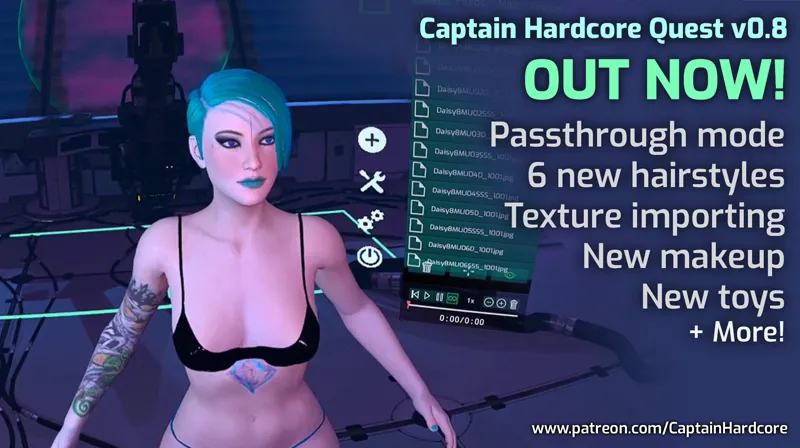
Captain Hardcore Quest update 0.8 now available! Passthrough mode, 6 new hairstyles, texture importing, improved hand tracking physics and lots more!
Hey everyone! Quest standalone version 0.8 is now available! 👽
Download it here!
This is a big update with passthrough mode, new hairstyles, texture importing, improved hand tracking physics and more! I've also ported over the anal beads from the PC version for Asstronaut patrons!
Posing characters in passthrough mode is a lot of fun. You can place them on real life furniture like a bed, chair or sofa and get the feeling they're actually in the room.
Video of passthrough in action: VIDEO
Thank you all for the amazing support! 👽
Changelist:
NEW: Passthrough environment - You can now create scenes in your own house! Pose characters on real furniture and see your real life body. This is very cool and immersive, it adds a new dimension to the game and will be super cool with colour passthrough on the Quest Pro. To use passthrough just create a new scene and select the Passthrough level.
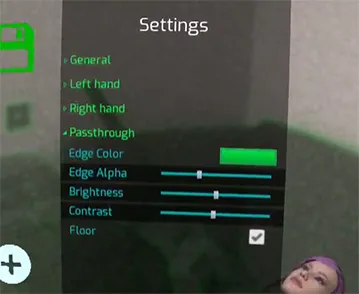
NEW: Settings for controlling passthrough colour, brightness, contrast and a toggle for the floor visibility.
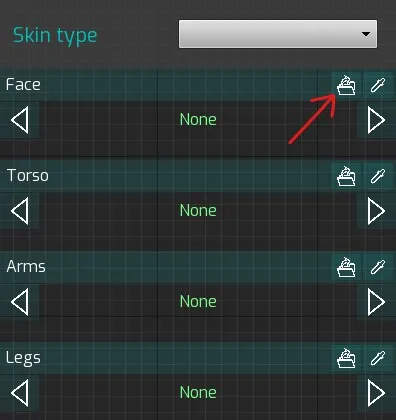
NEW: Texture importing. It's now possible to import any Daz Genesis 3/8 skins or makeup/tattoos. There are thousands of these available on Daz 3D and you can even make your own in an image editing app. The Quest has limited GPU memory so I've decided to limit this to one texture slot per UV map. This means it's not quite as advanced as the PC version with specular, normal, roughness etc. but you can still completely change the look of the character with custom skins and decals!
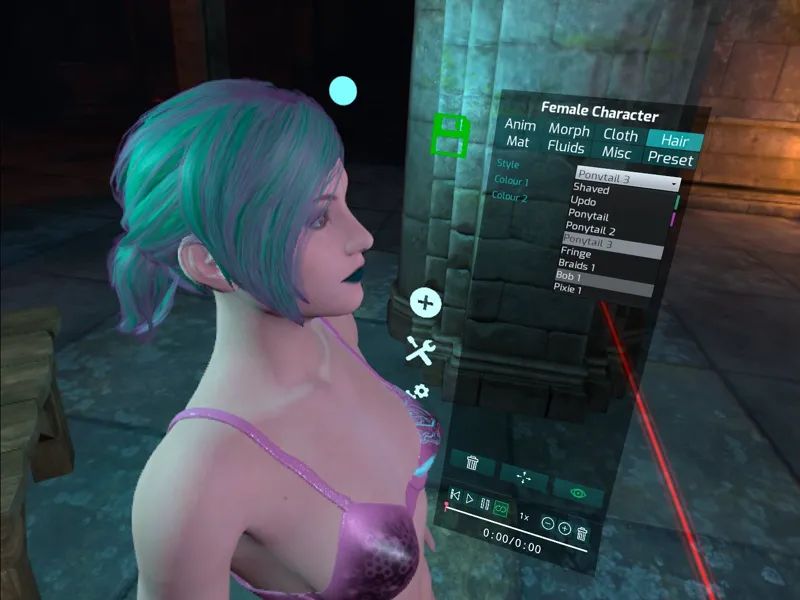
NEW: 6 new hairstyles + Shaved head option. This helps a lot with character variation, hair physics will be added later.
NEW: 5 new preset makeup styles.
NEW: 4 new preset tattoos.
NEW: Updated to hand tracking 2.0 and increased tracking frequency.
NEW: Improved hand tracking physics. This means characters no longer jump away suddenly when you touch them, it feels a lot more like the hand physics from the PC version and they respond a lot better to touch than before. You can easily insert your fingers in their mouth, pussy etc.
NEW: Anal beads toy for Asstronaut level patrons.
NEW: Doe strapon toy.
Improved: Added expandable areas to the settings menu for better organisation
Improved: Updated engine to 4.27.
Improved: Characters, Scenes and TextureImport folders are now created on first launch.
Fixed: Bug where the hair would sometimes reset after scaling a character.
Fixed: Giant characters not saving correctly.
Fixed: Giant toys not saving correctly.
Fixed: After switching from hand tracking back to controllers the grab button would sometimes stop working.
Fixed: The leg Next/Previous buttons were inverted in the materials settings.
Fixed: Skin wetness not working on male characters.
Fixed: Gap in the legs UV seam when Skin 3 is applied
Fixed: Voice settings not saving.
Fixed: Giant mode for toys was not working for galactic trader patrons.
Fixed: Character scale not saving correctly.
Known issue - Some translucent materials do not render correctly in the passthrough environment (for example fluids are not visible against the passthrough background). This is a limitation of the engine and unlikely to be fixable.
Known issue - Skin collision is not accurate enough for the hand physics, need to work on this in the future.

Comments (26)
How do you use hand tracking? I'm a new vr user, sorry for ignorance. I have a quest 2, and use pcvr.
Hi Anti, Ive successfully downloaded both files with sidequest, but cannot find the app anywhere on the headset. Yes I checked Unknown sources. I checked with the sidequest file manager too and the files are nowhere to be found. Please help!
Hi Screw, did u try, like Anti specificated, to inserto both files respecting first APK and next the other one? :) I had problems to find the quest version, but I just didn't check the Unknown sources xD.
I am really enjoying this version. I will admit, I stopped using the Quest version after trying the very first Quest CH release. It was really just a novelty to me, I could use my Gaming PC/RTX 3080 to do so much more with the PC version; with either the Quest 2 via the PC link or on my Vive Pro 2. The pass thru version is a game changer, not something that even the PC version can do. I love all the different environments I can use in the PC version, but pulling my own room into CH is amazing while using the pass thru. I received my Quest Pro today, and I was looking forward to using the color path thru in CH. After setting everything up and getting CH loaded on the Quest Pro, I was disappointed to see color pass thru isn't actually working in CH yet on the Pro, it is still B&W. I left my play area, and it switched to color pass thru, but as soon as I return to my play area it's back to B&W in CH. I hope there is a patch that will fix that soon. For me, using the pass through is in CH is the biggest addition from all the versions so far. I positioned a sofa in the game in the same spot as the real in my room, it lined up perfectly. Then I sat one of my favorite toys on it, and she sat there watching me, as if she was really in the room. Oh what a time to be alive.
A colour passthrough patch was just released!
re textures: would sth like this work? https://www.daz3d.com/nylon-pantyhose-for-genesis-8-females
It seems like a pantyhose texture material only, but not skin texture.
HOW TO IMPORT TEXTURE 1. Download the texture PACK! I have posted a link for an example texture pack below! 2. If you downloaded a GENESIS 8 DAZ TEXTURE PACK look in the Folders carefully and locate the files >>> ARMS, LEGS, TORSO, FACE. These Files are usually in the Content\Runtime\Textures ... Of the DAZ texture pack 3. NOW that you have the textures Put them in a FOLDER of your choice 4. OPEN Sidequest while your quest is connected to the PC. 4. In Side Quest TOP OF the TEMPLATE there is a FOLDER OPTION click on it. 5. Locate Internal shared storage\UE4Game\FluidGame\FluidGame\TextureImport 6. NOW DRAG AND DROP the Folder with the textures into SIDEQUEST Internal shared storage\UE4Game\FluidGame\FluidGame\TextureImport 7. It will say successful 8. LAUNCH THE GAME, Now in the game select a character and go to the materials tab, you'll see a small open file button for each UV area (face, torso, arms, legs). Example Link with textures LINK https://www.renderosity.com/freestuff/items/87908/free-skin the textures are locted under Runtime\Textures\SmidA\AsiaSkin of the zip file. You dont need all of the files in the folder. Look for diffuseorginal (ARMS,LEGS,TORSO,FACE) those are the skins other files are just Bump Maps.
How do we import daz textures
Ok. I found a way to do it. Just in case you don't have a PC or maybe you don't have the ability to. On a android(Any android, iOS doesn't seem to work for me) you can download BugJaeger. After setting up developer option by the Meta Website and Debugging your phone with developer mode. You can download the link on your phone and have it available. Then get a file locator and manager, I suggest CvFile and download on your Oculus. Plug in the cable that charges the Oculus with your phone and Allow file transfers. Transfer the Apk for the file manager CxFile. Repeat for the Apk Game and on the File manager download the Apk. Copy or cut the obb file. Go to system, go to Android open Obb. Go to the folder for game and paste the Obb. Boom it's running. In steps 1. BugJaeger on Phone 2. Use BugJaeger to download a file manager for the Oculus. 3. Download the Apk for Captain Hardcore 4. On the File manager download the main Apk. 5. Copy the Obb file and then paste on the android file for the game in the files manager. Then the game should be set. Hopefully this helps anyone have a good one.
I can not get it to work. Can anyone help cause no matter what I do it doesn't work.
Just downloaded for my quest2 and wow! Amazing what you have done. I know you put a lot of emphasis on the female customization, but can I request you add the same tool bar to adjust the males facial features? Also allwoing for a choice between circumsized of not would be amazing :) overall amazing 10/10 gonna recommend this to my friends
Is there a tutorial or guide on how to import textures?
Liking the passthrough mode. In passthrough mode how do i set - character position height and camera height? The model is not standing straight and is upper floor although floor height is set accurate. This is also in the main app. I can only move characters forward, backwards and kinda rotate the character in standing axis. But i cannot move the character up or down and also not the camera in game ( passthrough and non passthrough) up or down with the stick. - change character poses? The charcter loads either laying or standing in a weird pose. If the character collides with me for example moving it and it overlaps me for a short moment the pose changes to a entire incorrect legs arms etc position like feet are legs are drilled .... it looks like a mesh explotion shortly then it changes. - How can i rotate a character laying position as a example. I want to rotate / turn her to show butt so somehow i have to rotate her. - How can i add a sitting position or prone or doggy or bj position kneeing pose? I also cannot find that in the non passthrough mode. Is there no poses menu? - save the scene to where i positioned the character? If i reload it always starts entire off character position and where i placed the character. Like 20m away. So no room / scene coordinates are saved here and i always have to re-position all and everything.
Great update, been waiting for hairstyles (still wish there's more clothing) and of course still wish the standalone oculus is more like PC one. Happy to see little by little you're getting there. Great job! Keep up!
Incredible! I've had my eye on this title for a few months now and finally got around to checking it out. The model customization is impressive, the physics too. And passthrough?! *Swoon*
I got it working, are you planning remote possession for one model? Would be cool two people can play n same environment.
Not sure but this update doesn't seem that different than the previous version. Wasn't there supposed to be lactating in this one?
I'm having trouble downloading this one. When I select the game from my menu. It just has the 3 loading dots and never loads to the main screen? Is anyone else having this issue?
Did you sideload the .obb file after you sideloaded the .apk file? This step is outlined in the "- HOW TO INSTALL" file in the download. I had a similar issue and this is what I was doing wrong.
Sorry I'm fairly new here but when it says daz3d texture importing, does that mean we can import daz3d models or just like fabric textures, item textures, etc? For example of I buy a Lara croft model from daz3d, can I now import it?
So far only texture importing for the model's skin at the moment. (Head, Torso, Arms, Legs) Hopefully he will add model/clothing imports in the future, fingers crossed!
I am waiting for cock tracking))
The Quest API does not allow that, but if you are a bit creative you can replace your real member with an ingame toy that you can move.
Is there anymore information on the daz 3D importing?
Progress reports and updates have been really solid and impressive the last few months. Cant wait for the next PC update. Keep up the good work!