


🔨 Many Improvements to The Build Mode, Thanks to Our Playtesters!
Hi!
Anna here, today I’ll show you some of the improvements we made recently on the build mode!
As you may already know, we are focusing on the build mode these days and to help us finish and polish every aspect of it, we do in-person playtests with friends every month to gain feedback from real players. These feedbacks help us to improve existing features but also prioritize features that are lacking. Sometimes playtesters bring forward issues that we never thought of; things that seem logical and intuitive to us devs might not be for new players.
Note that this post is for Patrons only so please don’t share it, thank you!
New Item Widgets: Resize, Scale, Rotate, Move
The existing widgets for modifying an item (resize, scale) were not always super intuitive to some of the playtesters, so we improved them:
We replaced the blue circles with arrows to help players understand that these are for resizing items because it wasn’t obvious to our testers.
We added an arrow icon to the yellow scale widget so its purpose clearer. We also added a rotation and a move widget because players had a hard time understanding how to move and rotate by directly clicking on the item once or twice. Now, there’s another way to do so!
New Item Size Selection Menu
Players didn’t realize that some objects were resizable. In addition to the resize widgets, we decided to add a new menu to show size variants for an item in the build mode catalog. This way, you can easily see which items are resizable directly from the catalog (thanks to a button with a “resizable” icon) and you can choose one of the predefined sizes for it.
New Item Variant Menu
Making the size selection menu also gave us the idea to do the same for different variations of the same item. For example, there are different types of kitchen counters (with or without drawers, kitchen islands, …) and there are also different styles. Sometimes it can get a little overwhelming to have them all displayed in the build mode catalog, so we also made an item variant menu to help with that!
New Video Tutorial Tooltip
Some of our building tools are a bit advanced for regular players and might need extra help to understand, especially for features that are not usually present in other games, like the tool to place curved walls. That’s why Alex made this very useful video tooltip because sometimes an image is worth a thousand words!
Improvement on Eyedropper Mode
The Eyedropper tool now shows the thumbnail associated with the item just like the one in the build mode catalog. It also opens the catalog in the correct category! You can pipette items, but also wall and floor paints, moldings, fences…
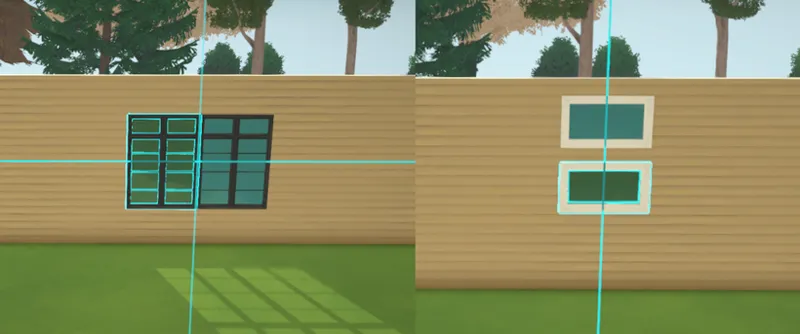
Improvement on Windows
It used to not be possible to have a window that spread on two different walls, but now it is, thanks to Alejandro and Jérémie!
You can now create big windows that extend over multiple floors! (Note: the floor has no thickness for now, but it is still a work in progress!)
Infinite Max Scale and Resize
Items now don’t have an upper limit on how much you can resize or scale them.
Improvements on Snapping and Alignment
Some improvements have been made on item snapping and alignment.
That’s all for today! I hope you appreciate these little improvements.
With more playtests will come more little tweaks and additional features, to make the perfectly well-rounded build mode we hope you’ll have fun playing with! We will do the same for the live mode just after and we’re looking forward to telling you all about it.
Have a wonderful weekend,
Anna 🌞

Comments (110)
i can't remember if this was answered anywhere but will the size of some things like windows be shown as you resize them? if i want a window wall to be a certain length but have several evenly sized window panels i feel like that would be hard to do otherwise
Catching up on older updates here, and this one got me so excited! This build mode looks like it’s going to be so powerful but user friendly too. I can’t wait!
I keep getting more and more excited every time I see something new for this game! I can’t wait to play because this looks soooooooo good!!
I don't think this is exactly relevant. I was just trying to find a recent post, rewatching old build videos that got released like 2 months ago or whatever. I keep seeing a lot of build modes happening. What looks like it would be live mode. Are we going to be able to build in live mode and have them like react or will the game pause and we're just not at that stage?
I am gonna have a ton of fun building a town for myself, utilizing the lots and all. Very excited to play with it. I play sims4 to build and am not rly too interested in the live play as much.
This made me seriously so excited, the catalog is looking beautiful!
Item variant menu : Very much appreciate Building mode video Tooltip : Absolutely love it Eyedropper thumbnail : Fantastically brilliant Item size selection menu : Very smart and time saver ! Rotating widget : I can live with, it's cute on its own. Resizing arrows : I really hope you can give us the option to keep the dots. One of the things that I love about Paralives, is how clean and minimalistic it looks. If people do not understand that the dots are to resize, then how about a tutorial ? Or please... An option in the menu to keep the dots... I really, absolutely, dislike those new arrows. It looked fancy and polished, and now it looks a bit like a "age +5" game... And I say this with all my love and support. Anyhoo, love you guys, wishing the best to the team as always, and good luck with this promising game <3.
Yeah I feel like little triangle arrows would look really nice and accomplish the same goal
If you need another play tester, let me know :) I have experience in software troubleshooting and testing. Also I’m on Mac if you need Mac testers
Love this so much! I love the progress. You guys are awesome!
I am blown away by the improvements! Keep up the amazing work!
This. This is just amazing !! It may seem like little things, but it's basic needs that I'm so happy you guys are going your ways to fill and even more ! Soooooo hyped.
All awesome and intuitive improvements. I love that I can really see myself building with these tools!
I would love if the resize tool had an option for set sizes, for example expanding the bed by 20 cm at a time instead of smoothly. That way everything doesn’t become a unique size and it’s easier to match.
Another way to solve this is by having the eyedropper tool copy exact sizes.
Do the cabinets and counters still have the option to change the doors and drawers or pulls and knobs? Or has that feature been removed since the early demos?
It's so cool to see how far this has come, and the improvements every week! I'm missing this game in my life and I can't wait until I can get my hands on it!! Counting the days to early access! 🤩
amazing! those windows are going to come in handy for the Unpaused challenge videos on youtube.
Love that you guys are listening to your community! ♥️ If you ever need another play tester let me know!
Do y'all need more play testers? How would I go about becoming one? I'd love to help :)
I'm thinking... If I use a bed with three places or a bench with many places, people will always enter by the side of it and go to the center? Or they would stay at the side until someone else try to enter?
Bon travail à toute l’équipe !! Une idée pour améliorer l’apparence des lignes bleus d’alignement : vous pouvez peut-être adoucir les extrémités des lignes, de sorte à ce qu’elles disparaissent petit à petit en fondu ?
I have a question, will we be able to put more than 2 paras in one bed? Since we can put our 256137 cousins on the same table?
I love the style and the imporvements that will have a huge impact on gameplay. I am just worried, that the animation, when you set something down could maybe become annoying when your playing for hours on end. Since there is a huge focus on the build and buy mode, what are the experiences by the testers and the dev team on this matter? Will there be a possibility to turn this off, as well as the sound?
Looks amazing. Really reminds me of Zoo Tycoon 1 with the little helpful examples on how to build. Looks like an instant classic to me!
Whoaa, these are such small looking changes, but they're HUGE improvements! I especially love hiding variants behind a sub-menu of sorts with the counters. Makes it much easier to narrow down a style by seeing them all clearly together without getting distracted by the bloat of having to scroll through each variant. I love that so much <3
The more features you announce, the better the game gets!
Can you separate beds and cribs? I would appreciate it!
This sort of thing is why play testers is important! I really like the interface changes, I think it indeed makes things more obvious. Love how much you can stretch that picnic table. Oh and the eyedrop tool preview helps a lot too!
The build mode interface is absolute eye candy 🩵 can’t wait to see what you guys will do with the live mode/character creator eventually, it’s all coming together for a super cute and cozy experience 🥰
The visible rotate button is going to be such a great relief to use
The new tooltips and icon additions/changes for variants, etc. look great! Great for accessibility too.
I'm so grateful for this update! Personally my favorite is making the resizable option clear from the menu. It's extremely valuable to have a neat, visibly clear menu!
This is great! I’m all for more clear instructions and tutorials, honestly. Typically, I don’t always use them, but it’s nice they are there when you do need them. I’m excited because this build mode makes me want to build again!
I hope that yall have an auto roof option.
Build mode looks like it's getting some exciting improvements. I'm terrible at building houses but once the building is done I love buying everything from there. I grew up watching Niecy Nash on Clean House the design part is most fun to me. I already have some ideas for my first para
I used to watch that show, too!
I'm actually really excited about this building mode. Haven't been this excited to play with a build mode in a while.
There’s no LIMIT?? That’s gonna be so funny I can’t wait
I love all of it. ❤️ No complaints or requests for improvement from me. Thank you for your great work and for always trying to take our suggestions into account. Please don't cancel Paralives, that's my biggest concern.
Wow! The game looks better each week! Loving the updates and I hope you guys have more feedback each month with the playtesters
I am too excited!! I love this and cannot wait to play! Thank you for listening to your community!! Much love and keep up the awesome work!
Impressed by the multi-level windows!
Can't wait to have a massive family gathering with my 52371 cousins :D Apart from that the UI improvements are amazing and look much more intuitive now :з
Love it! Even more excited to play this. Oooh to be apart of the play test lol
The thumbnail while using the eyedropper is a great idea! (I'm guessing the thumbnail is on the left side of the cursor when you hover over an object near the right edge of the screen?)
The video tooltip is very interesting, I don't think I had ever seen that in a game. But I imagine we can toggle it playing, because otherwise it might feel annoying in the long run ? I don't know, I might need a tooltip for a functionality I don't use often, or forgot about, every once in a while, but seeing it play every single time would seem infantilizing... The variant menu is nice :) And I like that there's a tooltip for each of them, which means variants can be given a name. That's so useful for tutorials, for streams, all kinds of things, if players can communicate in something else than "third one on the left in the second row" ! Even for tagging ! So it leads to the possibility of looking directly for a certain tag that only brings up variants (let's say "drawers cabinet", for instance). The only thing I'm not a super fan of is the rotate/move icons. Not their existence, but their look... I don't know, it feels bulky, and their not being of the same size also bothers me XD It's such a silly detail when I say that out loud though.
You make a valid point, maybe there can be a setting to allow/disable video tutorials? So you turn them on when you need them, but you don't have the clips popping up every time you hover the mouse over the icons. edit: maybe the same thing could work for all the various tooltips, hover texts etc., you can choose when to see them or not (maybe a simple small toggle "show tooltips y/n" in an upper corner of the screen). Once you've become more and more skilled in the game, you don't need them to appear every time anymore.
It looks so good. This game is going to be so good. I'm a very proud patron of yours. Proud to support such a great game. <3
I signed Patreon this month because I finally have a steady job, I'm loving following the development and I'm super excited about here in Brazil, thank you for putting so much love into the game. The build mode is really cute with the new icons by the way
What great improvements! I’m especially excited about having multiple default sizes, will save a lot of time when building.
Very useful updates, these are all very useful in comparison, right choices ! Also give Alejandro and Jeremie a bonus for that multiple-wall window possibility ! (bonus and free grilled cheese ! Everyone needs grilled cheese in their lives !)
Really happy to see all the improvements after the feedback, I don't think they are small improvements, these things are the core of the experience. Seeing this update reassure me of how important is for everyone of you giving us the best game possible and I'm sure it will be with a lot of heart.
Esto es super útil cuando eres nuevo o llevas tiempo que no construyes casas por la propia desmotivación de los menús no intuitivos e incluso algo pesados,es genial pensar en volver a tener ganas de construir y crear con mas posibilidades de las que nunca hemos tenido, mil gracias al equipo por escucharnos,y gracias a los maravillosos tester!!:33333
Wow! Small tweaks but they make a big difference during gameplay! Kudos to you guys
I really like the new UI for the Item Variant Menu and the Tooltip Videos! I’m positive new variant menu will make it quick & easy to build with themes without having to scroll endlessly or typing in a search bar, also combined with the eye dropper! You’re doing great, Team Paralives! Can’t wait to play ❤️
I was wondering, but maybe it's too early to ask since as you say all the items still have no cost: when you resize an item, I suppose the price will increase/decrease proportionally?
(from Anna) Yes it's a bit early to answer since we're still figuring out the prices of everything, but in my opinion I agree it should increase/decrease depending on the size (or maybe, the number of spots there are at a table/bed)!
Really good improvements. I follow the development from the beginning so many of the things in the UI were kinda obvious to me (and to the developers, I believe). Only when you have fresh eyes that you see that it's not so clear to someone who is seeing the game for the first time.
I seriously can’t wait to build in this game!😫 Everything looks so efficient
Is a collections feature possible? So that if items come in a set (e.g., bedroom set) we can easily find the pieces in one spot? The cabinet idea is brilliant, btw!
(from Anna) It's not planned yet but I think if you find a bed you like, you might be able to search for the items of the same style with the search feature!
Every time I see a build update, I can’t help but imagine how crazy the community-made builds are gonna be.
I love all of these changes! Can't wait to try my hand at building in game!
These are all soooo good to see. Lovely that you've thought of these things, there are some other games that have house building that don't have these features and it can be frustrating or cumbersome sometimes. Thank you for being so thoughtful! <3
Love it!!! 😍♥️
I think the resize icon within the build menu is easier to tell what it’s for than the one on the objects. The four arrows going outwards made me think it was a move button.
Omg the cabinet with the gap underneath!!!!
Amazing improvements!!
Wow, the builds in this game are gonna be craaazyyyyy! Will we be able to download other people's designs? I'm more of a decorator myself 😄
Yes, you'll be able to share your creations and download creations from other people with the Steam Workshop!
Love the ease of resizing and the variant menus!! I get more and more excited with each update coming out!!
Windows with no wall boundaries!! Yes!!! 😄 The builder in me can't wait to get my hands on the Paralives build tools!! 💕
Love your attention to detail with everything about this game! The changes you made to the building tools make so much sense and will make a big difference when playing.
So amazing cant wait for the early acces, maybe the blinds, curtains can close over window for sleepy para, monster under the bed for child paras
OMG! I love love LOVE the cabinet grouping! That's one of my biggest grrs about other simulation games! 😘
Love it and in love with it. Cannot wait to play and stream this game. ❤️
You are all amazing 🤗❤
These improvements look great! I particularly love the kitchen one! Who wants to sift through dozens of different kitchen pieces looking for all the ones that match a particular design? Not me. This makes soooo much more sense! And all the tool tips look great too! And the multiple level windows seem to scream, "skyscrapers" perhaps...? They definitely look like something I'd love to build with.
The resize tool is such a quality of life improvement Frome other simulation games, I LOVE IT 😍😍😍
I love how considerate you guys are and the fact that you’re testing and improving the game so it’s less confusing for future players. You guys are amazing and I can’t wait to play with build mode!
Looks awesome!!
Is it possible to turn on/off snapping as needed?
Yes it is!
As a builder, I love all of this so much!!! This game is one good thing to look forward to in 2025.
One word : Awesome
the video tooltip is a great idea. You have something like that also in architectural programs.
I. Am. So. Keen. For. This. Game.
It’s genuinely so cool to watch this game come together after following it almost since day one, well done!!
Huge update for me the HUD looks so much better love the window update. I'm gonna have so much fun building
I. Am. SO. Excited!
Omg I love the updates! It seems way less intimidating now. Could the video tool tips be put on a on/off toggle in the settings? I know once I get the hang of it, it will feel in the way
(from anna) That's a good suggestion! Hopefully it shouldn't get in the way since you have to keep your mouse over a feature for some time to get the video tips, but if it does we'll look into making it an option :)
I love seeing these little improvements 🥰 at the end of the day, they’re big decisions with how it will all play in the end.
It looks great! 👍🏻
If I want to have a picnic with all of my cousins but have 2,147,483,648 does the picnic table support all -1 of us? On a real note, I love these changes. Definitely more user friendly for people like me who can't take a hint!
Amazing work as always guys!!!!
2025 cannot come soon enough, this opens up so many new building opportunities. I'm so excited tor this game!
These are some excellent improvements
Nice!💚
Anna, you guys are amazing. Thank you for the post. P.S - MULTISTOREY WINDOWS!! YAY!!
right?! i love the windows over multiple walls/storeys! that's going to make for some incredible build options
Loving what i see!
I can wait to host a family dinner with my 6837 relatives!!
Build mode looks so fun!!!
Amazing! I was excited to see no upper limit on sizing. The more freedom, the more creative builds!
The video tooltip will be amazing! I also love the variants having their own menu. Great work!
Absolutely astonishing progress!!
I'm so excited/impatient for this!
This is amazing 🤩🤩🤩