
DirectX 11 Wallpaper Glitches
All sets have now been updated and reuploaded. You can find them easiest at Houseofharlix.com and also Curse Forge.
The following 11 sets were effected:
Harrie
Brownstone - Part 3
Coastal - Part 2 & 5
Klean - Part 3
Octave - Part 2
House of Harlix
Bafroom
Baysic Bathroom
Harluxe
Kichen
Orjanic - Part One
Tiny Twavellers
---
Happy Thursday & Kit Release Day!
UPDATE: Just wanted to clear up some confusion. As far as I'm aware this should only be an issue for PC users as mac does not use DirectX to run the game.
As many of you will be aware yesterdays patch has now defaulted The sims to operate using DirectX 11. There are many of my old wallpapers that have been rendered incompatible after this update. Thank you to those that have messaged to let me know about the issue.
As I previously said I wasn't holding off for this to be officially implemented just to be sure I wasn't updating for no reason. Now that it has been officially launched I will be updating my wallpapers from past sets. As you can imagine it will take me a while to get upload and update all the links across my multiple platforms. I will update this post once the process has been completed.
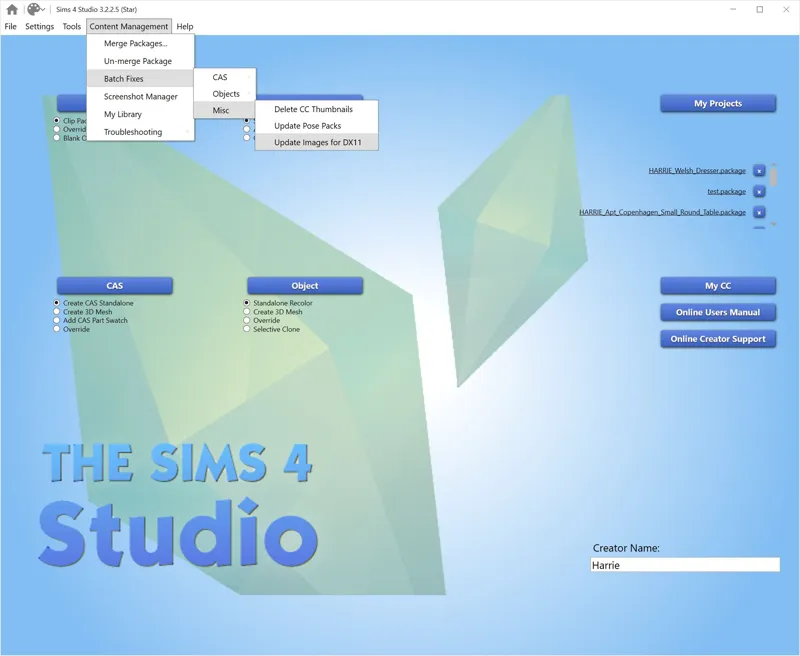
However I do highly recommend rather than waiting for me to complete the process and you having to redownload every set effected, using the Sims 4 Studio batch fix instead. It will only take you 5 mins to download and fix. You can download this for both Mac and PC HERE. Once downloaded and installed simply go to Content Management > Batch Fixes > Misc > Update Images for DX11 (as shown above).
I recommend this method over redownloading all my content as I will also be running that batch fix on my content to reupload & doing it yourself will mean you don't have to redownload all my sets or any other creators content that has been effected by the update. It will fix all out of date content.
If all of this sounds way too scary for you, you can wait for me to reupload all my content & in the meantime you can also go into you game to opt out of DX11. You will find this check box in your games graphic settings. Simply restart you game after this and it will continue to launch using DirectX 9 and the wallpapers will not be glitched. Once you have downloaded my updated versions you can uncheck that box and switch back to DirectX 11.
Have a great rest of your Thursday!
Harrie 💜
Comments (54)
Hey Harrie (or anyone else who sees this), please help! ♥ Is it only wallpapers that were affected by this? I have quite a bit of content by both you and Felix (or collectively) that have the "?" all over them and are broken. Things like the Klean shelves, Klean windows and doors, the Kwatei left open shutters, Octave strip lights, Smor sliced butter and pizza cutter, etc. Is this a problem everyone is having or is it something specific to me? I'd love any help or response! Thanks!
If you question marks on content it means that you do t have the textures in your mods folder. Textures are linked between items to keep file sizes lower, so if you have the unmerged files and remove files that contain the texture, this issue arises. I suggest keeping all files from the same family in your mods folder
This works ! tysm !!
Country also need an update
You got me stumped on that one. Haven’t had any cc break like that the entire time I’ve been creating. I’m all up to date on patches and everything is working in my game. I would suggest making sure that all of your script mods are up to date. They are usually the main reason that people report broken cc that isn’t actually broken. The only other thing o can think of is that somehow the files have become corrupted, so I would suggest redownloading any effected sets. All of my cc currently available for download is up to date and compatible with the latest patch. Hope this helps 🙂
Heyy does the glitch looks like an “?” On the wallpapers? The brownstone wallpaper makes my walls disappear when I hover over them with my mouse. I did run the directx 11 yesterday however this specific one is still giving me issues.
Hello! I'm not sure if anyone else has mentioned this, but the infant bassinet in Tiny Twavellers is also glitching! Just so you know. Thank you for everything you do! I love your CC!
Him i have a problem with one wallpaper es from TinyTravelers Mural wall and mural wall trim even when i change with the new one still having a problem
I cant fix myself
click link in settings that say use direct X 9 iff to hard to fix it is there now
Please see the bold first paragraph of the post on sets effected and where to download
hi, thank you so much for updating all of it! youre great. i noticed the coastal collection part 8 is marked as if it was still on early access on your website, thought i should let you know :)
Thanks for letting me know, somehow missed that
Just out of curiosity, do we need to do this every time we download new wallpapers?
To answer my own question: yes, for the time being, you must use this method every time you download wallpapers.
After I have done the update using s4studio, all my building mods folder is broken.
Mine too! I uninstalled the game and reuploaded it, the game loaded just fine so then I went to put back the mods folder and now it won't even load the game 😭
I tried the link and am not sure how to download it. I clicked on something and my PC blocked it.
mine did too - i hit "more info" when it blocked it and then got the option to run anyway
tysm Harrie!
I tried it and it worked very well for me! Took me 1,5h but now everything is fine. Thank you so much, Harrie! ;*
The link provided is confusing. It takes me to a message board that says the community version is broken and to use the beta version, but when I try to download that there is so many files it wants me to choose from and I don't understand any of it.
I've updated the link
Hi Harrie, I used the suggested S4S method to update your wallpapers for directx11, but now my game won't launch with specifically your custom content in it. When I remove your file, the game launches fine with all my other cc but with your's it doesnt, and it won't even give me an error, it just takes me back to the EA launcher like I never booted the game. Has anyone else had this problem? Do you have any suggestions? Shall I just redownload all of your content?
After using the 50/50 method, I determined the issue was with specifically the Klean collection, I redownloaded those files and my game is booting fine now, I'll just wait for your specific file fixes for the wallpapers in that collection because I think the issue did occur with the S4S fix.
Mine doesn't have the option of update images because my computer runs directx12, however I still have the '?' walls
When I do this, all I get is a small square that says loading. Is this what is supposed to happen? I'm completely new to this
me too! been like this for over an hour :(
Ugh wish I knew this before I deleted all the affected wallpaper! Now I have to wait for you to post the fixed ones!
Thank you!!!!!!
im unable to open this app on my macbook. I got a new computer yesterday and since my game wont launch at all with mods. I did some trouble shooting, moved everything out, and theres no issue with the tray files or saves just cc. None of my script mods are broken, would this dx11 thing cause this issue? I was able to open the sims on my old laptop after the update
sorry my post was misleading. I just thought it through and realised macs won't be effected by this issue as they don't run using directx, its only a PC issue
Thank you!!
s4s is giving me a "if you're not testing dx11 you shouldn't run this, are you sure?" type of message, i checked and i have dx12, is it still safe to run?
I got on my game yesterday and tested all of my CC wallpapers and none of them seem to be impacted (fingers crossed!) but this is so helpful if they are!
Hi Harrie! I had a quick question. I learned my computer has DX12 and so far I haven’t had any issues with visuals for any cc. Is this only an issue for DX11 users?
you may have that on your computer, but the game utilises DX11 to run. So everyone will experience the same issues for my wallpapers on the tall and short wall heights
Oh goodness thank you! 🙏
this is why you are the best CC creator out there.🩵🩵🩵 THANK YOU!!!
Thank you for sharing this with us Harrie! For others that have a lot of cc (100 GB), thought I'd share I'm in hour 2 of the update and I anticipate it will take about 6 hours for Sims 4 Studio to complete the process for me. :)
Wow, yep that is a lot of cc!!
You just made it soooo easy, THANK YOU
No wonder my game looked fantastic yesterday. I did notice the wallpaper glitch so thank you for the fix. Love your work!!!!
Hi I’m having issues with your windows too. Any advice?
Can you be more specific? Windows haven’t been effect by any updates for many years
Hi, there! This was scary for me but I decided to do it anyway. It was really easy & I can confirm it works! It did take a while for it to go through all my files though. Roughly 25 minutes.
I redownloaded your CC yesterday but it wasn’t in the game (still isn’t - it’s just on my computer) will I need to do this still when I do put it in the game?
Yes you will my older cc hasn’t been updated yet
Thank you, Harrie. I was not sure if I can batch fix all your cc that is affected. Good to know that I can also do this on other parts of build and buy, not only on wallpapers.
Thank you so much for this! I have S4S but had no idea I could fix this so easily myself!
Just wanted to say I love your work so much & thank you for keeping us updated ❤️
tysm
This is amazing!! Thank you
I can vouch this works & has fixed all of Harrie’s wallpapers in my game using direct x 11 ☺️☺️