
The bug is fixed. Plus Tetris & Body Slam
The long story of the M68000 related bug finally came to a happy ending. Long story short, Blackwine identified the instruction that broke Shinobi and Ijor -the M68000 module author- suggested the read-modify-write cycle could be wrong in the glue logic.
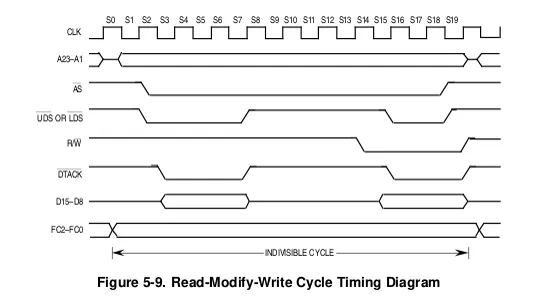
Normally, a CPU takes control of the data bus to read or write, not both. However, the M68000 provides a special case for an atomic read-modify-write that doesn't release the bus in the meantime. Once the importance of this special cycle was revealed, how the JTCPS2 core logic was sensitive to it was obvious. However, it still isn't clear why the original CPS2 could handle it correctly, as the schematics seem to suggest otherwise.
I first verified the solution in the System 16 core; both Shinobi and SDI now worked. Then moved to CPS2: Mars Matrix worked, the Gigawing issues went away, and even the Progear bullet patterns got fixed.
I have applied the fix to other cores using M68000 too: SF1, Tiger Road, F1 Dream and Bionic Commando. Most corrected binaries are already available in JTBIN.
There is a new CPS2 beta and a new System 16 one. Two games are new to System16 this week: Tetris and Body Slam. Although Body Slam is playable, it isn't complete yet, and you will notice some graphics missing.
Atrac17 worked on default options for all CPS2 games and made new MRA files. He took in suggestions from MJY71 too. You can update CPS2 directly from update_all now.
You may need to delete the old MRA files manually for System16. Please do it if you find duplicated files. The updater cannot delete files, and there are discussions going on about how to improve it.
In parallel, we have started work on the TLCS900H chip for NeoGeo Pocket.
That's all for this busy week!
Español
La larga historia del error relacionado con la M68000 finalmente llegó a un final feliz. En pocas palabras, Blackwine identificó la instrucción que rompía Shinobi e Ijor, el autor del módulo M68000, sugirió que el ciclo de lectura-modificación-escritura podría estar mal hecho en la lógica del cor.
Normalmente, una CPU toma el control del bus de datos para leer o escribir, pero no ambos. Sin embargo, el M68000 proporciona un caso especial para una lectura-modificación-escritura atómica que no libera el bus en el proceso. Una vez que se reveló la importancia de este ciclo especial, fue obvio cómo la lógica central de JTCPS2 era sensible a él. Sin embargo, todavía no está claro por qué el CPS2 original pudo manejarlo correctamente, ya que los esquemas parecen sugerir lo contrario.
Primero verifiqué la solución en el núcleo del Sistema 16; tanto Shinobi como SDI ahora funcionaban. Luego lo trasladé a CPS2: Mars Matrix funcionó, los problemas de Gigawing desaparecieron e incluso los patrones de bala de Progear se solucionaron.
También he aplicado la corrección a otros núcleos que utilizan M68000: SF1, Tiger Road, F1 Dream y Bionic Commando. La mayoría de los binarios corregidos ya están disponibles en JTBIN.
Hay una nueva versión beta de CPS2 y una nueva System 16. Dos juegos son nuevos en System16 esta semana: Tetris y Body Slam. Aunque se puede jugar con Body Slam, aún no está completo y notarás que faltan algunos gráficos.
Atrac17 trabajó en las opciones predeterminadas para todos los juegos de CPS2 y creó nuevos archivos MRA. También recibió sugerencias de MJY71. Puede actualizar CPS2 directamente desde update_all ahora.
Es posible que deba eliminar los archivos MRA antiguos manualmente para System16. Hágalo si encuentra archivos duplicados. El actualizador no puede eliminar archivos y hay discusiones sobre cómo mejorarlo.
Paralelamente, hemos comenzado a trabajar en el chip TLCS900H para NeoGeo Pocket.
¡Eso es todo en esta ocupada semana!
Comments (80)
Do I have to rename the Atari Tetris? It seems to have interfered with the SEGA Tetris download. Some of the MRAs ended up in the same folder as the Atari Tetris alternatives.
I would love to play Aurail, the music is great, Cotton is on my wishlist too and for christmas i would love system 18 and system 24, Shadow Dancer and Revenge of Death adder are my favorites sega arcade games with shinobi, thanks again for this core shinobi plays great!!
Cotton will be available soon. I’m working this week on the MRA files for System 16B games, such as Cotton.
Thanks for Tetris! I like this japanese version a lot, have the PCB and it plays great on the mister, cant tell if theres any differences...
Thank you for message Jose, old MRA files were my issue. Now fixed. 👏✊
same issue, rather annoying to have this beta screen pop up on games already working fine.
Hi Milo, I'm sorry about your setup problem. You can find the unlocked file in the #betafiles channel of our Discord server. That file will work correctly for you. Your issue is probably related to either old MRA files, old MiSTer firmware or misplaced/missing beta.zip file. In case you want to look into it.
This is awesome, the updates are really making my MiSter a great subscription. Any plans on helping out with the X68K port in the future? I wonder if this bug is relatable?
It depends a lot on the specific core details, so I don't know if it is happening on the X68K core.
I got a good one; I've noticed all the special mra files such as the Unlocked CPS2 games, Trainer cps2 games, and SSFII The legacy beta have the lock screen now too with the latest update. Will we need new mra files to play them? These were very fun renditions to play!
Hi Joey, you can use the unlocked RBF for CPS2 in the Discord #betafiles channel
In the blink of an eye, this great project turned into some kind of ransomware. I am sad.
Hi Jörg, you can use the unlocked RBF for CPS2 in the Discord #betafiles channel. I will keep distributing the unlocked file versions too, but not through the public updater.
You have to add those MRA manually from here https://github.com/atrac17/Arcade_Offset/tree/0e7c69b8b2540c913bf7d6f6a7b04533e66dad43
I added them and still lock screen. Strangely, the other unlocks work fine (no beta.zip lock screen).
Everything was working for me, but today I tried to play Dimahoo unlocked and get the lock screen... Beta.zip is in its place. All the other games work still, including regular dimahoo. Anyone have any ideas?
The main problem is that even when you delete the MRAs, they may exist still through cached symbolic links. The best way is to delete all the contents of the "/media/fat/_Arcade" directory EXCEPT the "cores" directory. Copy the MRA's over from the ZIP and delete "/media/fat/Scripts/.mister_updater/update_all.last_successful_run" and "/media/fat/Scripts/.mister_updater_jt/update_all.last_successful_run" then run update_all.sh
Yea, just had to do delete everything off my card and install my backup. Don't understand why the nag screen had to be added.
Had a quick question on a more weird CPS-2 MRA and the new beta.zip format that doesn't seem to be working. It's two-tiered. Trying to run the MRA for Super Street Fighter II The New Legacy (0.4), and copied the beta.zip file from the June 11th post here. The two things I am seeing are: 1) First, I'm not seeing it get downloaded as part of the current update_all script. Also not seeing other Trainers / Unlocked MRA files get pulled in either. Should they be? 2) This MRA is still giving me the error that I need the beta.zip file in the right place as well. It's working just fine for normal MRA's in the normal location as pulled by update_all so I tend to think this is an issue just for alternate MRA's that aren't getting pulled in yet by update_all. Any possibility of help there? Can pull logs or other info as you need. EDIT: Might have answered my question at https://github.com/atrac17/Arcade_Offset/tree/0e7c69b8b2540c913bf7d6f6a7b04533e66dad43
Also to note: SSF2 The New Legacy 0.5 is out as of this month!
Not working for me. I’ve followed every instruction given by other users (changing update all/jotego downloader settings, deleting all MRA files, placing beta.zip in games/mame, etc). I’ve deleted the entire contents of my arcade folder and games/mame and reinstalled using update all with the recommended settings four times. I’ve started from scratch and manually reinstalled cps2 beta using the traditional method. No dice. I give up.
Already updated mister and everyting... Still getting "place the file betazip in the folder games/mame" worst idea ever this "beta.zip" solution. I tried to copy every MRA by hand also to no avail.
I erased all previous CPS2 mras, erased the previous "beta.zip" file, added the most recent mras, the newest zip, then ran update_all and everything works
Thanks for the tips, but no go for CPS2 or System16 for me. I put the Beta.bin file of 11/06 in the games/ mame folder => no results. Then deleted the cores, as well as MRA and RBF files, and did a full synch update_all including for the Mister. I did that three times now and even deleted all the ROMs following update and still no results... What am I missing here?
Put the entire "zip" file in games/mame, don't open it and put a "bin" file.
Thanks for the tip. It was useful. CPS2 core doesn't work at all for me. S16 works fine. I used update_all. not sure what I should do. All other cores/games work fine. Edit: My MiSTer was not the latest version. That fixed it.
That's right. It requires a recent MiSTer firmware but the change was done a few weeks ago so I would not have thought of it. I'm glad you solved it!
I would like to make a little contribution to the community. For those still messing around with Jotego`s new update system for Beta cores in particular here is what I found out. I deleted all the mra and rbf files and even some of the folders but I left arcade and games / mame and started from scratch with the CPS2 folder from jtbin-master. Be warned that this takes some time to update .. then it updatet all of the other cores as well and even put the beta into mame/games (you should leave this undeleted). Now everything works very fine. The main reason why the "nag screen" does not disappear is because the update all script turn the contents of beta.zip into beta.rom but it should be beta.bin. You should also enable the update all ini settings like in the video shown as well as Jotego.ini. I think the problem is also that the systems vary a little and you should also stick only to one updater (do not mix update and update all). I hope this can help someone a little. I guess it is still a matter of trial and error. regards,
Thank you!
Hi everyone! First I would like to say a big Thank you to Jotego who made all these wonderful arcade cores possible. Arcade boards will die soone or later so this is a good alternative for all arcade fans all over the world.
Love the new update method! Great work JT Team on the cores and new mras
wow this is beyond annoying, have the nag screen as well. wish the old method stayed the same.
Hi Scott, Have you been able to make it work? The sticking point is that MRA files changed and old CPS2 MRA files will show the splash screen. Old files need manual deletion. I suppose System16 has worked fine for you and you only had the trouble with CPS2. Sorry about that
Someone has solved? Could you please help me?
Sorry for the typo
Hello. My beta.zip file is correctly located to the games/mame folder but I still have the hag screen. Could you please tell me how to solve it? Thanks
Hi Federico, please check these things: -Overwrite an existing games/mame/beta.zip, maybe the updater placed it instead of you and what you have there as beta.zip is a MAME file with the same name -Manually delete old MRA files for CPS2. Old MRA files won't work. -Run update all That should work
How do I get the key once I have the cores downloaded?
So I cleared out my _Arcade directory, went into the update_all script and told all the updater scripts to do a full resync. Now all of the CPS2 and jts16 games are missing? I turned of beta sync, reran the update_all, turned on the beta sync and ran it again and still no dice. Did this functionality get removed? :/
For anyone that runs into this in the update_all.sh configuration under the Jotego updater settings make sure it's set to update_jtcores.ini and not update_all.ini. That appears to break it.
I have the beta notification too.
Are you still having problems? Remember to delete old CPS2 MRA files, please.
I tried what you said and it didn't work for me... I still have this beta.zip notification
Same here, both System16 and CPS2 give me only the beta.zip notification. The file is still in place from last week (just checked and to be sure copied it over again). Was there a new beta.zip and we didn't notice? EDIT: Got it working, tried was others said, deleted all mra and the rbf files manually and used the files from the zip that was attached to the post. This worked. Don't know if the files from the repository are different or what else is the reason.
I now have the beta.zip notification thing on shinobi. Really kind of frustrating and very much not as friendly as the previous method where I didn't have this. :/
In order to get this working I needed to do the following. - I completely removed everything in my _Arcade directory. - in update_all.sh I went into all the updaters and told them to resync everything. - In the Jotego updater I made sure that it was set to use update_jtcores.ini instead of update_all.ini - verified that the the option for beta cores in the jotego updater was set to true. - saved settings in update_all.sh and ran the updater. - verified that the beta.zip file was placed in /media/fat/games/mame After doing all of that I was finally able to clear out the beta key error. Needless to say this was FAR from convenient or user friendly and was significantly more work than any previous update I've ever done for a test core from this patreon. Hopefully the next round of updates actually just work.
Would Genesis core see any benefit from this 68K bug fix?
I was thinking the same thing. And anything else using the 68K, like Neo-Geo, Cave, and unreleased cores like the Taito 68K (Rainbow Islands!).
This is so awesome. Thank you! Also, I am a true Neo Geo pocket fan, great news it will be included in the Mister in the future.
None of the CPS-2 trainers/unlock/grego2d/etc hacks seem to work now. They all give the DRM screen.
Same here. Didn't have this issue before
Did this fix the stars in Strider?
After today's update I got a lot of duplicates showing up. But when I look at the _Arcade folder, each game has only one MRA file. Where did today's update put these duplicate MRA files and how to remove them keeping only the current versions ?
Fantastic!
Jose & Team… amazing work!
After playing around for a long time, I finally got it working last week, but now this week again I get the beta.zip nag screen :( This was loading Mars Matrix I thought the beta.zip was supposed to last for a month? How do I get a new one?
I re-copied beta.zip (from last week) to both media/fat/games/mame and /media/usb0/games/mame but I'm still locked out. ALL CPS2 games are now locked out with a nag screen. I'm really sorry I ran the update script
That casual NGP drop. Nice. Thank you as always. Looking forward to what you all come up with.
Thank you José for yet another awesome #JTFriday! However, as Michael Johnson notes above, Time Scanner is nowhere to be found (it's not inside the .zip either) 🤔
I can second the fact that Time Scanner does not appear. MAME Getter only grabbed Body Slam.
He meant Tetris
Great work guys - I can’t find time scanner anywhere after the update all has run - I can see and play body slam - anyone else have the same issue?
Yes, me too
Gracias José! No me queda claro… ¿en Mister basta on hacer “update all” o hay que hacer algo con el “betas_misterxxxx.zip”?
Does this mean the Shinobi bonus stage doesn't glitch if you win?
Cool thanks.
Insane and congrats with the cpu bug fix. This is one of the most impressive updates ;).
Awesome! Great news on cracking that 68k bug! Also neogeo pocket is a long standing dream of mine. Thank you so much for the hard work!!
Neo geo pocket chip!!!!! Very exciting updates this week!
Fantástico trabajo, como siempre ;-)
Que buenas noticias!!! Muy agradecido como siempre!
when you said 2 new system 16 games i was like.... `golden axe golden axe golden axe golden axe golden axe golden axe golden axe golden axe golden axe golden axe golden axe golden axe golden axe golden axe golden axe '
Congratulations!!
NOW...WOW!!!HOW??? THANKS TO AMZING HARD WORKS!
What a discovery! That must have been hell of a challenge to find. Such a rarely used feature. Congratulations, and thank you so much!
Thanks for your hard work brother. It is most Appreciated 🙏🏼
Amazing work as always, thanks to all who have contributed to this update!
Amazing work as always !
Excellent!
Thanks Jose & team, epic work!