
Item Search & Filter Mockups
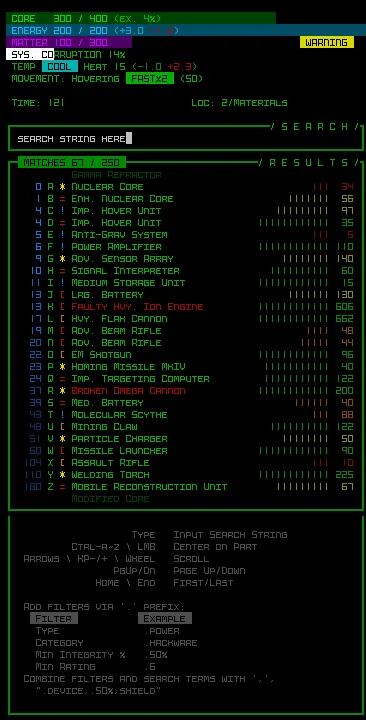
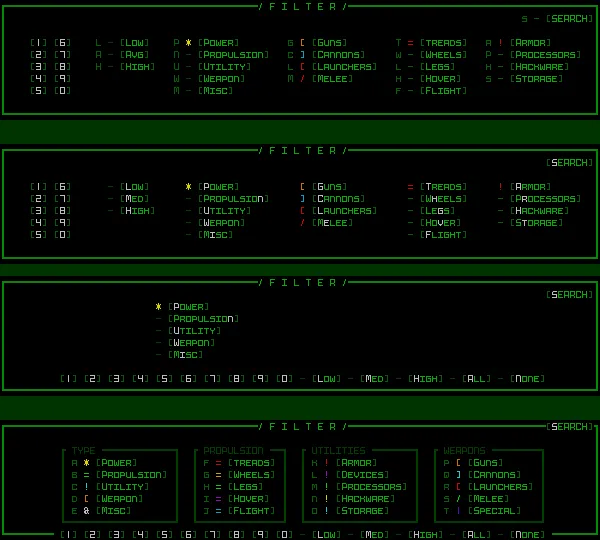
In the images for this post you'll see a collection of four older mockups that were mostly done last year when I was thinking about how to best organize a dedicated filtering UI that could appear over the top consoles on demand to allow you to filter the labels in real time.
The iteration at the bottom was the final one I arrived at, but since then I've been thinking more about the potential for a search feature and how that could be even more flexible to allow for both searching and filtering via a single text interface. As such we now have an even newer mockup which would instead replace the HUD's parts list and inventory on demand with some new windows to facilitate those actions.
Simply typing would start to filter all known items for matching substrings, eliminating irrelevant labels on the map while also listing those items that match (since of course many could be off screen as well), each with their distance (in blue) from your current position. As per the help text at the bottom there would also be access to additional filters and search criteria if you want to be more specific
I think this would be an even more robust implementation, combining the searching and filtering, although on reviewing this it's also a lot of work, much more so than either a simple search feature or the original filtering concept I had planned, so I've decided this particular feature would have to be a (2) on the voting list. Note the voting hasn't closed yet if you'd like to modify your votes in response, though this feature does currently lead the pack, hence my work on developing the concept further here.
Comments (6)
Looking good! I've been wondering about one thing though. In cogmind items are usually stored in stockpiles so you would likely get a lot of annoying repetitions in the search as it lists every item in each bunch consecutively. On the other hand the number of items in each stockpile can be quite important so removing the repetitions wouldn't be ideal either. Listing each 'stockpile' and the number of units in it would fix this problem, but I'm not sure the added complexity would be worth the effort.
Hey that's a good point I haven't addressed, thanks for reminding me. I'd like to say we could somehow merge entries in that case, but there are also often going to be slight differences like in terms of distance and/or integrity% (in the case of damaged items), the latter being especially prominent after certain large battles where even *without* any stockpiles you'll find there's going to be a lot of duplicates. In the end I think this won't really matter too much because you filter the list as you type, and it also simultaneously fits up to 26 entries and is also easily scrollable. In any case, this is the kind of thing that can generally wait until the feature is implemented and in use, then potentially tweak if necessary based on actual use cases.
That's exactly what I meant by shortcuts, yes. Thanks for the reply! I think part of me was wondering this because your mock-ups tend to look more polished and thought-out than some final AAA game UIs, haha. Cheers! :)
Ha yes I do put a lot of time into mockups and revising them, though. In this case the bottom area's meaning is mainly representative of "there are probably going to be instructions down here," "they'll likely be gray," and "this is about how many lines and what kind of stuff I could fit down here." We'll see if/how it evolves for the real thing. Might be pretty close, but there's still more work to do!
Hey there! Thanks for the insight, this looks really promising! While being fully aware this is a mock-up for a feature that might not even end up being implemented, wouldn't the inventory scrolling shortcuts (as opposed to Log) make more sense here in terms of UX consistency? Probably an edge case somewhere of wanting to open/scroll the Log and search for an item.
If by shortcuts you mean the keyboard commands (it took me a couple minutes to figure out what you were referring to xD), you can ignore that because it's a mockup, just throwing random stuff down there that came to mind while working in REXPaint. Mockups are less about content, and more about layout and presentation to figure out how things fit into a window in a usable manner. All of my mockups include varying amounts of random non-applicable content (I mean, look at the item list, a number of those things aren't even from Cogmind :P). The keys can't even be determined until the final functionality is decided, so it's too early to worry about details like that.