
Read me
Compilations:
As I create more mods it gets more difficult to find and download all mods. I wrote a post where you can easily download every mod I uploaded to this page.
Video Polls:
Every Saturday I'll upload a new video showcasing my mods. Patrons of Video and Mod tiers can vote for which game in the weekly poll.
This week's poll is here (Open until Thursday 22nd, included).
Video Collection
Galleries Collection
Installing mods:
Note: None of this methods replace any of the original files of the game, so no backup is needed.
Games in alphabetical order:
Bright Memory: Infinite:
Doesn't need any program.
1. Go to folder ...\BrightMemoryInfinite\Content\Paks and create the folder ~mods.
2. Place the files of the desired mods in there.
To uninstall a mod, just delete the .pak files.
Dead or Alive 6:
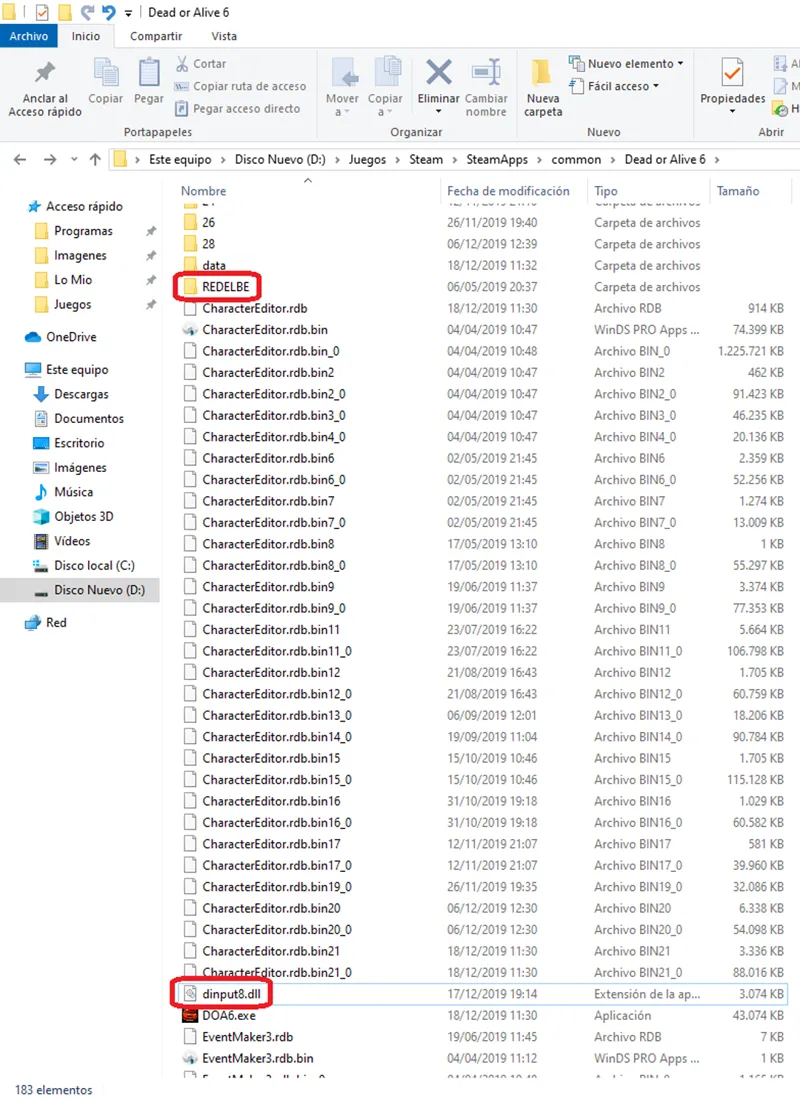
REDELBE is needed. Attached below is the latest version of the program. Whenever the game is updated, the tool must be updated too. I'll keep the post updated with the latest version.
1. Open the REDELBE zip and copy the file "dinput8.dll" and the folder "REDELBE" in the folder where you have the game installed.
2. Copy the REDELBE folder of the mod in the folder where you have the game installed.
There are two kind of mods in Dead or Alive 6, I usually include both:
Direct Swap: Replaces a costume, hair, stage, etc.
Layer2 Method: Adds a costume, hair, stage, etc. in an existing slot.
To use a mod using the Layer 2 method, you have to select the costume, hair, stage, etc. and then press a button.
XBOX controllers: The "Back" button.
PS3 controllers: The "Select" button.
PS4 controllers: Use the "Share" button. You may need a program called "DS4Windows" and ticking an option called "Hide DS4 controller" for the button to work as equivalent of the xbox back button.
Other controllers: The equivalent key to the above three.
Keyboard: The "F" key.
There can be multiple mods in the same slot.
To remove the mod, delete the files you copied.
There are further instructions inside the zip.
Dead or Alive 6 Last Round:
To install mods created for Dead or Alive 6, I recommend RDB Explorer.
Read this tutorial.To install my mods created for Dead or Alive 6 Last Round, use Kashira Mod Manager.
Download the latest version from this page (Kashira-win-x64.exe). Place it anywhere.
Instructions are here.
You can only install one mod per costume, but you can create different profiles with different sets of mods applied.
Dissidia Final Fantasy NT:
DFFNT_PATCHER is needed. Attached below.
1. Open the dffnt_patcher zip and copy the file "dinput8.dll" and the folder "DFFNT_PATCHER" in the folder where you have the game installed.
2. Unzip the mod in the "DFFNT_PATCHER/Data" folder.
To uninstall a mod, just remove these files.
Dragon Ball Z Kakarot:
Doesn't need any program.
1. For the SD Version, go to folder ...\AT\Content\Paks.
For the HD Version, go to folder ...dlc\Remaster\AT\Content\Paks.2. Create the folder ~mods.
3. Place the .pak files of the desired mods in there.
To uninstall a mod, delete the .pak file(s).
Final Fantasy VII Remake Intergrade & Final Fantasy VII Rebirth:
Doesn't need any program.
1. Go to folder ...\End\Content\Paks and create the folder ~mods.
2. Place the files of the desired mods in there.
To uninstall a mod, just delete the mod's files.
For installing Dresscode mods in Final Fantasy VII Rebirth, read here.
Granblue Fantasy Versus:
Doesn't need any program.
1. Go to folder ...\RED\Content\Paks and create the folder ~mods.
2. Place the files of the desired mods in there.
To uninstall a mod, just delete the .pak and .sig files.
Guilty Gear Strive:
Doesn't need any program.
1. Go to folder ...\RED\Content\Paks and create the folder ~mods.
2. Place the files of the desired mods in there.
To uninstall a mod, just delete the .pak and .sig files.
Invincible VS:
This Mod Enabler is needed.
1. Unzip the contents of tagfighter in the main folder so mods can be loaded.
2. Go to folder ...\TagFighter\Content\Paks and create the folder ~mods.
3. Place the files of the desired mods in there.
To uninstall a mod, just delete the mod's files.
The King of Fighters XV:
Doesn't need any program.
1. Go to folder ...\KOFXV\Content\Paks and create the folder ~mods.
2. Place the files of the desired mods in there.
To uninstall a mod, just delete the .pak and .sig files.
Metal Gear Solid Δ:
Doesn't need any program.
1. Go to folder ...\MGSDelta\Content\Paks and create the folder Mods.
2. Place the files of the desired mods in there.
To uninstall a mod, just delete the mod's files.
Midnight Suns:
Doesn't need any program.
1. Go to folder ...\MidnightSuns\Content\Paks and create the folder ~mods.
2. Place the files of the desired mods in there.
To uninstall a mod, just delete the .pak files.
Mortal Kombat 1:
MK12TTH is needed. Attached below.
1. Unzip the contents of MK12TTH in ...\MK12\Binaries\Win64 so mods can be loaded.
2. Go to folder ...\MK12\Content\Paks and create the folder Mods.
3. Place the files of the desired mods in there.
If you want to install an UBL mod, read this.
To uninstall a mod, just delete the mod's files.
Ninja Gaiden II Black:
Doesn't need any program.
1. Go to folder ...\NINJAGAIDEN2BLACK\Content\Paks and create the folder Mods.
2. Place the files of the desired mods in there.
To uninstall a mod, just delete the mod's files.
One Piece Odyssey:
Doesn't need any program.
1. Go to folder ...\odyssey\Content\Paks and create the folder ~mods.
2. Place the files of the desired mods in there.
To uninstall a mod, just delete the .pak files.
Samurai Shodown:
Doesn't need any program.
1. Go to folder ...\SamuraiShodown\Content\Paks and create the folder ~mods.
2. Place the files of the desired mods in there.
To uninstall a mod, delete the .pak and .sig files.
Sex Chess:
Doesn't need any program.
1. Go to folder ...\SexChess\Content\Paks and create the folder ~mods.
2. Place the files of the desired mods in there.
To uninstall a mod, just delete the .pak files.
Soul Calibur VI:
Doesn't need any program.
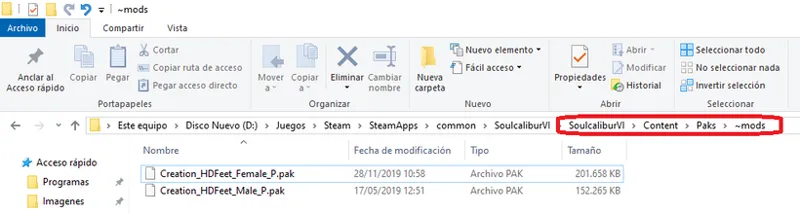
1. Go to folder ...\SoulCaliburVI\Content\Paks and create the folder ~mods.
2. Place the .pak files of the desired mods in there.
To uninstall a mod, delete the .pak file(s).
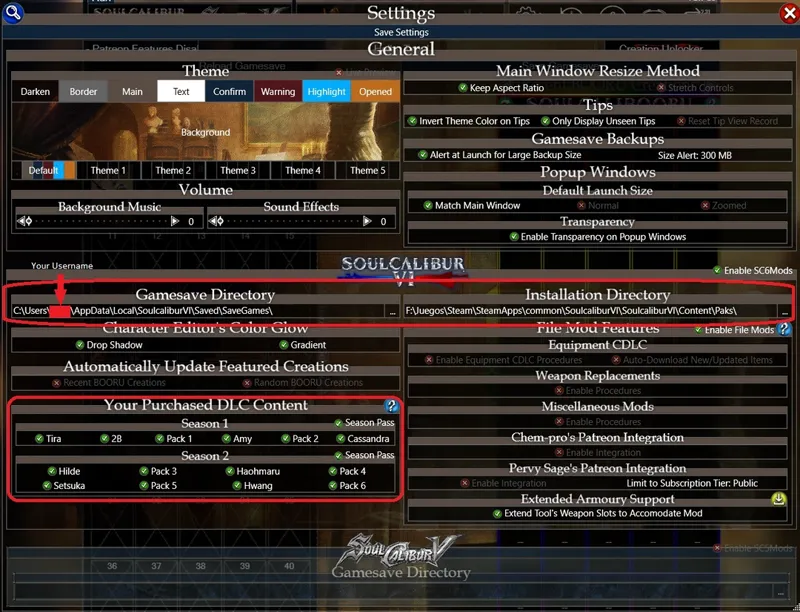
For CDLC mods I wrote a tutorial here: Vodkalibur Tutorial | SegadorMods en Patreon
Tekken 8:
Doesn't need any program.
1. Go to folder ...\Polaris\Content\Paks and create the folder Mods.
2. Place the files of the desired mods in there.
To uninstall a mod, just delete the mod's files.
Uncharted: Legacy of Thieves Collection:
Recommended to be installed with Fluffy Mod Manager.
Download and instructions here.

Comments (22)
By any chance, do you also make mods for DW3 Remaster?
Hi. I haven't done any mod for Dynasty Warriors 3 Remaster.
안녕하세요 모드 고맙게 사용 하고 있읍니다 닌자가이덴 블랙 이나 닌자가이덴 종류 도 관심 가져 주셨으면 감사할게요
Hi. Thanks. I'm actually looking into it.
Segador, can you please make another version of Creation Topless that has the updated light nipples? I don't use it because of the color but I wish I could because of the protruding nipple. This is my second month subscribing to your Patreon, thanks!
Sure. I'll send you a message for the details. And thanks for your support.
MAKE MORE FOR TINA?
OK, but no need to shout.
Will you make more topless mod for doa6 this month?thank you!!
I'd like to do at least one. Do you have any character in mind?
How comfortable, Luv it
Thank you.
Can you make clothes damaged, and destroyed only when all clothes are damaged?
I'm afraid I can't.
my mods have somehow made the controls for the game go bonkers. any idea what thats about or how to fix it?
My mods don't mess with the controls at all. No idea what could happen to your game.
the link to superwombat's mods doesn't seem to work as of current
It should work now.
Why it`s not working? I have this error: " Failed to apply patch"layer2:PatchMRCWI"
Because the game was updated. I've uploaded the new version of REDELBE.
Thank You
You're welcome. And thanks.