
How to join my Discord server! // INSTRUCTIONS IN DESCRIPTION
Yes, I do have a Discord server that's been around since the start of my Patreon!
You may already be in the server, but here are the instructions anyway:
In order to join my Discord server, you must connect your Discord account to your Patreon account. I do not provide invite links.
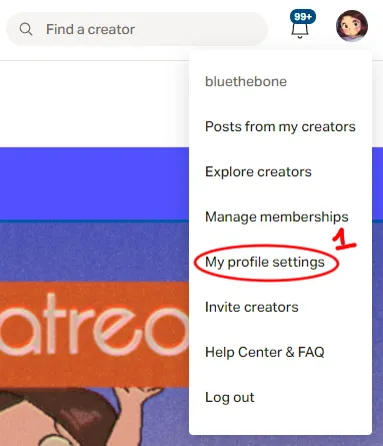
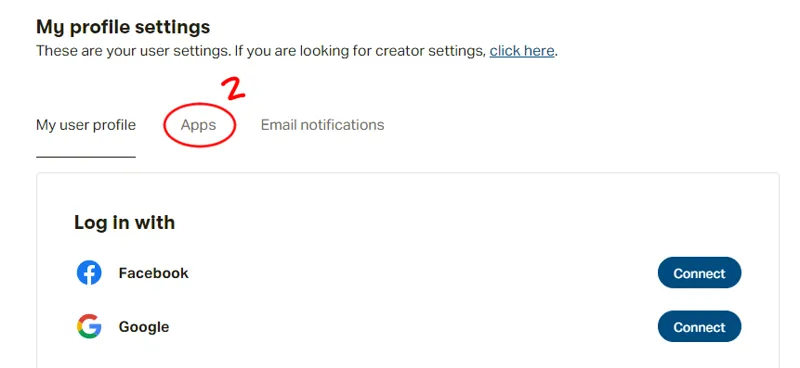
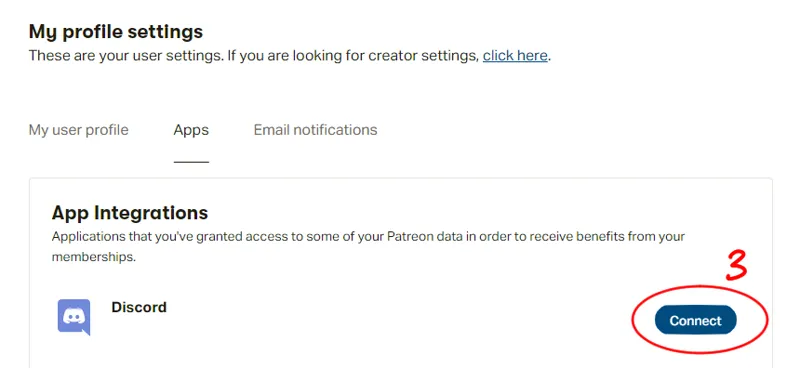
Go to your profile settings page on Patreon and click "Apps", then click the box to "Connect to Discord" and log in to your Discord account.
By then, you should be automatically connected to my Discord server. It may take a few moments for some people.
Picture instructions: https://imgur.com/a/nDaaigp
Leave a comment if you are still having trouble joining! Thank you! ♥
Comments (5)
Hi, please I did all the steps and it's still not connected. Thanks!
Well I did the steps and as I guessed I can not enter the server :c I hope I can soon.
Instructions unclear Got drunk and cured all of the cancer.
Man I should give more unclear instructions huh
Thank you!!!