
KKManager v0.13.0
Mod, plugin and card manager for games by Illusion. It includes an automatic mod updater.
What's new?
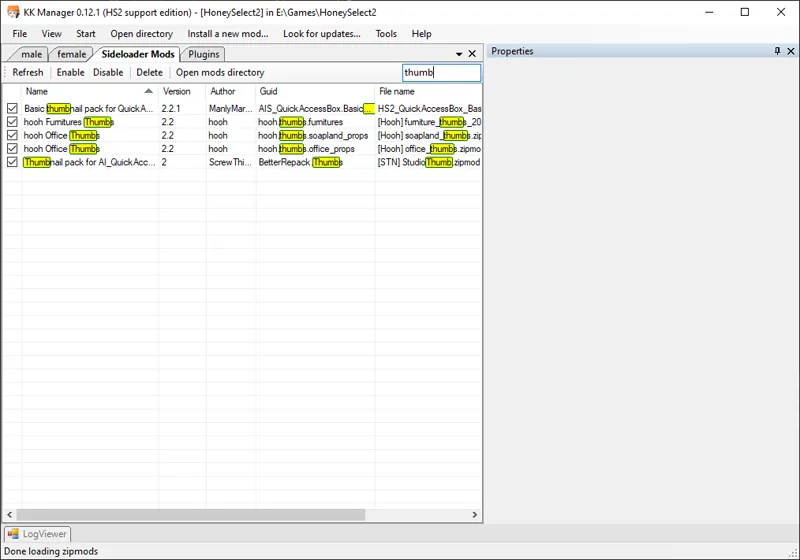
Added search boxes to card, zipmod and plugin windows (as seen in preview image)
Added "No cards were found" message to card window if there are no cards in selected directory
Added timeouts to prevent the update process from getting stuck in some cases
Updated the update format, old KKManager versions will have to be updated to download updates
Improved the "KKManager is outdated message", will now offer to open download page
Fixed failing to read update source version if the update format changed too drastically (which resulted in not detecting that current KKManager version is outdated because it thought the file was corrupted instead)
Log game name and install path for easier troubleshooting
Updated SB3UGS to v20.5.1
How to use
Download the latest release below
Either overwrite your old KK Manager installation (usually inside a "[UTILITY] KKManager" folder in your game directory),
or extract it to a new folder anywhere outside your game directory (do not extract the manager directly anywhere in your game directory).Start KKManager.exe, create a shortcut to it if you want.
If the game directory was not automatically detected, select where you installed the game.
If there are any mod updates available, the update menu button on top will turn green after a while. You can click it without waiting to check for updates immediately.
If you're a patron and have issues connecting to the update servers, or the update speed is very slow, check this post for an alternative update source.

Comments (14)
Hey, I just got into modding the game and I'm very confused on how to download the mod manager I go to the releases page, and I click download it brings me here and nothing actually downloads what am i missing.
i got it from here, i got the basic windows antivirus, it could be that its saying that cause it needs to modify stuff without permission but im not sure
Are you sure it's detecting a trojan and not just telling you it's an unknown application? Try to scan your system with something else to make sure it's not infected and redownload KKManager.
I got a warning about a Trojan Virus
What antivirus are you using? Make sure you downloaded the file attached to this post. You can scan the download on virustotal.com to see if it actually is infected or not.
After I DL am I supposed to extract directly to the UTILITY KK manager file? some of the files settings and a few others have been updated but not the KKManager exe. I have the 12.0 from last month.
Yes, extract to the same folder and overwrite old files. If in doubt, remove all old files first and then extract the new install.
The mod updater feature is extremely helpful. How much does Technician Chikarin get paid?
She gets a free space in the basement and a lifetime supply of ice cream.
Yes, I let it sit for a solid hour and it never moved. I will try these out though. Thanks for the help
Everytime I try to update, the manager stops responding. This is my first time trying to update it since installing the game so not sure if I did something wrong, but now when I start the game it does say there are components that won't work if I don't update. Does this sound like a common issue or easy fix or should I try just uninstalling everything and going back to default?
Did you try to leave it for a minute? Maybe it's just taking a while to process the updates. Try to reinstall KKManager by removing all old files and extracting this release in their place. If that doesn't help, try using the test update source here https://www.patreon.com/posts/new-mod-update-38855200 Alternatively you can wait for HF Patch 3.3, I should be able to release it today, barring any unexpected issues.
Hi Marco, currently getting an error when trying to update mods. It finished just about everything I had in the queue except for the Pool Map. It tried to download it over and over and then eventually I get the failure popup saying that access is denied to that file. I downloaded about a gigabyte worth of other mods successfully though, this map is the only problem for me currently.
Try restarting your pc and running update again.