
KKManager v0.9.3 - Fixed mod updater and other improvements
Mod, plugin and card manager for Koikatu! and Koikatsu Party.
This release brings many fixes and improvements. The update system is now working properly again thanks to using new sources.
This should have been v0.10.0 but I forgot.
What's new?
Fixed and improved the update system
Improved data displayed in the update progress window - easier to read and can see download speed
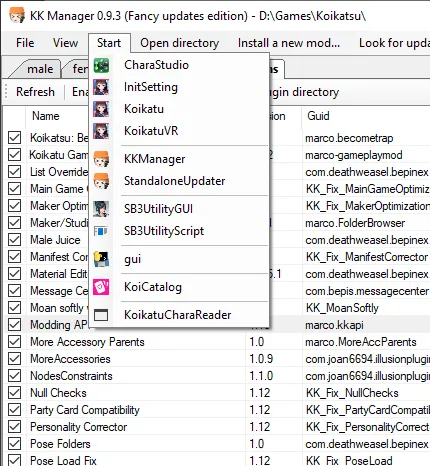
Improved the Start menu - applications are now grouped and have icons
Added log viewer window (open from View menu) and improved logging overall
Added option to compress game files to reduce disk space usage (in Tools menu)
Added option to turn off automatic update check (now off by default, turn on in Tools menu) - KKManager no longer accesses internet unless asked to
Added update ignore list (#18) and a secret easter egg
...and many more fixes and improvements, check the full changelog
How to use
Overwrite your old KK Manager installation (no need to delete files) or extract to a new folder anywhere (or install the latest HF Patch 3.0.2 or newer to get it).
Start KKManager.exe, create a shortcut to it if you want.
If the game directory was not automatically detected, select where you installed the game.
If there are any mod updates available, the update menu button on top will turn green after a while. You can click it without waiting to check for updates immediately.
Comments (10)
Hi there i'm little confused do i need to download your HF Patch for Koikatsu v3.1 or just use mod manager to update the game?
You need the patch to install the required plugins. KK Manager only handles content mods at the moment.
nice! it doesn't use mega link?
It doesn't anymore.
awesome! lol don't know enough to be able to figure that easter egg out lol. Not sure if mine is broken or something, but for a while the previous one and even this one I get an application error https://i.imgur.com/qCOJN9r.png every time i close it and no idea why. Not a clue to what this object reference it is talking about.
Remove your kk manager completely and try a fresh install.
We started sponsoring from today. I've been indebted to you so far, and I look forward to your continued cooperation. :)
Thank you!
Hey, I found sometimes the download get very slow when downloading very large mods that looks unnecessary... is it possible to add a button like "skip this mod"?
Someone did add a way to skip mods but there's currently no interface for it. You need to create an ignorelist.txt file in your kk manager directory and add names of the mods you want to skip to it.