
AI_CheatTools v2.7 - First release for AI-Shoujo
Trainer for AI-Syoujyo / AI-Shoujo. It allows control over player, heroines, and most other aspects of the game.
Trainer for AI-Syoujyo / AI-Shoujo. It allows control over player, heroines, and most other aspects of the game. It also integrates with RuntimeUnityEditor to provide useful debugging tools.
WARNING: THIS IS SUPER OUTDATED, GO HERE FOR THE LATEST VERSION.
What's new?
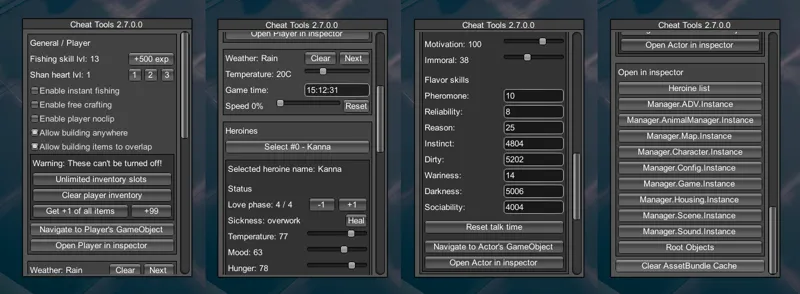
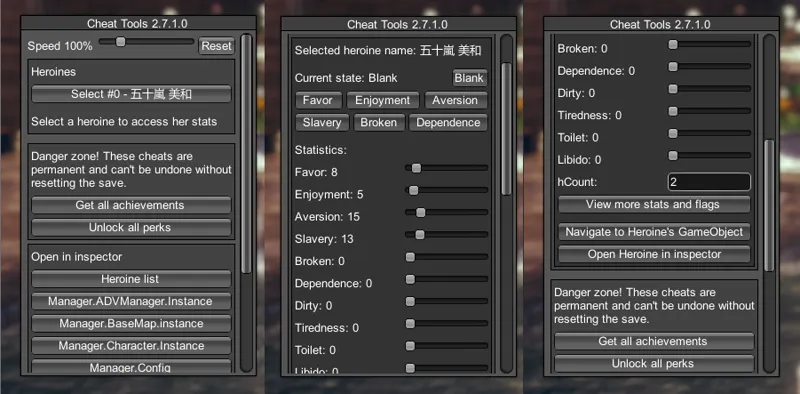
This is the first stable release of the plugin for AI-Shoujo. It's mostly feature-complete, check the preview picture to see the available cheats.
How to use
Get at least BepInEx v5.0 and RuntimeUnityEditor v2.0 (both included in HF Patch and most packs). Warning: When updating the RuntimeUnityEditor, make sure that you remove the old version from BepInEx\Plugins manually or this plugin won't work!
Download the latest release below.
Extract the release in the game directory, the .dll file should end up inside BepInEx\plugins.
Start the game and to turn it on press the Pause key (you can change it in plugin settings, search for "cheat").
It's recommended to turn on the system console to see if there are any issues with your game. This can be done from English launcher or from plugin settings (turn on both "system console" and "Unity message logging", then restart the game).
Comments (19)
Hi there, does this stili work for the latest version? Mines says Cheat Tool 3.6 and does not function no matter which hot key I change to. Thanks in advance!
This version is super outdated, download the latest version from https://www.patreon.com/posts/37889909
Just introduce all the downloaded files to the location where the exe is?
Only download the AI zip, and extract it to where the game exe is.
can you add items to inventory?
It can give you all items.
I don't get how to use/install this
Follow the How to use steps or install latest HS2 HF Patch
the plugin shows up on my plugin list but doesnt work when i press the key. changed the keybind to no avail. i have updated both my bepln and runtime but still it doesnt work. i do not have multiple versions of bepln or runtime so idk whats happening
Are you sure you don't have multiple RuntimeUnityEditor dlls in different folders? Check your output_log.txt for errors, if you can't make sense of it you can send it to me on discord.
Does it work on AI r4?
Yes, but when updating the RuntimeUnityEditor, make sure that you remove the old version from BepInEx\Plugins manually or this plugin won't work if the editor is duplicated.
Great. Is skill editor planned ?
At some point, yes.
I have no idea how to open this in game, even changed the hotkey :(
Most likely outdated runtime editor, download the latest version.
could anyone make a short tutorial on how to get bepinex and other mods needed for this. i have beens truggeling to instal them
For the first time setup it's recommended to get the full HF Patch. Otherwise follow the installation instructions of all mods you want to install.
Brilliant, highly appreciated :)