
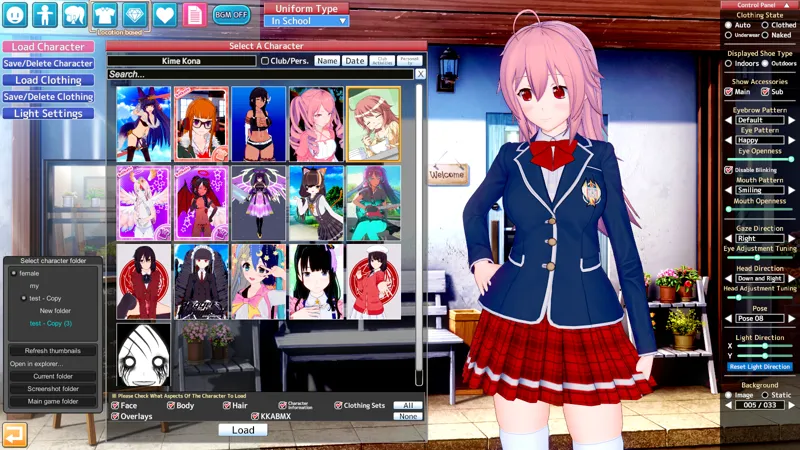
KK_BrowserFolders v1.1 - Maker and Studio File Browser Folders for Koikatsu!
Adds folder support to Maker character browser and Scene browser in Koikatu. You can organize your scenes into folders and use this plugin to browse them. Also known as KKSceneBrowserFolders or MakerFolders.
How to use
Make sure BepInEx is installed and your game is updated.
Place the dll file into the folder BepInEx in your game's directory.
Important: Remove KKSceneBrowserFolders.dll from BepInEx if you have it, it's an old version of this mod. There is a mild incompatibility in KK_ReloadCharaListOnChange v1.2 and older, check for an updated version.
Start Maker or Studio and open the maker character/scene load window. You should see a new window next to the standard file list. Click on the folder names in the list to open contents of that folder.
Changelog
Added maker folders
Added saving scenes to folders
Added settings
Renamed to KK_BrowserFolders
Sort folders like in windows explorer
Code cleanup and refactoring
Comments (1)
marco can you like marry me pls