



Flotastic February!
We have passed 2500 patrons and it's time to celebrate! I have created a special pack with 25 Flotastic brushes and I will share it with ALL of you this month. It's a Patreon exclusive pack, which means I won't be sharing it anywhere else.
I have worked on this pack for quite a while, trying to make the perfect brushes for a wide variety of paintings. I feel like this pack is the Basic Brush pack 2.0 😃 So I hope you'll like it as much as I do. In this post I'd like to share what each brush does.
NOTE: This is an older post, right now the Flotastic Brush pack is only available to Eager Learners and Master Students, you can find the pack through this post: https://www.patreon.com/posts/44839717
THE BRUSHES
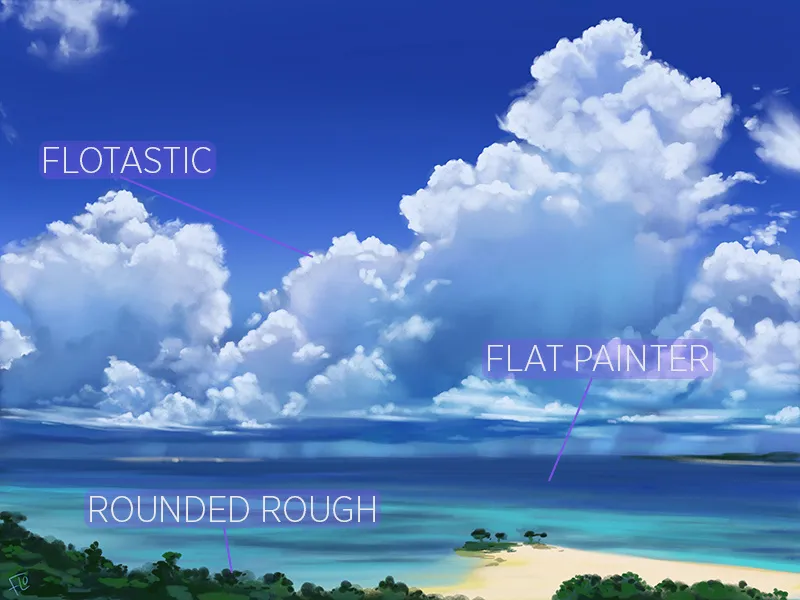
Flotastic: The Flotastic brush is a textured brush which is great for basic painting. You can use it when painting clouds for instance! The opacity is set to pen pressure, so if you press lightly, the strokes will become more transparent.
Flotastic Sketcher: The name says it, this brush is for sketching! This is the most Flotastic sketching brush out there, so I'll be using this a lot. The harder you press the more opaque the stroke becomes and if you use the side of your pen, the stroke becomes bigger, just like a pencil.
Flotastic Blender: Use this brush with the smudge tool to blend colors. Perfect when making portraits for instance. It leaves a nice texture with a slight noise.
Flotastic Inker: A brush that's nice for delicate inky lines.
Flotastic Hair: This new hair brush is great for detailed hair. Use it on top of a base to add detail and smaller hairs.
Smooth Sketching: A more watery sketching brush, it gives the feel of a small watercolor brush.
Base Painter: This brush is great for just about anything, you can use it to lay down base colors or to glaze transparent strokes on top of your painting, blending areas this way.
Darken Line 2: A new and more Flotastic version of the Darken Line brush! Great for dark details in your paintings.
Lighten Line 2: A new and more Flotastic version of the Lighten Line brush! Great for light details in your paintings.
Flo Darka: This brush is great to add darker areas to your painting, you can use this for bigger areas than the Darken Line. Be sure to play around with the opacity slider and use colors that aren't too dark.
Flo Lighta: This brush is great to add lighter areas to your painting, just like the Flo Darka, you can use it for bigger areas. You can use it to subtly light up areas, depending on your opacity settings of course.
Flat Painter: A nice textured flat brush. I really enjoy using this one for landscape paintings for instance. The harder you press this brush, the more opaque your stroke becomes.
Rounded Rough: A round and textured brush with dynamic colors. The harder you press, the bigger your stroke becomes.
Opaque Coloring: This brush is great for painting big shapes, laying down a base for your painting for instance. It's nice and opaque and has a slight texture.
Big Darkener: It's big and it makes things darker 😉 Play around with the opacity and the color you use to darken up areas in your painting.
Dynamic Color: This brush can add dynamic colors to your piece, don't go overboard with it though. Play around with the opacity slider to get the effect you want.
Smear it Around: A very smeary brush, use it to smear colors around on your canvas.
Dibby Dabby: This dabby brush is nice for adding highlights to skin for instance, but I'm sure it can come in handy in landscape painting too. Go and experiment!
On The Flo: A textured brush which is great for a mossy surface for instance. It's nice and smeary and has dynamic colors.
Leafy: The name says it, this brush is great for creating leaves! If you press harder, your leaves will become darker.
Grassy: You can guess it, a great brush to create grass! Not much else I can say about it 😅
Barky: This bark textured brush can come in handy to add grungy bark texture to stuff. Like ehhh... trees! But don't limit yourself, you can experiment of course!
Stippy: Another textured brush, you can use it to add some texture to stylized illustrations for instance.
Dabby: This creative brush can be used to mimic foliage for instance. Great for more stylized landscape paintings.
Hatchy: A crazy hatchy brush! An easy way to add a hatchy texture to your illustrations.
FINALLY
Be sure to experiment when using brushes, play around with the opacity and size sliders and experiment with colors. When using brushes that make things darker or lighter, be sure to use them on the same layer as your other colors are on, they won't work on a separate layer. Same goes for the blender and smeary brush of course, colors need to be on the same layer to be able to smudge or smear them.
BACK TO THE OVERVIEW
Comments (141)
Hi Flo, I know this is an old post but I was wondering if you have this post about your flotastic brushes and how to use them in a document style that I can save to my device for reference instead of accessing via Patreon every time? I was also curious about your individual brushes used that we can download and if you have them in a brush set instead, I would love to have them all but as my library is overflowing as it is individual brushes are a bit of a nuisance. Many thanks.
Hey Zee, I'm sorry, but I don't have this in a document style. But what you could do is take a full page screenshot in a browser to create a document from that. And for the brushes, I don't have have them all in one brush pack. I'll think about doing that in the future, but it takes a lot of time unfortunately.
Hi, was able to download the files but none of them has .brushset file to import onto procreate. please help its frustrating not being able to start working on tutorials due to lack of access to brushes despite having every other kind of file in folders! please check and revert. Thanks a lot for the tutorials, keen to start of once i get access to .brushset file to import
so we still cant use our computer to download brushes or any procreate files right?? Im having so much trouble when things get changed around even a little bit. Im 70 years old and Have fibromyalgia and it messes with my comprehensive and cognitive thinking.........but I love your tutorials when I can get them to work.
You can still use your computer to download files, nothing has changed 👍🏻
Hi Flo I have the same problem I download the brushes opened the zip file then folders but there are no brushes which I could import to procreate there are only files with your siginiture and the brush shape. I have no problems with google dive or such. Please help
Ok i solved the problem .. for everyone please download all files one by one than it will work do NOT download all at once
Flo, I know your brushes do not come with Procreate. I was asking about the other two sets that can be downloaded from here.
None of my brush sets come with Procreate
Flo, what did the trick was to change the extension from zip to .brushset. A question: the Procreate Basic Brushes brushet is the same that comes with Procreate?
I'm happy you got it to work. And no, my basic brush pack doesn't come with Procreate 😉
Hello, I am new to the community and one of the first things I did was to download the 3 sets of brushes. They downloaded as zip files and when I extracted them the result was not a file with the extension brushset but a folder with that extension. I am not being able to import them into Procreate. What did I do wrong? Thanks!
Hi Edson, you might find this post in the FAQ area helpful: https://the.flocreate.community/c/faq/how-can-i-import-brushes-into-procreate You can also try to change the extension to .brushset since it's not a zip. Or use the Google Drive app and open the files directly from drive.
I downloaded the brushset file and try to import it into procreate by tapping on it in my files. It says it’s imported but when I go to procreate, the brush folder is not there. What do I do?
Have you checked this post yet? https://the.flocreate.community/c/faq/how-can-i-import-brushes-into-procreate
I downloaded the brush sets and unzipped how do I install as tried on my iPad and through Google drive x
Perhaps you'll find this article helpful: https://artwithflo.com/how-to-install-procreate-brushes/
THANK YOU! this helped me out also, spent ages trying to figure it out, i'm so dumb!
Hello, I'm not able to install these brushes into procreate. It's the brush.archive file and then image files but does not allow me to install the files on both ipad and mac. Through google and safari. Am I doing something wrong?
Have you checked my article about importing brushes yet? https://artwithflo.com/how-to-install-procreate-brushes/
I’m having the same problem this is the only post I see.
You can find everything you need through this post: https://www.patreon.com/posts/44839717
I am eager learner.. It doesn’t even let me download the flotastic brush set which makes me sad. It also doesn’t even let me open the brush set which makes me sad Because for your new lesson for the rocks, I can’t even use the flotastic brush set.
Did you go to the post with the Google Drive link to download it? It might help to have Google Drive installed on your device.
I can‘t open the post, i think because i am a newbie and only superfan. Am i right? I get the message that it’s locked.
That's right, it's only available for Eager Learners and Master Students now that Flotastic February is over.
Where do you get the brushes where do you click?
You can find the link through this post: https://www.patreon.com/posts/44839717
This brush of yours is awesome! I did enjoy the barky and dabby textures :)
Thank you! I'm happy you like them :D
Hey I didn’t get the link for brushes can someone help me
You can find it in this post: https://www.patreon.com/posts/44839717
Congratulations, Flo!!! I look forward to your videos and insight! Thank you for the brushes...they will be used!
Thank you so much, Jerrold. Have fun with the brushes!
This is a wonderful gift. Thank you Flo!
You're welcome!
Hi Flo, I tried get the brushes, but it says that too many people downloaded the file and its currently inaccessible... Is there an alternative link where I can download the brush set?
I have never heard of that issue before, there shouldn’t be a limit. Have you tried using a different browser yet?
Thank you so much for the brushes!
You're welcome!
I can’t seem to add the brushes either to procreate. I clicked the more option and procreate isn’t there
Perhaps you'll find this article helpful: https://artwithflo.com/how-to-install-procreate-brushes/
Congrats on passing 2500 patreons and thank you so much for all these amazing brushes. My procreate brush library is ridiculous from all your brushes I have lol I have had medical issues and this was a nice surprise to come back to today. Cheers my friend!
Thank you so much :) I'm sorry to hear about your medical issues, I hope you feel better now.
Hey Flo, I just became a patron of yours! I am trying to "open with Procreate" when I click the 3 dots and Procreate is not an option. What am I doing wrong?
You might need to click the more options to find the app
I tried to download and it is telling me the download has reached its quota. Has anyone else had problems with it?
That's strange, there shouldn't be a quota.Have you tried using a different browser?
Question re your landscape example image above - is that from a previous training video or a future one ? I find it to be quite beautiful and would hope there is a lesson past or coming in the future that demos it's creation.
The landscape is just a personal experiment. I created it while working on perfecting the brushes. It won't be a tutorial, I'm sorry
I love them to! I like the smear it around one thank you
Thank you! Happy you like them :)
Just downloaded the pack. Thank you for these.
You're welcome :D
Just saw this and it made my day! Feels like Christmas morning. Thanks for your generosity.
It's my pleasure! I'm happy you like it :D
My apologies if I’m leaving this comment again, I thought I left it yesterday but I don’t see it on here. Do you have a tutorial for the girl on the bottom right? It’s such an awesome picture!!
Thanks you for all the work you do for us! Can't wait to give them a try. Might drag out some older drawings and spruce them up a little.
It's my pleasure :) I hope you'll have lots of fun with these brushes!
Thank you! I can't wait to try and use them!
You're welcome :D
Omg!!! These are amazing!!! Thank you so much!!! ❤️❤️❤️
You're welcome! I'm glad you like them :D
these are OUTSTANDING!!!!
Thanks! :D
Thank you! Do you have a tutorial on the girl that’s in the picture on this post? I’d love to see that😁
So awesome. Thank you.
You're welcome :)
These are awesome! They work in the upgraded Procreate Pocket too.
That's great :D
Thank you, Flo. Love the way you create.
You're welcome and thank you!
THESE ARE AMAZING/BEAUTIFUL/SO VERSATILE. Thank you for always spoiling your patrons! We are appreciative and very eager to start using these!
It's my pleasure :) Have fun with the brushes!
will you be doing tutorials using these brushes?
I will definitely be using these in tutorials, it's my new favorite set ;)
Thank you, I'm excited to experiment with this brush pack!
You're welcome!
Can't wait to give these brushes a go! I have learned so much since I joined this community. Thank you for the brushes!
I'm so happy to hear that 😃
Thank you Congratulations and I love you ❤️💕
You're welcome and thank you 🥰
thank you so much for the brushes! Congrats on the Patreon milestone 🥳💕
You're welcome and thank you so much 😊
Thank you Flo, and congratulations! 🎉
You're welcome and thanks!
Thank You so much! These are wonderful😀
You're welcome 😊
Thank you so much. You are the best teacher ever!
Awww thank you so much! 🥰
Thanks Flo! These brushes are amazing!
You're welcome and thanks!
Thank you so much Flo! The brushes are fabolous! I can’t wait to see what you are going to create with them! 2500 on Patreon 🎉 congrats ✌🏻
Thank you so much Sara
Fabulous. Had a play with them today 👍
Thk you so much
You are awesome ❤️and the pics in the post are wonderful. Can't wait to see them in tutorials :)
Thanks! The paintings in the post won’t be in tutorials though. I created them while developing the brushes.
Congratulations on 2500 patrons! I can't wait to try out this new brush set. :)
Thank you!
Congratulations 🎉 You are the best!
Wow, Flo! Congrats! 🎉🎊🍻 That’s a heck of a following. And thank you for the brushes—I’m looking forward to playing with them later! Also, I’m digging the branding on them 😁
Thank you so much 😃
I cannot wait to get home from work to download these brushes and play woth them! Thank you, Flo, what an amazing gift! 😁😁
It’s my pleasure 😃
Thank u very much. And congratulations 🥳
Thank you 😊
So excited to play with these! Thanks!
My pleasure 😃
AMAZING!! We get to celebrate with you by downloading these fabulous brushes👌🏻👌🏻 And I,love the names...so clever and fun. You deserve all the accolades and followers. Looking forward to tutorials utilizing this brush set. A big thank you Flo 👩🏻🎨❤️
Thank you so much 😊 that is so kind of you to say ❤️
Wow ! That's an amazing Gift !! Thanks a lot ! Perhaps you could make a tutorial with these brushes Have a good Day
You're welcome! And yes, I'll definitely be using these brushes in tutorials.
Congratulations Flo! 🥳 Big achievement. Thank you for the brush set. Looks amazing! Can’t wait to use it. ✨
Thank you so much Tamara!
Thank you Flo! 😁
Thanks, Flo!
You're welcome 😃
Thank you very much Flo. One of the nice to have problems with Procreate is the large and somewhat confusing numbers of brushes to select from. This Flotastic brush set looks like it will be a one-stop set that takes care of most of my painting needs when it comes to brushes.
You're most welcome 😃 I hope you'll enjoy the set
They look so great. Cannot wait for using it in the future tutorials. I think Stippy is very good for texture of cat's nose.
Thanks! I hope you'll have lots of fun with them 😃
Thank you! 🥰
Love them thanks!
Thanks and congratulations, your video tutorials rock and I love doing them
Thank you so much 🥰
huge congratulations!!!! looking forward to try out these brushes they look like they are going to be perfect to help with my latst project !!! here to the next 2500 !!
Thank you so much! Reaching 5000 patrons would be crazy 😅 But who knows!
Congratulations 🥳. And thank you 🥰. I love using your brushes and I can’t wait to discover these.
Thank you! And you're welcome :)
Thanks 🥰 I am new to digital art and I've found your tutorials so helpful, I had to become a patron sub
I'm so happy to hear that, thank you!
Hey flo. Thanks so much for the brushes. I can’t download them though. I can’t get pass the screen that tells me google drive can’t scan. I don’t see three dots to click like it says in description. Any idea what I’m doing wrong? Thanks :)
Just put download anyways
Thank you and congratulations!
You're welcome and thanks!
Thank you
Thank you
Thank you so much for these amazing brushes! I am absolutely in love with the forest landscape and I'm hoping that you'll decide to make a tutorial on something like that sometimes!
My pleasure! And I'll be sure to keep it in mind :)
thank you, Flo!