




NS2 Character Creator Update - Part 1
Yoo,
Sorry for the wait! As I think I mentioned, builds would usually be out more frequently than they have been this month, but I've had some major internet trouble with uploading so it's all packed into this one bitching update.
Anyway - Part 1 of what will be a hugely extensive character customization suite is ready to download, features outlined below.
Face Tab - This is a more experimental feature and it may change over time based on feedback. Instead of having a huge list of sliders, face proportions are set by plots on a graph. Each graph contains up to 3 plots, which are positioned with Right, Left & Middle click of your mouse within the box.
The amount of customization available in the Face Tab admittedly isn't as much as I'd like, as there's no Jaw, Cheekbones, Ears, etc, sections. But they will be coming in the next update and hopefully allow for a wider range of faces to be created.
Currently it may be frustrating if you're trying to achieve a certain look, with the limited amount of controls available. But I'll be working with playtesters and experimenting more to make this way nicer and more extensive.
FYI - My UI skills suck and it is possible to expand too many sections that the list cuts out at the bottom. The Heart Icon can be clicked to minimize the "Health and Wellbeing" section to make more room for the rest of the UI.
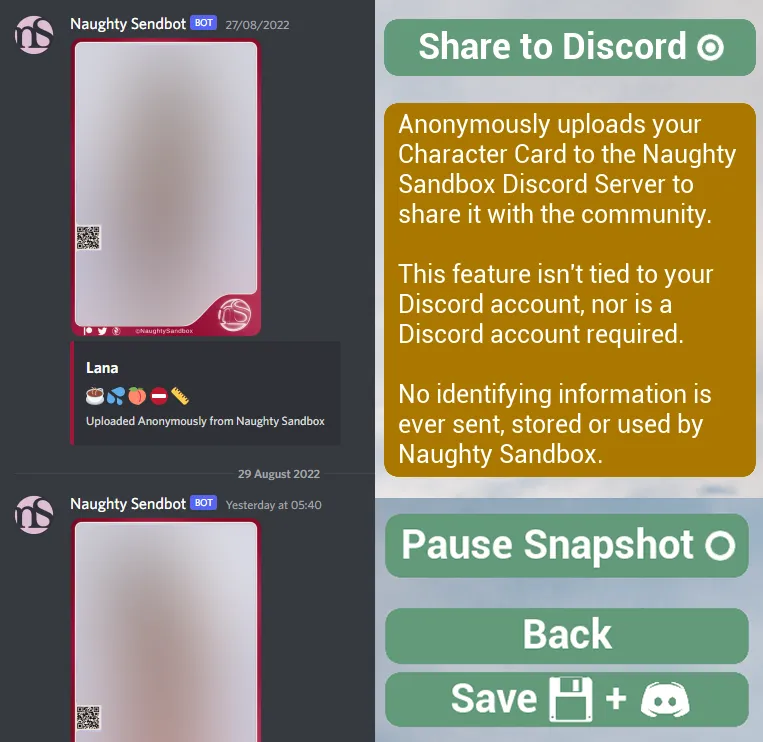
Hopefully as the Creation features and support for the project increases, the Character Share channel will act as a very nice archive of people's creations, to pick and chose from.
The Character Card screen also has a new Pause Snapshot button, to give you more control over the snapshot and so you don't accidentally save out characters as they're blinking.
And some small things:
Feature - Hair options and other UI bits which let you choose options, now highlight the option you've chosen. Obviously it was trash before and you didn't really know what was selected.
Bug - Adding Paint to a character locks the skin tone color. This is not really "by design", but there is a reason for it which I can't tackle right now. A workaround is simply to remove the paint, set your desired skin color, and apply the paint again.
Bug - Adding Paint to characters with a non default skin tone can look bizarre, this is a color blending issue that I'm gonna look into fixing. Most things look absolutely fine, but subtle things like makeup may look too bright on darker skinned characters.
Wew I think that's it, Build link will be posted in a sec, THANKS SO MUCH FOR YOUR SUPPORT!!! <3
Comments (2)
All these features do work in vr or only desktop and how to install them pls
Desktop only for now. To run the game, grab the latest build link in a Build post, download it, extract it, and run the .exe!