
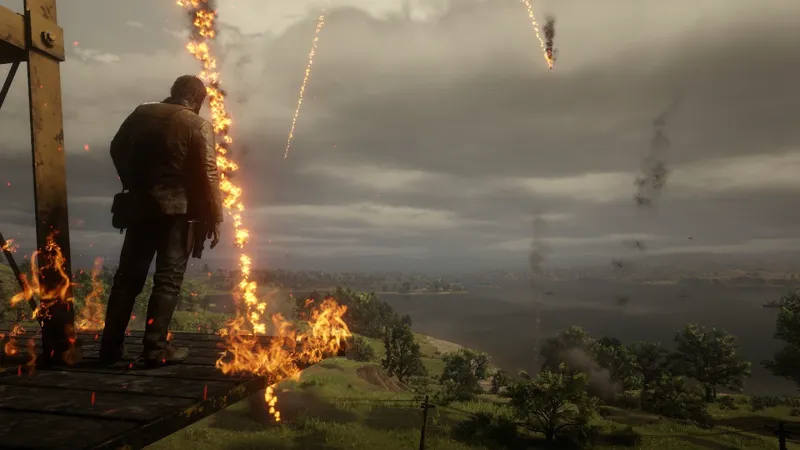
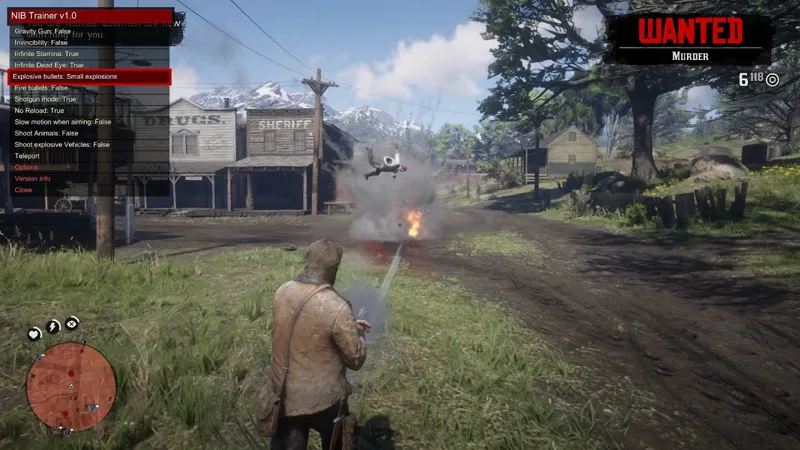
RDR2 - NIBSHDotNet and NIBMods Menu
Lot of people was asking me to update and fix my first trainer for RDR 2 so, i decided to take some time to finish my .net plugin and NIBMods menu for Red Dead Redemption 2 and also recreate my little trainer :)
Same hotkeys used in GTA 5, Ctrl+N to show the NIBMods Menu.
You need Scripthook RDR2 by Alexander Blade in order to use my .net plugin and my .net mods. Case the site isn't working, try this mirror.
I decided to make my own .net plugin based on the actual .net plugin to avoid future issues, since v1 of the plugin lot of things naturally changed and future releases probably will have even more changes in names and etc. that would cause issues with working mods (like happened with ScripthookvDotNet v3). This plugin will load ndll files to let user be able to keep using ScripthookRDRDotNet plugin for other .net mods :)
Check "README NIBMods Menu and NIBSHRDRDotNet.txt" for installation and requirements.
RDR 2 Mods - Meteor Armageddon in Red Dead Redemption 2 (YouTube)
Comments (38)
Is there any controller support?
CANT COONET TO PATRON NETWORK
SHOW ME A SCREENSHOT
I installed your mod menu and the latest super arthur mod. I started a new game. The first time I open the mod menu it allows me to enable super arthur but when I open the menu again with super arthur active it doesn't allow me to select super arthur to disable the super arthur powers. The mod menu opens but when I select the menu option it just quickly flickers in the back to the main mod menu. I only used the files of yours that you have here.
i will test soon
mod seems to be unfunctional
what happens exactly?
i made everything in readme, but still not working. How can i fix?
Hey Julio! My menu will not open, even after installing all the things mentioned. I have been trying to install the super arthur mod, and have installed the menu and everything else, yet when I press control+n nothing happens, and no log files have been generated. Is there a definitive reason on why this is happening? Or is my computer just being mean?
probably you aren't using the recommended scripthook by Alexander Blade, the one from nexus doesn't work fine
installed these, still working ok? if installed correctly ?
i didn't tested recently, isn't working?
[ERROR] The exception was thrown while executing the script ́̎.́̍. [21:12:06] [ERROR] Caught unhandled exception: System.NullReferenceException: Object reference not set to an instance of an object. at ̈̓.̈̒.̉̂(Keys ) at ̘̗̃.̃̐̈(Object , Keys , ̘̗̃ ) at ́̎.́̍.̘́(Keys ) at ̄̆̒.̃̐̈(Object , Keys , ̄̆̒ ) at ́̎.́̍.̂̂(Object , KeyEventArgs ) at RDR2DN.Script.MainLoop() Any ideas? I've reinstalled a few times mod menu just flashes but no functionality
nothing changes when you press arrow up/down or Enter? odd, never saw this issue
I was not coming aggressive. Also the words on the menu don't even pop up., but what smart is that you have nexus mod team help you and put it on nexus mod. It would be easy and better. I see you have not update the mod since 2026. I see 2020, but also why scripthokk v 1 if you could make it for scripthook v2
what would change if it was posted in nexus mod? the missing screen on text (issue in your side that i probably can fix) would magically disappear? instead of saying all this you could simple say that you have a issue and describe it like big part of people do, i fixed and improved lot of stuff due to decent issues reports. record a video showing the issues you have using medal.tv and post the link here
why is my game crashing if i spawn a train or something like this? with the stream to earn mod if i install that mod its crashing - sorry it is the superman mod! can you help me with it?
hard to say, there is no specific interactions with trains in my super Arthur mod for rdr2
the https://dotnet.microsoft.com/download/dotnet-framework/net48 and other files arent working
the actual windows 10 and later already have this framework, which other links aren't working? Run game launcher as administrator: -With game and Rockstar Launcher closed use windows explorer (or any folder in your computer) to navigate to "C:\Program Files\Rockstar Games\Launcher" (Or wherever your rockstar launcher is installed) -Right click the file "Launcher.exe" and click in "Properties" -Click in "Compatibility" and check the box "Run this program as an administrator" then click in "Ok"
I see that the same thing happened to many people and no one gave them a clear answer that they could read.
where you saw? send email it's very easy man, but if you don't want ecen try, upload the images to a site like imgurl and send me the links
on the latest version of rdr2 and cant get rdr2 NIBMods Menu to open when pressing Ctrl+N. I have all requirements including scripthookvrdr2. Any advice?
check log files for errors, you will find few ones in main game folder, case you can't find, send me email with screenshot of main game folder gtaivscripting@gmail.com
i press Ctrl + N and nothing happens
installed scripthook? running rockstar launcher as administrator?
esse menu ainda funciona?
última vez q testei, umas semanas atrás, estava funcionando
it works but the camera view is under the ground riding the aminals
you mean when using pig rider mod? latest time i tested past week it was working fine, only the rabbit that showed issues but was because of his size
Don't think this works anymore...
works for me and i have an obscene amount of mods meteors can crash the game if you get unlucky with what it hits. maybe ur using directx? youre supposed to use vulkan
when i open the menu there arent a list of the mods i intalled (your mods) only the name of the menu shows up and when i try to click it says ''there are no items''
read my answer to your other comment...
I've done all the methods but the nibmods and trainer menus don't come out, is the steam rdr2 updating?
wait for scripthook update
is the menu still working? I haven't been able to get it to open
yes, i just had to update Scripthook