



OIV installation errors and solutions
You can open the Installation Log to see (commonly in the end of the log) the error messages, they would mention a file where it had issues doing things.
Corrupted dlclist.xml file (due to unclosed comments or missing lines/characters)
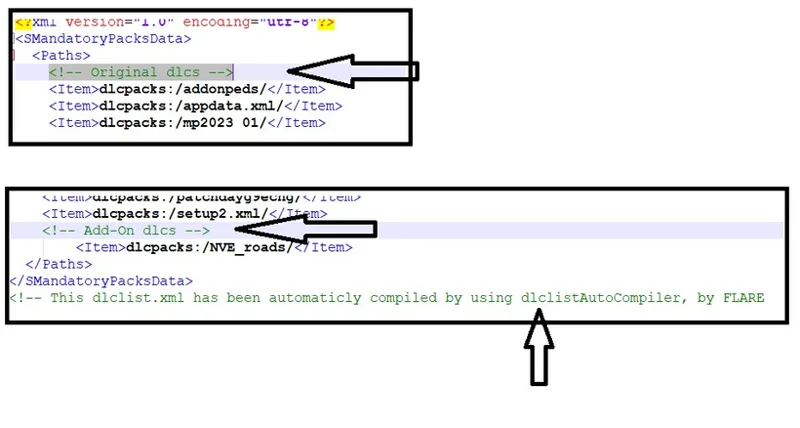
Recently some users had "installation error" message when installing OIV files of some mods, that issue can be related to comments made in dlclist.xml file using tools like the one that goes in a "addon peds selector" mod. To fix this issue you should remove all lines that have comments, lines like this:
To fix it, in OpenIV, click in "Edit Mode" to enable edit mode then navigate to mods/update/update.rpf/common/data, right click the file dlclist.xml and click in Edit, find and remove the lines that are comments, they start with
Also make sure that the end of the dlclist.xml file is correct, it should end with those lines:
Also pay attention to the items, each
Admin/user rights
Some users also had issues due to the fact they couldn't overwrite some files because they was created/owned by other user account in a previous setup of the mod, the solution is delete (or rename) the mod files folder in gta Scripts folder, each mod have a folder in gta Scripts folder, Superman v2.2 for example have the folder "Superman V2 script files"
Case you can't fix your OIV setup issues, email me the installation log: gtaivscripting@gmail.com
Comments (9)
hello, i am trying to run invincible models with the superman mod. i have followed every tutorial, edited game xml files, done the heap limit stuff, all of it. right now when i start the game i get an infinite black screen and it just keeps loading. no rockstar logo or anything, what do i do?
heap limit adjuster and packet file limit adjuster too? running rockstar launcher as admin? did you checked superman readme to see if you didnt forget something like battleEye?
when i use the flying grap it lets go after a few seconds. how do i stop this?
Suit Config have a section about this attack, there you will find something related to target (or victim) self detach, something like this
ive done what you said and it still says ''location is not avalible'', is there any way to fix that issue?
this one isn't mentioned in the guide. Show me a screenshot of this error: gtaivscripting@gmail.com
Well I tried it and everything you said in your instructions I have done. And it still doesn't work :(. Like my OIV File has 0 KB size, In your vid it has like 38000 KB size
it's clear that your download failed... maybe your antivirus blocked, or even the web browser, here in Google chrome for example, i have to click on "keep" in right top corner of the browser when it start downloading scripthookv, it's possible see this in my video
Thank you so much for the extremely helpful and simplified Modding Guides that you have uploaded recently, like this OpenIV one sir Julio, your Awesomeness! 🔥🌟🤴👍🌟🔥 💖🙏💖