



Undervolting is coming to Handheld Companion
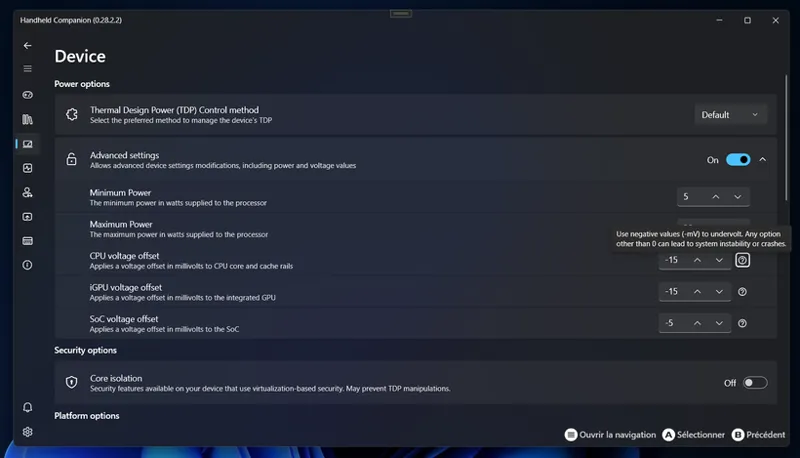
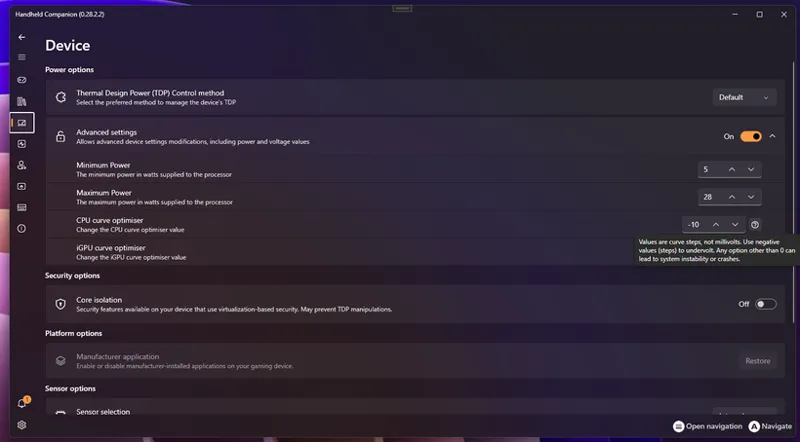
Dear all, with next Early Access build we will be adding built-in undervolting for both AMD and Intel handhelds.
What’s new?
Intel devices
New controls for per-rail voltage offsets in millivolts (Core, iGPU, SoC), where values are mV offsets.
AMD devices
New controls for All Core Curve and GPU Curve, leveraging AMD Curve Optimizer. Please note values are curve steps, not mV. A curve step is roughly 3-5mV.
Safe starting points & Silicon Lottery
As you may know, note every chip are equal. Silicon lottery means that there is a difference from chip to chip leaving the factory on how little voltage they need to function at a given speed. To keep things simple (and reasonably safe) as you try and get the most out of your device, we recommend the following first-try values in the UI:
AMD (Curve Optimizer)
All Core Curve: –10
GPU Curve: –10
Intel (mV offsets)
CPU Core: –40 mV
CPU Cache: –40 mV
iGPU: –40 mV
System Agent / SoC: 0 mV (leave at 0; tiny gains, higher risk)
From there, you’ll be able to push further if your silicon allows it – but these should give a noticeable improvement on many handhelds without instantly falling into BSOD territory.
What kind of gains can you expect?
On typical 15–30 W handheld devices, a mild, stable undervolt like the ones above usually means, at the same TDP:
Around 4–8°C lower CPU/GPU temperatures in sustained gaming
Roughly 5–15% lower APU power draw, which is about 1–3 W saved in that 15–30 W envelope
Equal or slightly better sustained FPS, because the APU has a bit more voltage/thermal headroom before it hits limits
A small but real bump in battery life and less fan noise in long sessions
Nothing is guaranteed (silicon lottery is real), but those ranges are consistent with what we see on GPD/AYANEO/Steam-Deck-class devices and in wider laptop undervolting guides.
A few warnings (please read!)
Any value other than 0 (steps or mV) can cause instability, crashes or, in worst cases, data corruption and different devices – even of the same model – will tolerate very different values.
You should always:
Change values slowly
Stress test CPU and GPU together (3DMark, Unigine, Kombustor, your heaviest games)
Back off if you see crashes, hard locks or visual glitches
As always: feedback, screenshots and crash stories are very welcome here or on Discord / GitHub.
Comments (4)
Hi, set Mhz for CPU and iGPU don't seem to be working on WIN5 yet, is it still a work in process?
Also, on the Win5, the max TDP that can be set is 75w, although the device is capable of 85w by default...
This is great! I thought Intel had blocked the undervolting feature a long time ago, and AMD never had it. Any idea when it'll be released? I can't wait to try it out.
A nightly build for Patreons should land this weekend.