


Patreon 0.20.5.3
Release notes
Implemented support for Legion Go detachable controller gyrosope.
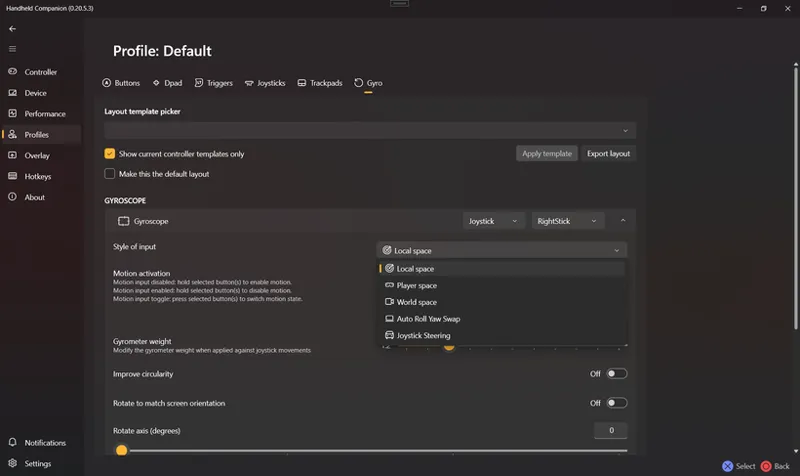
Implemented JibbSmart's GamepadMotionHelpers library across all devices and controllers.
Support proper gyroscope calibration.
Support proper gyroscope filtering and drift cancelation.
Support three movements algorithms: Local space, Player space, World space
Improved overall inputs management and hotkeys handling.
Implemented multi-GPU, multi-display management.
Supports Intel gpus (retro scaling, sharpness).
Supports AMD gpus (integer scaling, RSR, sharpness).
Improved HC installer
Install dependencies only when not installed or newer version comes with installer.
Show optional reboot screen only when required.
After installing HidHide, remove desktop icon.
Option to open the application after install.
Updated RTSS and HidHide upgraded to the latest versions.
Implemented support for new devices
Basic support for the Ayaneo Slide (missing fan and LED control) by @DevL0rd.
Improved foreground process detection, for games that hide their true foreground window.
Helldivers 2 or other games that use nProtect GameGuard.
Improved overall UI implementation, by following MVVM design pattern, (45% done) by @Matthias
Fixed issues
Fixed missing default mapping for Dualshock4 touchpad.
Fixed an issue affecting UI performance when changing application settings.
Fixed virtual Dualshock4 implementation, IMU accelerometer ranges and timestamp and swapped axis.
Partially fixed 3D overlay positioning.
Fixed a crash on duplicate entry in DisplayAdapters (multi monitor setup).
Fixed a missing GUI binding error.
Fixed process detection handling Null, occured with Windows lock screen.
Fixed a crash on close of HC due to mishandling of display adapters.
Fixed power preset main GUI creation, deletion, rename and initial selection.
Fixed a crash on display settings changed with no selected profile.
Fixed a crash from suspender while accessing process while it gets modified.
Known issues
The combination of gyroscope and mouse on the desktop layout may not work as expected.
Very fast gyro movements may not be captured correctly.
The user interface may hang randomly.
3D overlay may show signs of incorrect positioning.
Hot-plugging an Intel graphics card is not yet supported and requires HC to be restarted.
Comments (3)
When trying to use the DualShock controller I get no detection on my rog ally. Can’t play any PlayStation games or anything needing a DualShock to play.
I have been a long term supportor, but some function never worked for me. Like manual cpu clock, I have tried changing power plan to high performance, changing power mode to performance, even plugged in, but still can't reach the set clock. I'm using the Legion Go and I found this software is actually taxing. With HC on I suffer stuttering in cyberpunk even at 30fps @ 800p with 30w tdp, without HC I can get stable, minor stuttering at 30fps @1200p with 20w.
Sorry to hear you are having trouble. One difference could be that the default power presets have turbo disabled, that might be worth checking?