
iPad & Procreate info (2023)
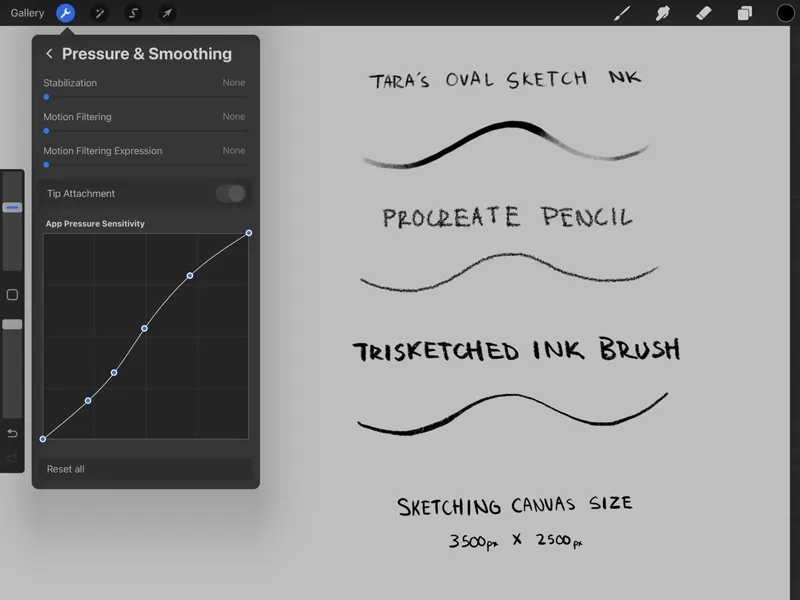
Hey folks so I've been meaning to make an updated version of my Procreate info post from years ago so this is that. Below I'll share a few of my most used brushes and where to get them as well as the best brush packs and their creator and where to get them as well. Also you'll see my pressure settings in Procreate and my typical canvas size for sketching.
These are three of the most used brushes for me in descending order? I think that's right? Anyways these are super fun and versatile and you can get them at these links.
UPDATE: I now use the “lineart” brush from this set by Alexandre Diboine for the bulk of my sketching. It’s just felt real nice lately. May change at some point but wanted to update the post with it. Grab it here.
Procreate Pencil (this is actually a default brush in the app :) )
Outside of those three there are a bunch of other incredible brushes for Procreate but IMO the best packs are made by amazing artist Max Ulichney and you can find them here.
Other than brushes and pressure setting there isn't a ton I do to make things work for me. The only other thing I personally can't work without is a matte screen cover. I've tried a ton and the most popular by far is Paperlike but I can't recommend those personally as they are pricey and the couple times I've tried them they just aren't great. I am currently using these as they were the closest replacement I could find to ones I used to use that are no longer available. They install pretty easy and any left over air bubbles have always just worked their own way out for me.
*Copied from original post*
General Procreate settings/thoughts:
Read the Procreate manual/guide and refer to it if you're stuck. It's written really well and easy to navigate.
Try to keep your stuff organized in the app. I find it can slow down my navigation in the gallery if I have a ton of stuff there. Stack it up!
Gestures are cool but if you don't use them that's fine.
Try to keep in mind the end goal for what you're drawing when creating your canvas.
Use the time lapse playbacks! It's neat to study your workflow and thought process.
Brushes won't make your art better but they can help you achieve a certain effect you may not have been able to before.
Just keep practicing and have fun drawing!