



Procreate stuff
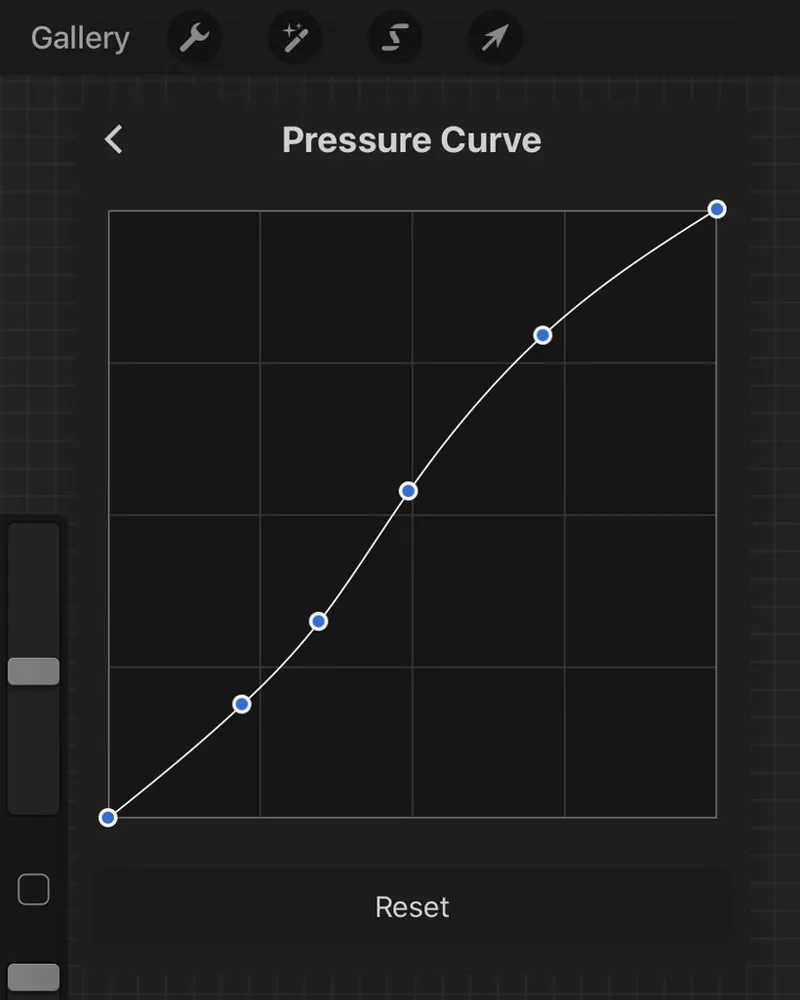
*So this post isn't going to be anything crazy, I just want to show you the brushes I use most often (as requested by folks) and I will do my best to provide links if they aren't default brushes already in the app. I'll also share my pressure curve settings and a couple other small things that can hopefully help some of y'all out.
Alright y'all here we go!
First, the brushes:
I made my own brush grouping in Procreate a while ago and I add to it as I find brushes I really like and use a lot. This isn't the whole group but it's like 90% of it, I couldn't fit it all in one screenshot. From the top -
Clayton Henry's inker (you can grab it here)
TK Manga Inker (me trying to recreate one of my favorite CSP brushes)
Shale Brush (this is a default brush in Procreate)
Tara's Oval sketch NK (This is a Tara brush that was tweaked For Nik Kole, get here)
6B Pencil (this is a default Procreate brush)
Noise Brush (this is a default Procreate brush)
MSP Airbrush (Sorry I legit can't remember where I got this)
Pixel Brush (another brush I made for myself, just a nice and easy 1px brush)
Mono-Line (a brush I made to just get a nice and solid line)
Hard Round (simple hard round I made, pressure sensitive and no fuzzy edges, bleh)
Soft Brush (this is a default Procreate brush)
Not pictured are a set I use a lot too which you can grab here.
Here is my pressure curve:
Equipment:
I am drawing on a 2020 iPad Pro 12.9.
My screen protector
iPad case
Apple Pencil grip/Cover
General Procreate settings/thoughts:
Read the Procreate manual/guide and refer to it if you're stuck. It's written really well and easy to navigate.
Try to keep your stuff organized in the app. I find it can slow down my navigation in the gallery if I have a ton of stuff there. Stack it up!
Gestures are cool but if you don't use them that's fine.
Try to keep in mind the end goal for what you're drawing when creating your canvas.
Use the time lapse playbacks! It's neat to study your workflow and thought process.
Brushes won't make your art better but they can help you achieve a certain effect you may not have been able to before.
Just keep practicing and have fun drawing!
Alright y'all I think that's it? If there's anything you want to know still or something I missed just ask in the comments and I'll try to get that sorted.
- Teeg