

🤖Self Hosting Guide - MyRobot
STEAM USERS: Download the mod below and extract to your MyRobot steam game folder, you now have access to self host features including FREE online/offline alternatives!
This is a workaround for Steams ToS not allowing games to have external services :(
🔠Local Text Generation
You can generate text responses (Offline and FREE) locally without internet connection using any OpenAI-Standard web API front end (Kobold, Oobabooga, LLMStudio, etc.). See Setting up an LLM (Text Generation) below.
📢Local Voice Generation
Patreon/Steam (Online): use the voice tokens from your membership/Steam to create sound for the local text you generate, custom voices are supported.
Self Host: (Offline and FREE): use your own beefy GPU to craete sound, custom voices are supported. See Setting up an LLM (Voice Generation) below.
Player2: (Online and FREE): use the free online service which also has various voice services.
🔠 Guide Self Host Text Generation:
This is for advanced users and I recommend Kobold as it is personally the easiest one to setup. You need a good GPU to do this, I'm on a 2070 Super and text gen is near instant.
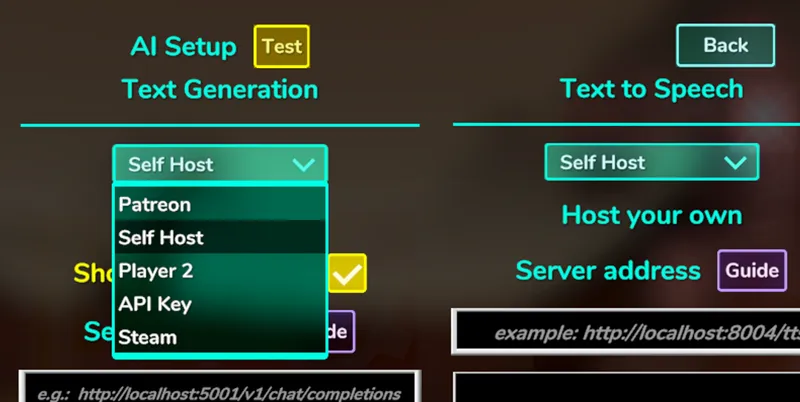
Pause Game -> AI Setup -> Text Generation -> Change dropdown to Self Host
Download https://github.com/LostRuins/koboldcpp/releases/tag/v1.83.1
Download this beginner AI Model (Scroll down to Provided files and download Q3_K_S)
Run koboldcpp_cu12.exe and select the model you downloaded in the Model section
Press the green Launch button
When ready it should automatically open your web browser to the default URL http://localhost:5001/
You can change that URL in settings, copy the URL into MyRobot, see below
Server Address - type in the URL of your frontend WebUI server then press ENTER. If it's red, it's an invalid path, green means it's valid.
Max Tokens - limit the number of tokens to process, more is smarter but slower.
Reduce prompt tokens - MyRobot injects additional messages into your chat history to help the robot visualize and understand things as the game is played, we recommend turning this ON unless you are running a strong and smart LLM model.
Voice Tokens - 1 letter = 1 token. So 150,000 tokens is about 5~8 hours of nonstop talking.
📢 Guide Self Host Voice Generation:
This is for advanced users and I recommend Chatterbox as it is personally the easiest one to setup. You need a good GPU to do this, I'm on a 2070 Super and takes up 4/6 GB VRAM.
Pause Game -> AI Setup -> Text to Speech -> Change dropdown to Self Host
Download https://github.com/devnen/Chatterbox-TTS-Server/releases/tag/v1.0.0
Follow their installation instructions (Docker setup command is easiest)
Once you have it installed you should be able to test it in https://localhost:8004/
Change to Self Host in the TTS in the AI Setup Menu
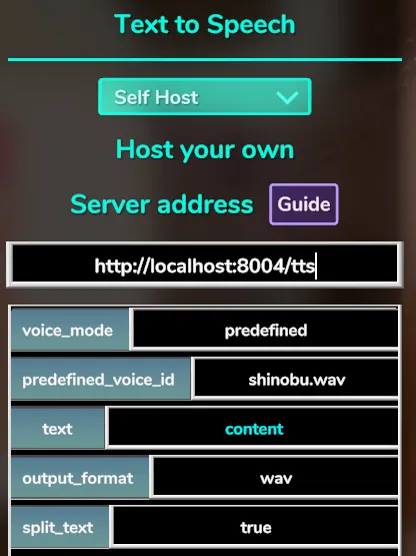
Setup your server address and program the necessary parameters (image below)
Chatterbox API Docs requires the following parameters, the "text" parameter is set to "content" which is a special cyan colored value that replaces itself with the actual text to transcribe.
Custom voices with Chatterbox requires a simple reference .wav file to clone the voice. My Shinobu voice is attached below. Place it in your Chatterbox/voices folder
Changing System Prompt
To change the system prompt for your local LLM to follow, connect your robot with the USB and head jack to the computer and in the Robot Editor, edit the system prompt in Software -> AI -> ChatAbility
Any questions? Comment below:
Comments (19)
Not working anymore, kobolt+airoboros and Omnivoice no result in any of them. Plus Omnivoice asks for something like "text" and after few attempts game spams "Error:Other_Error"...
can we use api providers? like Openrouter.
when i tried using Fireworks.ai it gave me "Error: Other_Error" "Payload Must Contain a 'text' or 'input' field with the text to synthesize"
How do we setup the player2 tts? I dont see anywhere in-game to set it up. I have the program running, but there's no settings to configure in-game.
Just install player2 and set your tts to player2. That’s it, it’s automatic.
Can we configure multiple voices with self hosted TTS? Since we choose a predefined_voice_id for the hosting and everybody then will use that voice.
Not at the moment but real soon!
I installed the mod but the option for self-hosting still doesn't appear
Sorry i JUST fixed it. Try again.
Ollama doesn't seem to work setting the base URI, even though it generally supports OpenAI style API prompting. Not sure if this is a me issue or not yet. But would be glad to see support considering Jetson AGX Orin is a powerhouse for LLMs and project digits will likely become relevant for this later as well, the specific nvidia docker containers being the pain point. Lmk if there's specific debug data I could gather.
Mmhmaybe if you can provide your model, hardware, and info on your setup i can attempt to recreate it. i don't actually know if OLLAMA is supported with the frontend API.
for some reason any llm used with kobold doesn't follow the in game prompt and will break itself within minutes for me. ill ask something or do something like poke it and the llm will start endlessly typing until the game says its lost connection. when i look at the terminal it shows that the llm repeated the same word or sentence over and over or repeated its prompt over and over. and unless i restart the kobold app and the game the llm will repeat the same answer to any question after
You may have to reset the chat history of your robot by brianwashing it with the system prompt Robot Editor.
for some reason i cant make it stop speaking in *actions* even with system prompt
There is now an Agent Leaderboard from Galileo Ai at HuggingFace. This might be useful for function calling. gemini-2.0-flash-001 is better than gpt-4o-2024-11-20, cheaper, and faster. Mistral Nemo is the last one but small and open source .
For some reason when I use KoboldCPP as my local LLM the AI voices blast the fucking volume at 100% ear-rape. Also when I try to use oobabooga it says failed to connect to LLM.
Looking into this now
So if I understand correctly, you couldn't find any local LLM models that can run do function calling? I did some limited testing with Mistral Nemo Instruct and it seems to understand both, function calling and roleplaying a character. Maybe add it as an option in the next build weather function calling is enabled or not?
That is valuable information. Im gonna note that down for later. Thanks! Yes I should definitely check that out.