




Final preview for public 0.3 update
It took a while, but now, I believe, it should be ready, and stable enough, for a public update. Thank you for all the reports, and all the feedback — and, my apologies that I couldn’t reply to some of the messages in time, I’m still going through the remaining ones.
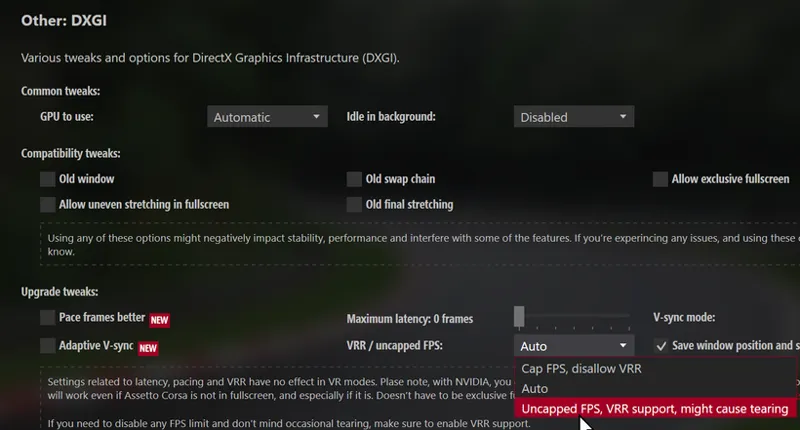
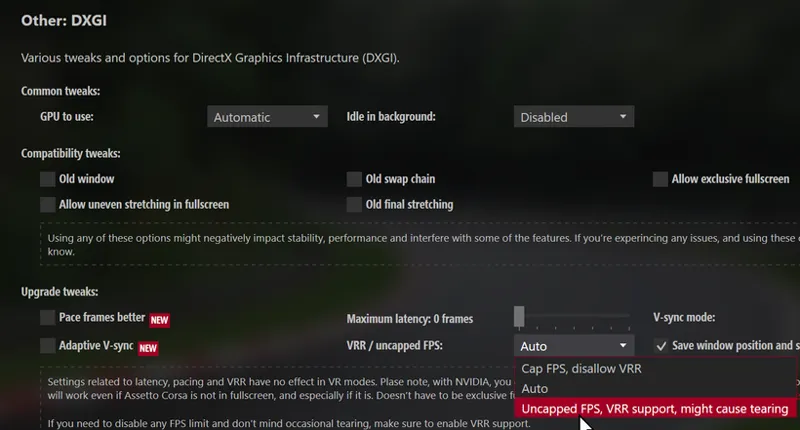
One breaking change in this build is explicit support of Variable Refresh Rate. It turns out that simply forcing it to be active regardless can lead to tearing, and for some it is unacceptable, so now VRR is enabled by default only if your system has G-Sync or FreeSync enabled somewhere, either in GPU or Windows 11 settings. This means that if you want your FPS to be entirely unrestricted, but don’t have G-Sync or FreeSync enabled, you’ll see your frame rate limited by your display refresh rate. To remove that cap, open DXGI Tweaks settings and switch the “VRR / uncapped FPS” option to “Uncapped FPS”.
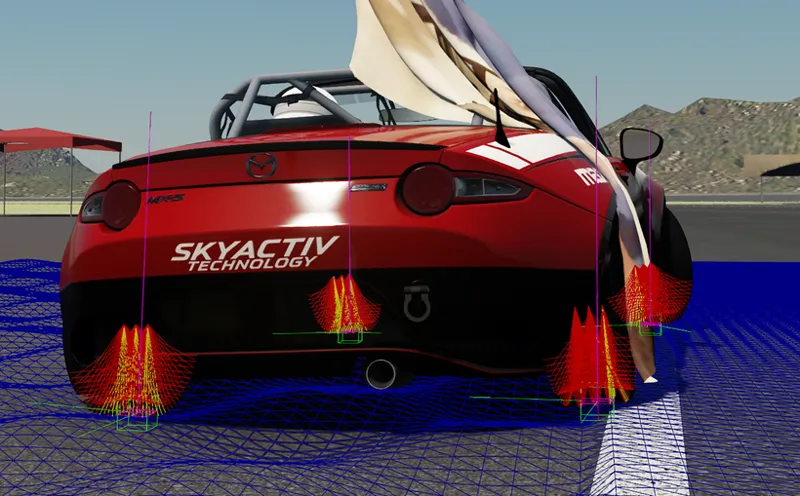
Apart from fixes, there are also some other improvements. The big one is reworked surface noise used for grass, sand or, on some tracks, curbs. With this update, each tyre ray gets its own independent and more precise compute, helping with car stability over road edges when a tyre touches grass or sand, or even curbs on some tracks.
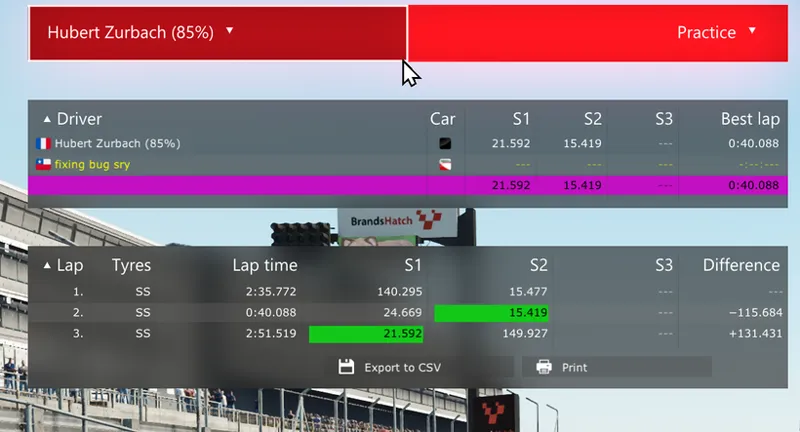
The new main menu also got a few fixes, especially for the Time Table tab. Now, just like the original menu, it allows you to select a car or a session, or even a few of those at once, to compare. Oh, and an old 0.3 bug with leaderboards malfunctioning in replays has also been fixed.
There is also a new built-in weather controller allowing you to choose a few weather types to switch between during the race. Pretty basic at the moment, more options will be added later. For such cases, there were also a lot of fixes for Rain FX, to try and get it to run more smoothly, especially at the start.
For those who like to see the music in-game, tracking of current media has been reworked entirely to be more responsive and provide more information. Also, CSP now can capture the audio as well, for accurate peaks and spectrum. Turns out, it’s even faster than the old way of tracking the system audio peak. And if you’re interested in playing audio (or video) within AC, there is a new experimental option to use FFmpeg instead of Microsoft Media Foundation for playback. It’s pretty raw, but seems promising so far, even if it requires loading a few MBs of libraries on the first launch.
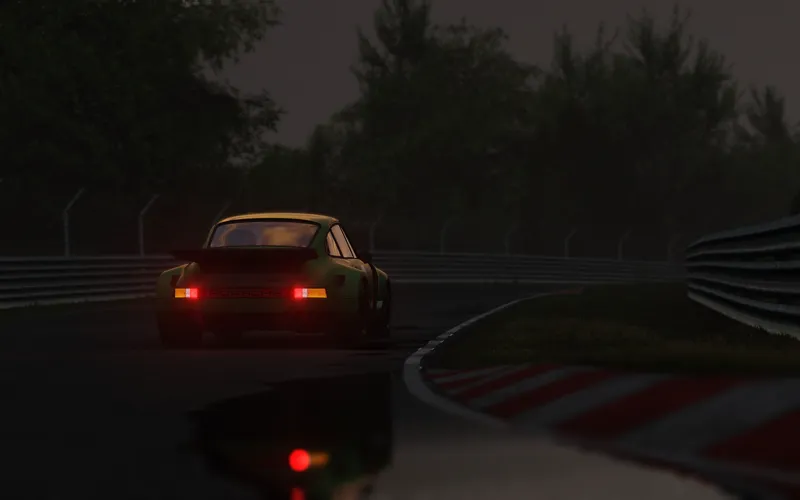
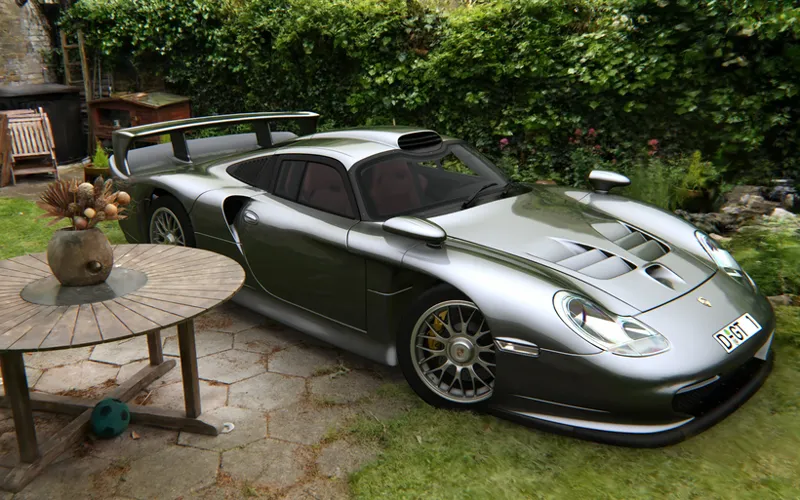
As another strange experiment, I also added support for Gaussian splats showrooms. A strange format for sure, but, in theory, might be the easiest if you want to try and capture some environment to make a showroom out of. Here is one I prepared as an example, based on a scene linked here.
Other notable changes include rewritten car state saving (now includes more, with better precision and stability), fixes to Grass FX, particles, change of the algorithm the physics engine uses for collision detection, stutters reduction, and a lot more. Here is the full list of changes, and here is the new build.
Unless something explodes really badly, this update should, hopefully, be the last preview, and the public 0.3 will be ready in a week. So please, give it a test! It’s been a long journey, but hopefully now it’s almost over. And after the public 0.3 release, I’ll finally be able to get back to working on new features, and more frequent updates.
Comments (110)
when i use rainfx with pure my game kinda soft locks and the cars freeze and the rpms just freeze where they are too but the weather keeps going
I have to ask, I tried your product for first time, installed to CM. The preview CSP was selected but grayed out- message "could not install CSP" and sessions would not load. Is this something you could direct me on how to resolve?
Updating to preview 528 solved the 99 cpu issue for me
Anyone having weird moments where car just freezes in place mid run like if game crashed but can still move the camera? Does not fix itself by restarting the session tho, have to completely turn off the game.
AI really needs some tuning, no race without any overshooting AI or creating crashes with other AI's and blocking the road temporarly. I start with 23 AI's, 90% strength and 50% Aggression. No Race ends with all cars. Pitstops are 1/4 full with retired cars on a 10min. race LOL
the extra buttons no longer work on this patch
hello i'am having problems with 99% CPU playing offline mode with this 520 version and on 445 version i get prob, i get stuck on race start when playing weekend/championship mode
Hello, la physique est devenue une catastrophe, les voiture volent dans les air le CPU brûle. Tu as une solution à proposer sur cette page ou un correctif de mise à jours. ça fait quelque jours que je cherche des solution , je deviens fou. Merci
I can't even launch my game at all after installing the new CSP. Says I'm still in the 0.2.12 version when it says it's enabled 0.3.0-preview520. Anyone else has/had this problem?
i am. i noticed you need direct x. i am installing that now and hopefully that fixes it
I can't play since this update. The game freezes in race mode.
Tried this version, game locks up after a few minutes in any session. ESC still works to menu. When exit session, extended time, error window appears to exit session. Went back to 445, fine. BTW i have Pure 3.50 installed.
no wheel animation with the update in replays over here, drivers head disapeared too and lots of flickering.
hi, with this build, i have virtual miror grey, dark
hey man great work as usual but cars suspension been acting funnier all car feels floaty and the steering wheel centre is kinda broken test was done on different servers among them no hesi, 2-step UK since these are most popular, same behaviour offline and tried 2 steering wheels G29 + Moza R5 hope this gets fixed cause drivin atm is kinda impossible
Hello, I need to report a bug I'm experiencing, which in my case seems to be a softlock. The situation is as follows: this has happened to me on the EK Momiji Line and EK Tsuchisaka sections. During races against the AI, the game freezes at a certain point. I can still rotate the camera with the mouse, switch cameras using F1 and F5, and even use the pause menu, but the game and audio remain frozen. This has only happened with this version; I tested version 445 today and never had this problem. I should also mention that I'm not getting any CPU usage alerts or similar warnings.
my replays work but the car tires are static throughout it (not spinning)
I'm also having the problem with the 99% CPU. And when attempting to play online races via LFM, the game crashes as soon as there is contact with another vehicle.
Is this a stable verison now? I tried it release day and it would crash in vr. Would like to update if stable now
What's happening? Did the 99% Cpu problem got fixed or what?
As others I'm occasionally getting the CPU occupancy 99% but the worse problem is that the race freezes and AC needs to be restarted pretty much in every race. This only happens when racing with AI, in practice mode everything works fine. I have tried preview 361 and currently testing 445 and they don't seem to be affected.
This update has made overall performance worse. My gaming setup is a bit limited, but v030p445 ran better for me than this one, and now more than ever I’m getting the 99% CPU usage warning. I’ve reverted to the previous version whilst I wait for you to release a hotfix or something similar. In any case, thank you for your incredible work in trying to improve this game, which is over a decade old 👍
There is a problem with this version: I cannot start a race because a .dll file is preventing it from launching.
Hi. Anyone had VR problems when going into VR either freezing or crashing back to desktop. Any remedies please. Been like this from 3.0. Having to use 2.12. Many thanks.
Any Update on the 99% CPU Problem? This Version is literally unusable and there is 0 response to this topic
Deleting my post in which I mentioned a problem, and not replying to me... How classy!
Any reason why my "glance back" key is no longer working in chaser cam/third person after installing csp preview? I press my glance back bind and it keeps my camera in place. At first I thought some other bind might be interfering but it is not. Minor issue but would like to find out why its happening and if there is a way to fix.
Since this update, whenever I try to join any server or even play single mode. I can't launch Assetto Corsa because I get the error: "Steam API has failed to initialize."
Do you think it could be possible to get FSR2/3 to work with VR?
Just to add more feedback of issues with this version: excessive cpu usage and issues with mirrors (broken) and some textures (lack of). Thanks!
In both this version and the previous one (0.3.0preview 445), as soon as I click 'GO', my original screen resolution (1920x1200) drops to 1664x921. It’s infuriating! So now i'm in 0.2.11 and I can't have 'rainFX!
Love your work, but this update, my replays are flickering and mirrors are greyed out. also not getting any traffic in the replay during the session going to have to revert to 445 until resolved.
Hello Ilja, I am not sure if you have seen it, but we reported a critical bug in Discord a while ago. The bug report is called "Physics behaves different depending on your computer", and it's simple: since 0.3.0 versions, there are drivers which are 10-20 seconds slower in the rain while other drivers are not affected, and the issue happens offline and online. Please have a look into it, it's a big one for competitive racing. I have also messaged you on Telegram. Thank you!
Huge performance issue. 99% CPU issue. Car preview not working correctly. Thanks but back to 3.3.0 p445. Disappointing update.
DLSS for VR is it planned?
In my replays my cars wheels and mirrors stopped working along with no smoke being created. Happen to anyone else?
same here!
Hello, thanks for your job. Like some players, I ve got the 99 cpu occipancy problem. I 've got a i5 10400f, I 've try to check, uncheck the Hyperthreading fix, the check intel CPU, same problem. With lights-patch-v0.3.0-preview445-full, no problem. I hope you can make a fix. Thanks
cpu 99 plz fix
After upgrading from 0.3.0-preview361, game started to stutter like crazy. Sometimes it was like 1 second freezes :|
is rainFX in it?
did some quick rounds on Oschersleben, but in dry conditions, so everything works fine here, no issues, no stutters, no crashs. Will try different weather later on when I have more time
traffic planner crashes the game all the time. Preview 445 does not.
broke the game bro, i am getting CPU Overload. cant. unplayable
Hi Ilja, I found a small bug with Content Manager. The car selection window becomes huge and I can't resize it vertically anymore (horizontal resizing still works). Sometimes the window also turns black when trying to resize it. I managed to reproduce it: * Version 0.8.2594.39678 works correctly. * After updating to version 0.8.2892.40649, the issue appears. * A fresh Content Manager.exe works fine on the first launch, but after restarting Content Manager the issue comes back. * Disabling automatic updates fixes the problem. I also tested: * deleting `%localappdata%\AcTools Content Manager` * Windows scaling at 100% * DPI override * disabling hardware acceleration My monitor setup: * 2560×1440 (QHD / 2K resolution) * Windows scaling: 100% The issue seems related to the automatic update process or something being saved after the update. Problematic version: 0.8.2892.40649 Thanks for your work!
Amazing
I tried this preview and my points and other leaderboard stuff wont work
is there a way to have smoke and dust without using graphics adjustment tab :) i know it enables a ton of other options and most visual options not only make it tun worse but makes it look worse at same resolution setting , id love to be able to use particles without graphics adjustment enabled .
every version you realsing it keep getting worse my game crashing every 20 min bullshit
I think this preview version have broken the side mirrors on some cars when Real Mirrors are inactive.
@llja is thier anyway you can help me with 520 ever sense ive updated from 3.0 312 ive had nothing but crashes ive started from a clean copy and still crashing every 30 mins or so and even with this new update it happens
texted your telegram so when you can get back to me i sent you a message their
very nice
Can't get it to work. Preview445 is OK for me, but with 520, the AI just stop after a short while. Exiting the game leaves me at the Windows desktop for a while, then an error message comes up saying "Assetto Corsa is taking longer than usual to finish. It could be due to finalizing some data, or simply because something got stuck. Should it try and terminate now?" Pressing yes takes me back to Content Manager. All CSP settings returned to default, with Pure LCS 3.50 running.
Hi, After the update, whenever I complete a run and switch to the replay, the mirrors—regardless of the camera view—are either grey, or the left one shows red with the label "left" and the right one shows green with "right" (and in reverse, both colors and labels appear). Driver doesnt have head and flickering is massive.. Any idea what might be causing this? Thanks in advance for the reply 🫶
when dragging the zip into cm it installs the patch... then it shows, that settings are missing and it is reinstalling my current version 0.3.0-preview212 ... i cannot find a way around that
As soon as i put the new csp on i had a option to update cm which i did🤷🏾♂️ i didnt know if that was bad or not but the servers crash after a good 20 min and says csp and when i play no hesi the points dont move on the new update, so i then played single in brooklyn park just drifting and my replay looks like 2 people fighting to drive my car with at least 4 hands on the steering each turn😅HELP‼️‼️
u gotta downgrade sadly, use a version like 445
cpu occupancy on vr too !
Hello! On the track Kyalami 2016 there are some texture issues. With csp 2.11 there is not that Problem.
The game is lagging, and the steering wheel stops responding to the car completely. I'm going back to the previous version.
I reinstalled and still get 99 cpu warning everywhere, going back to old update until sorted
All my tracks have 99 cpu occupancy my frames locked to 90
CPU Occupancy warnings/99% lots of lag trying to do a race with 30 cars that was not an issue before (running AMD 9800X3D and MSI 5090 so its not hardware!)
Hi Ilja. Can you please fix the VR loading as it crashes or freezes as soon as you enter VR. to been like this since 3.0. Having to us 2.12 to get it to work. Hope you can do a quick update please.
faq yeah
Terrible stutter with this build, the render stats show constant late frames and erratic high use in the red Sim trace, over 500 late frames in a single lap with 50-60% Sim. Returned to Preview445 and back to fluid motion with 0 late frames and 15% Sim in render stats.
Something weird is happening, you are racing normally and randomly the car suddenly stops in place, sound is working, the game is working (everything, even you can also put the replay and watch it, open the main menu, etc), then while closing/ending the session going to the CM it takes a while and a message saying to force it or wait appears. I see the CPU (R9 3900X 12 core) going from 15% to 70%, GPU (RTX 5080) usage at 99%, which is kinda normal. So not sure what is happening. Going to revert to previous patch and see what happens. EDIT: Reverting to 445 solved both issues.
Like a few others on here I'm getting CPU warnings and my FPS that was locked at 90fps is now 75avg
The game keeps crashing even with the lowest settings. This only happens with the latest version. I think there's a problem.
car lights have issues on all 0.3.0 versions, many tracks have 99 cpu occupancy
Same feedback. I mitigated the issue by using: pure Gamma, economic mode, no Yebis, and Pure pp. No more CPU occupancy, and the blown-out lights are less noticeable.
Please, have a look into fixing the "New smoke and dust" settings, so you can't disable It, because It gives an unfair advantage online when Racing in the rain, as you don't get any water spray. Please focus in online equal conditions as much as possible. At the moment you can disable the water spray and wáter drops and have the same visibility as dry and that's just unfair
Did you take a look into the issue of physics behaving different depending on your computer in rain conditions? We reported this a while ago and its a Big one to fix or the game is dead for online
I'll work on the spray issue, thank you.
this latest one broke something, my g29 is now very unresponsive compared to the last preview, im not too technically inclined to understand why
going back to lights-patch-v0.3.0-preview445-full fixed it, so idk what to say to be of more help
Any vr Updates ?
Hi all, having lots of issues with street lights flickering. Anyone ideas? E.g. https://youtu.be/bs0GjZrKBaE
hi, i'm having some issues cause any time that i try open the game to play it goes straight to a crash, but with other version it doesn't do that .
The work you're putting out here is just so good—it's worth saying that.... So far, I haven't encountered any problems or bugs; I've only noticed benefits. On System 1—a full AMD setup—I'm getting about 20–40 more FPS, and things look much better and sharper than before. On System 2—Nvidia GPU with an AMD CPU—the update fixed minor bugs, and it runs more smoothly. Thanks for the work and time you're investing in this.
Hi, thanks for your work. Is there any way to add FSR 4.1, please?
You can use Optiscaler as your upscaler and it will inject FSR4 as long as you have Adrenaline running in the background.
Since this update I'm unable to load new replays made from online sessions. Old ones work fine and new ones from offline sessions work fine as well. I've updated both CSP and CM
please HELP! same issue replays are crashing
Hi. Checking it out, it's in a pretty good state so thanks for your hard work. I have however noticed a problem with smart shadows when viewing replays. At the Kunos version of Barcelona using TV camera 1, the grandstand at the final corner, the shadows over the seats fade on and off and then when it switches to the next angle, a static shot of the start straight with the garages on the left, their is a shadow the looks like it's extending and retracting across the pit boxes. If I reduce splits Lambada, this reduces the effect, but it's still there. I can't say I know when this bug appeared, but this is something I noticed recently when on 0.3.0 preview 445 and now in 520, but if I downgrade to 0.2.11, the effect doesn't happen the spots that flicker under 0.3 they are under a constant dark shadow. Thanks again and I hope this helps with getting things perfect for a non preview release.
I am getting 99% CPU occupancy warning on tracks I never use to and when the warning pops up my wheel FFB cuts out and the wheel goes haywire.
Same here
Great to see another update, are the surface noise changes for extended physics only, or across the board?
If anyone experiences crashing after CM update like i did. Just go back to previous csp preview. Redownload the new csp again and reinstall the latest csp update 520 or whatever the number is.
I installed the latest csp first, then updated cm, then the game crashes. So i went back to the previous csp, then re downloaded the latest csp again and then installed/ Now it works fine.
Offline races now seem to start on some older modded maps BUT still having the issue where the grid will only have 10 AI cars max. The rest of the grid will go into the pits and stay there. I turned off the AI extension and seems to solve it. Anything else that would be triggering that?
Just upgraded CM to 0.8.2892.40649 (I'm on Linux) and now the car selection window is a bit broken. Can't see the OK/Cancel buttons. Anywhere I can report it?
I’ll check it, thanks!
Thanks for all the hard work as usual, installed latest version, but previews generated by using CSP for final preview render created weird reflections. Please have a look when you can.
Sure, will do, thanks. Maybe you could DM me before/after screenshots on Telegram, @x4fab?
Hello, I play in VR, and my CPU usage has been at 99% since this update. Can you help me? Thanks.
Hello, could you please DM me on Telegram? @x4fab
You sir are doing a FANTASTIC job! Thank you. Incredible.
Hey, Ilja. Love your work. Can you please review how the water spray cars leave on wet surfaces work? I couldn't help to notice, at least on my end (I use Pure), even if the tarmac is not even wet yet cars start to leave a heavy cloud of water spray which is very unrealistic. Is there a way to delay it or customize it? A slider of some sort to set the max amount of spray would be a cool addition too for those whom want to experience the rain effects, but don't want the water spray to be too intrusive. Cheers!
Turning the road and ambient temperature up helps a bit but yes needs looking at 👍
Amazing job as always
Merci
Please make the smoke more realistic 🙏
I’ll work on it soon, sure
ah looks like im staying up tonight! I love your work so much , becuase of you I am devolping something , I'd for you look at.on my page. Any updates on ai, and side.ini within the spline ?
anyone tested VR fps impact?
my vr keeps crashing after a few minutes no settings changed but updated csp
Wow! Day of tests )
🔥🔥🔥🔥