

Kit Switcher Plugin is out: pick any 3D kit before kick-off
Kit Switcher is out, and it's free.
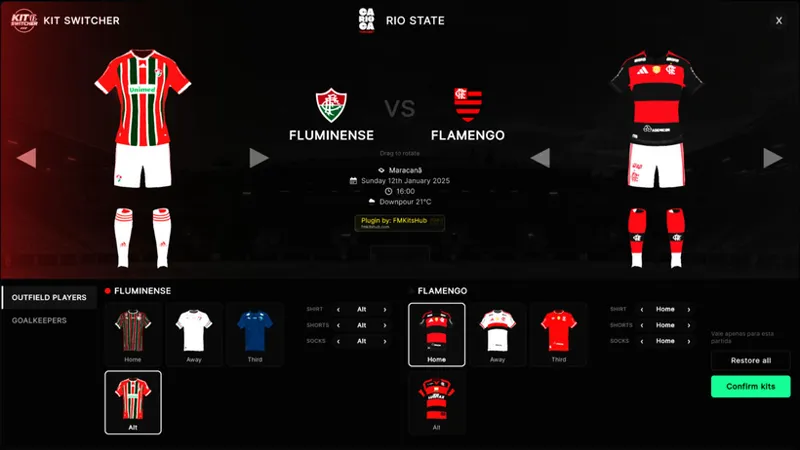
Before kick-off in FM26, choose the kit each team wears: Home, Away, Third, your Alt kits, any mix of pieces, goalkeepers included. One screen, live 3D preview.
📺
What it does
- 👕 Alt kits and every 3D kit in the club folder show up as cards. One click picks it.
- 🔀 Mix shirt, shorts and socks separately. The window flags custom combinations.
- 🧤 Goalkeeper kits in their own tab, same piece-by-piece choice.
- 🔄 Live 3D preview of both teams. Drag to rotate, then confirm.
- 🏟️ Works for any club. No 3D kit folder? It builds kits from the club colours, in memory, writing nothing to your files.
- ⚡ Only for that match.
ALT kits in Kit Switcher 👕
Got an extra 3D kit for your club? It becomes a 4th option next to Home, Away and Third.
How to add it:
Open Documents\Sports Interactive\Football Manager 26\graphics\Kits
Go to the club’s folder
Drop the extra kit inside a subfolder named alt
Open FM → Team News → Kit Switcher. It shows up as an ALT card.
For goalkeepers, use the GK folder. The pick only counts for that match.
How to install
1. Install BepInEx 6 (Unity IL2CPP, x64) in the FM26 folder and open the game once.
2. Copy the `FMKitSwitcher` folder to `BepInEx\plugins`.
3. Open a match and click Kit Switcher.
Needs FM26 on Windows and your 3D kits in the graphics folder.
Not showing up? Check the folder is inside `BepInEx\plugins`, and send me `BepInEx\LogOutput.log`.
This is v0.1.0, the first release. Tell me in the comments what you tried and what you want next. Thank you! ⚽
— FM Kits Hub
❤️ Help keep FMKitsHub free: buymeacoffee.com/fmkitshubb
Comments (11)
Is is possible you can add a video tutorial on how to install it and add it to the game ive followed the intstructions and i hasnt worked
Here a video: https://www.youtube.com/watch?v=qZ2s_M6p20E
Does this work alongside your FM Kits Suite?
Yes
what about on mac os can i install it?
Yes
Oi Tudo bem. Como fazer para os kits alternativos também aparecer no switcher. Tenho 2 kits alternativos salvos na pasta, além do home, away e third, mas nenhum deles aparece no switcher. Tenho que fazer alguma configuração adicional?
Eles tem que estar na pasta do clube, e dentro da pasta do clube voce cria uma pasta "alt" e la dentro voce coloca os kits
muito bom, encontrei alguns bugs, onde reporto?
Pode me enviar via no x https://x.com/fmkitshub ou via e-mail contact@fmkitshub.com, de preferência com o log após o erro para facilitar
fantastic !!