

🎨 Automatic kit colour updates are LIVE
Ever downloaded a 3D kit and the numbers or name font came out in the wrong colours?
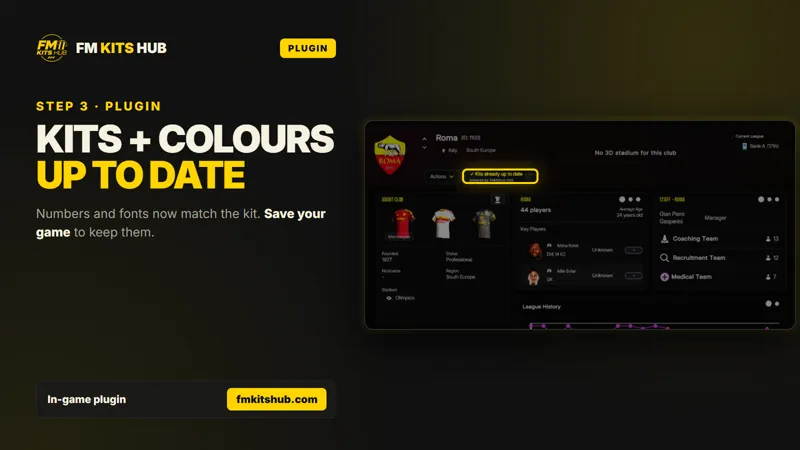
The FM Kits Hub App and In-game Plugin now fix that automatically. Shirt, shorts, socks, numbers, 2D icon and stripes all get the right in-game colours, taken from our online colour database. The database is updated with every new kit we release.
🔌 In-game plugin, fully automatic
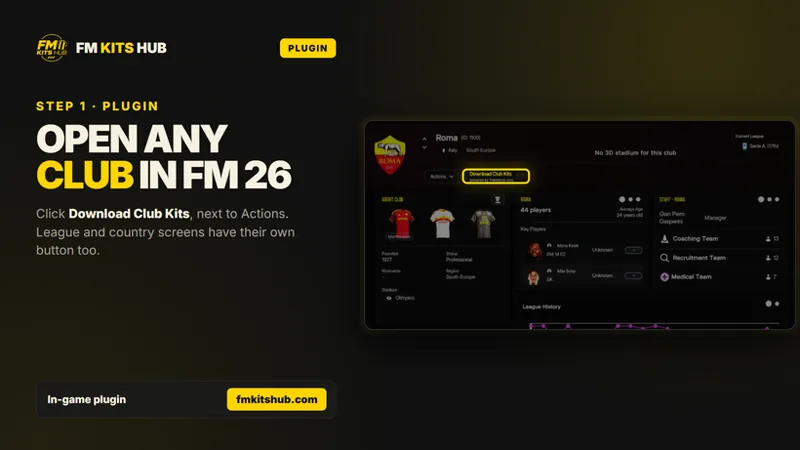
Open FM 26 and go to any club, league or country screen.
Click Download Club Kits (or League / Country Kits), next to “Actions”.
Pick 3D Kits, 2D Kits or 3D and 2D.
The plugin downloads the kits and applies their colours automatically. There’s nothing else to click.
Save your game to keep the changes.
💻 FM Kits Hub app, one click
Open FM 26 and load your save. Wait until it’s on the main screen.
In the app, click the new Kit colors update button at the bottom.
Click Update colours and keep the game open until it finishes.
You’ll see something like “8966 kits from 827 clubs updated”. Now save your game ✅
The app works without the plugin. If you want the easiest route, though, the plugin does all of this for you every time you download kits.
📁 Kits now split into Men’s and Women’s folders
Kit folders are now separated into Men’s and Women’s, so each team’s kits stay organised. You don’t need to do anything: the next time you open the App or use the Plugin, your existing kits are moved into the new folders automatically. Everything stays installed and keeps working in game.
Already using the App or the Plugin?
The update is already working for you. Just update and enjoy.
New here?
Download both for free at 👉 https://fmkitshub.com/
Plugin page 👉 https://fmkitshub.com/tools/in-game-plugin
Thank you for supporting FM Kits Hub. Your support keeps new kits and features coming 💛
Comments (1)
Another brilliant addition, thank you 👏