
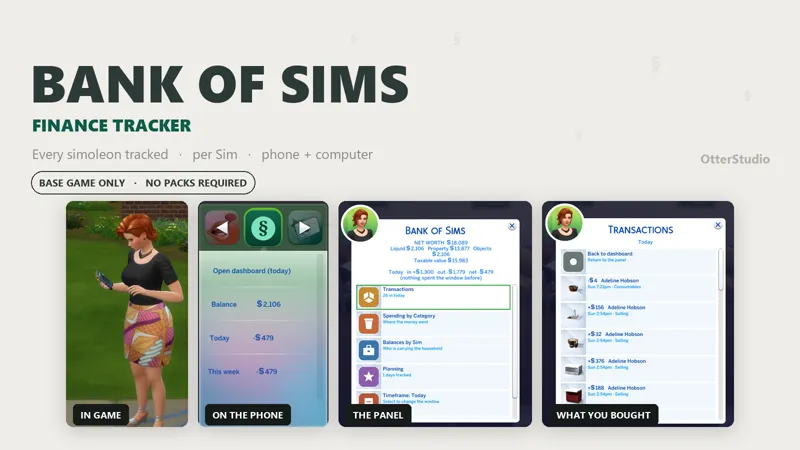
💰 Bank of Sims | Preview
Know where the money actually goes. Every simoleon in and out, who spent it, and what they bought on your Sim's phone and on any computer.
Base game compatible. No packs, no XML Injector, no other mods needed.
ON THE PHONE
An app whose rows are the numbers:
Open dashboard
Balance — §12,340
Today — +§340
This week — −§1,280
THE PANEL
One entry on any computer. Your Sim walks over and sits down.
Net worth — liquid, property, objects, and the taxable value bills use
Transactions — every movement, showing the item bought or sold
Spending by Category — drills into each one
Balances by Sim — drills into each Sim
Planning — budgets, savings goal, net worth history
Export to CSV
Today, 7 days, 30 days, All time. It remembers which.
EIGHT CATEGORIES
Career, Freelance & Gigs, Bills, Build/Buy, Consumables, Selling, Rewards, Other.
WHAT IT TELLS YOU
Payday — "Mortimer got paid §1,240. Balance §12,340. Earned this week §3,100"
Weekly statement — every Sunday, against the week before
Bill forecast — "Next bill about §1,900, in 2 days", and says if you're short
Budget alerts — "Bella has spent §2,400 this week, past a §2,000 cap"
Milestones — §10k, §25k, §50k, §100k, §250k, §500k, §1M
EVERY SIM HAS A LEDGER
The Sims 4 has one household pot, so Bank of Sims keeps its own books alongside it: a ledger per Sim plus a Joint one, always adding up to your funds.
Teens and older hold an account; younger Sims report under Joint until they age up, then their whole history appears under their own name.
LIFE EVENTS
Marriage — combine finances or keep them separate. Changeable later
Divorce — split 50/50, or by contribution
Death — their balance rolls into Joint
Moving out — their ledger is archived to its own CSV
WHAT IT DOESN'T DO
It never blocks a purchase, moves your money, or changes prices. Budgets warn you and let the spend through. Uninstall it and your funds are exactly where the game left them.
GOOD TO KNOW
Tracking starts at install, the game keeps no ledger of its own to backfill from
Only the household you're playing is tracked
Item pictures are matched to transactions, so a row occasionally shows a category badge instead.
INSTALL
Drop both files into your Mods folder (one sub-folder deep is fine):
OtterStudio_BankOfSims.package
OtterStudio_BankOfSims.ts4script
Then turn on Script Mods:
Game Options → Other → tick "Enable Custom Content and Mods"
AND "Script Mods Allowed" → restart the game
If you catch a bug, tell me and I'll get it patched.
Download
Comments (2)
When will this is public?
When will it be released?