




START HERE — Install RealCam Hub + iOS App for Assetto Corsa, BeamNG.drive & Forza Horizon 6
Hi everyone!
One Hub. One iPhone. Complete camera control.
RealCam Hub transforms your iPhone into a live cinematic camera controller for Assetto Corsa and BeamNG.drive.
Move the camera naturally, frame your shots in real time, see exactly what the camera sees through Live View, and record your footage directly from the Hub.
One Windows application manages everything:
Patreon access;
game companions;
iPhone connection;
live camera control;
recording and clip management;
updates and future game support.
Install it once, connect your iPhone, choose your game and start creating cinematic footage.
Please take a moment to read this post before installing
RealCam Hub 1.0.8 is the current Patreon beta release for Windows.
The RealCam iOS app is distributed as a private TestFlight beta.
The new RealCam iOS app requires iOS 26 or later.
The supported release pair is:
RealCam Hub 1.0.8
RealCam iOS 1.0.7
Get RealCam Hub and request for iOS TestFlight
The Windows HUB installer and iOS TestFlight request are available to paid Patreon members:
➡️ REALCAM HUB DOWNLOAD & TESTFLIGHT ACCESS — [CLICK HERE]
What you need
Windows 10 or Windows 11, 64-bit.
An iPhone running iOS 26 or later.
The Apple TestFlight app.
Assetto Corsa with Content Manager and Custom Shaders Patch, or BeamNG.drive.
Forza Horizon 6 on PC (Microsoft Store / Xbox Game Pass and Steam editions are supported)
Your PC and iPhone connected to the same private local network.
An active supported Patreon membership.
You only need one of the supported games. You do not need to own both.
Get the Windows RealCam Hub
REALCAM HUB DOWNLOAD & TESTFLIGHT ACCESS — [CLICK HERE]
Download the official RealCam Hub Setup.
Run the Setup and select Install.
Accept the single administrator prompt if Windows needs to configure private-network discovery.
Restart Windows only if the Setup specifically asks you to.
Open RealCam Hub from the Windows Start menu.
Open Account and select Continue with Patreon.
Complete the Patreon sign-in in your browser.
Wait until the Hub displays Premium Member and Access Active.
RealCam Hub detects supported game locations automatically. If a custom installation is not detected, the game path can be selected from the Games page.
Get the iPhone app
REALCAM HUB DOWNLOAD & TESTFLIGHT ACCESS — [CLICK HERE]
Paid members can request access to the RealCam iOS beta from the Download & TestFlight Access post.
Use the Apple Account email connected to TestFlight on your iPhone. Access requests are reviewed manually, so the invitation may not be immediate (24hrs max).
Please submit the request only once and never publish your email address in the Patreon comments.
Once approved:
Open the TestFlight invitation email from Apple.
Install TestFlight from the App Store if necessary.
Accept the invitation and install RealCam 1.0.0, build 48.
Connect the iPhone and PC to the same private local network.
Open RealCam Hub and the RealCam iOS app.
Complete the Patreon sign-in in your browser.
First connection — First Live View
Once the Patreon sign-in is complete on both RealCam Hub and the RealCam iOS app, continue with the first connection.
Connect the PC and iPhone to the same private local network.
Open RealCam Hub.
Open the RealCam iOS app.
Tap Connect on the first launch.
Select the detected RealCam Hub PC connected to the same network.
Keep the phone in a comfortable neutral position and use Reset Pose when needed.
After this first selection, the iPhone should remain connected to the Hub.
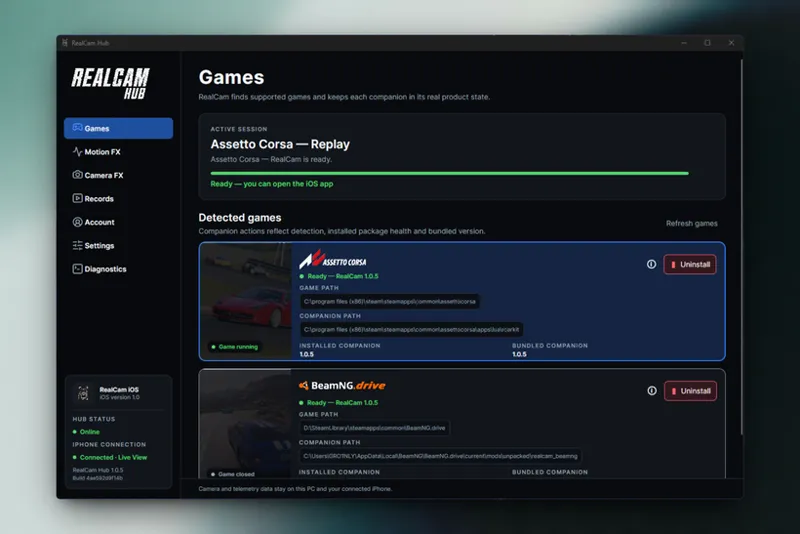
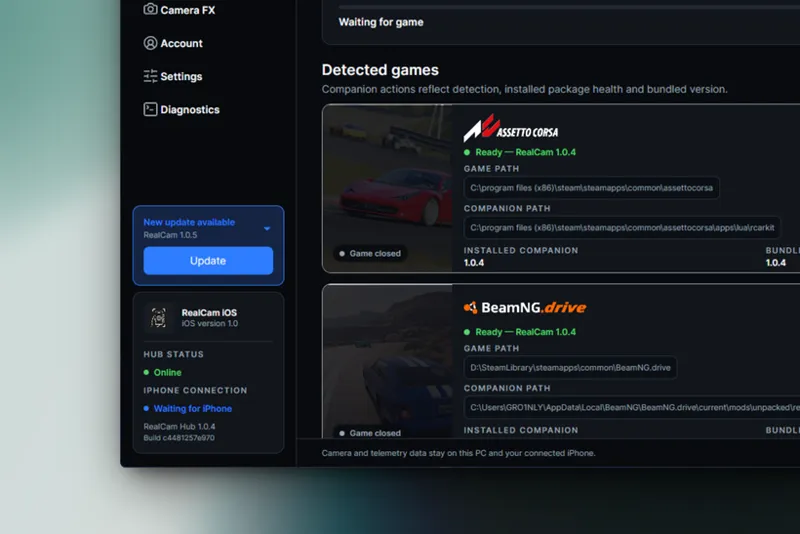
Before launching a game, wait until both indicators in the lower-left corner of RealCam Hub are green:
Hub Status: Online
iPhone Connection: Connected
When no compatible game is running, the iPhone displays Waiting for compatible game.
Once both indicators are green, launch Assetto Corsa or BeamNG.drive and wait for the drive session session to start.
Live View and the camera controls should activate automatically when the compatible game session is ready.
Forza Horizon 6
Open RealCam Hub on your PC.
Open RealCam on your iPhone.
Launch Forza Horizon 6.
Continue to the garage.
Select Drive.
Keep the iPhone upright and approximately neutral while the camera initializes.
Wait for Live View and camera control to connect automatically.
You can then switch between Car View and Freecam directly from the iPhone.
Both the Microsoft Store / Xbox Game Pass edition and the Steam edition are supported.
If you close the iOS app or ARKit tracking is interrupted, RealCam releases the camera and restores normal game control. Reopen the app or resume tracking to reconnect.
FORZA VIDEO TUTORIAL — COMING SOON
A dedicated Forza Horizon 6 installation and camera tutorial will be published soon.
The current START HERE video can already be used to install RealCam Hub, request TestFlight access and connect the iPhone. These first steps are the same for all supported games.
Assetto Corsa
Assetto Corsa requires Content Manager and Custom Shaders Patch.
After installing the Assetto Corsa companion from RealCam Hub, launch Assetto Corsa and open the RealCam Lua app once from the in-game app sidebar. This first-time step is required before using the iPhone controls.
Make sure the Assetto Corsa card displays Ready in RealCam Hub and that both connection indicators are green, then launch the game normally.
With the iPhone already connected, Live View and the available Assetto Corsa camera controls will appear automatically.
BeamNG.drive
Make sure the BeamNG.drive card displays Ready and that both connection indicators are green before starting the game.
The same iPhone application and the same RealCam Hub installation work with both games.
Switching replays or game sessions
After closing a replay or game session, wait a few seconds before launching another one.
Allow RealCam Hub to return to its ready state before starting the next replay or session. Because the iOS application is still in TestFlight beta, transitions can occasionally require a few seconds of patience.
Once the session is connected, Live View and camera controls should work normally.
Automatic updates
RealCam Hub checks the Stable channel automatically.
When an update is available, install it from the Account page. The Hub closes, installs the verified update, restarts and synchronizes the required game companions.
Screenshots (Windows Hub + iOS App)
Quick troubleshooting
Patreon opens the wrong account
Return to the Hub and use the alternate-account sign-in option.
A game card does not display Ready
Use Install, Update or Repair as indicated by the card.
The iPhone cannot find the Hub
Confirm that both devices are connected to the same private local network and that RealCam is allowed through the Windows private-network prompt.
The connection is lost after changing a replay or session
Follow these steps in order:
Close the current replay or game session.
Wait for RealCam Hub to return to its ready state.
Reopen the RealCam iOS app if it does not reconnect automatically.
Wait until both indicators in the Hub are green before launching another session.
Assetto Corsa does not switch to Passenger
From the RealCam iOS app:
Switch Plugin to Off.
Wait a moment.
Switch Plugin back to On.
The camera should return to Passenger.
BeamNG.drive Live View is unavailable
Switch BeamNG.drive to borderless or windowed mode.
Additional help
Open Diagnostics in RealCam Hub and generate a support report.
Send it privately with:
the game being used;
your RealCam Hub version;
your RealCam iOS build;
the steps needed to reproduce the problem.
Never send account codes, browser tokens or private credentials.
Ready to get started?
The complete Windows download and private iOS TestFlight request are available here:
➡️ REALCAM HUB DOWNLOAD & TESTFLIGHT ACCESS — [CLICK HERE]
Thank you for your support
A huge thank you to everyone supporting RealCam.
I’m building and improving the project alongside my regular job, and I try to put as much of my free time as possible into RealCam Hub, the iOS app, new features and future game support.
Your support, feedback and patience genuinely help me keep pushing RealCam further.
Thank you for being part of the journey.
See you on track!
Grow1nly
Comments (7)
No Android support?
I still haven’t received a email yet and it’s been over 24 hours since purchasing the Patreon ?
Hey mate! You can send me the Apple email address you used either by private message here on Patreon or on Instagram. I think there may have been a typo or an issue with the email, because all my TestFlight requests have been accepted. So if the correct address was submitted, you should normally have received the official Apple TestFlight invitation. Also check your spam/junk folder just in case. If there’s still nothing, send me your email privately and I’ll check what’s going on 👍
went to download it but it says virus detected
No stress! The app isn’t digitally signed yet, so Windows or some antivirus software may flag it as suspicious. You can upload the installer to VirusTotal to check it—it’s a false positive, there’s no virus in RealCam 👍
so have you stopped updates for android or will this also work with an android phone
Hey! I haven’t stopped Android updates 👍 For now, the new RealCam Hub only works with the iOS app because I’ve had more time to properly develop and stabilize the Hub + iOS side first. I’m already working on the Android app, but it still needs quite a bit of work before I can release something stable. It could take a few days, a few weeks, or potentially longer depending on the issues I run into. Android is definitely not abandoned though 🙌