
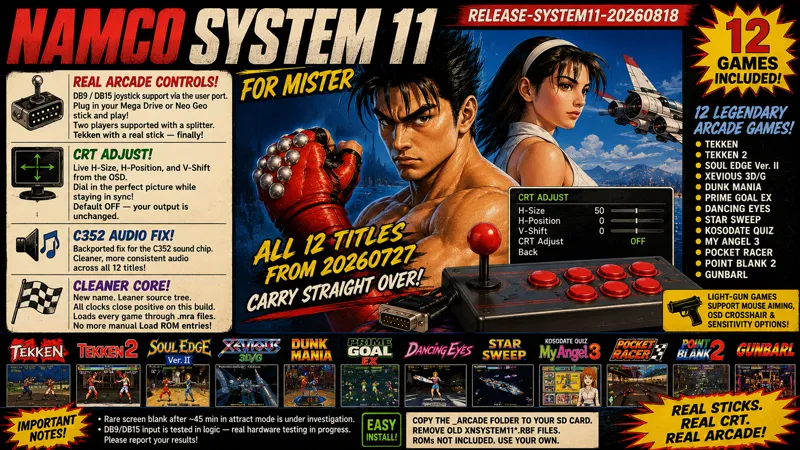
Namco System 11 - MiSTer 20260818
Download at the bottom.
The Namco System 11 core is back with its first release since July, bringing several meaningful improvements for players using original-style arcade controls and CRT displays.
This release adds DB9/DB15 joystick support through the MiSTer user port, live CRT geometry adjustment directly from the OSD, improvements to the C352 audio implementation, and a cleaner, more streamlined core and repository structure.
All 12 titles supported by the 20260727 release carry forward.
REAL ARCADE CONTROLS + CRT ADJUST
DB9 / DB15 Joystick Support
System 11 can now be played using DB9 and DB15 controllers connected directly through the MiSTer user port.
Supported configurations include:
Mega Drive / Genesis 3-button and 6-button controllers
Neo Geo / Supergun-style DB15 arcade sticks
Two-player operation through an Antonio Villena user-port splitter
Connect your controller, select UserIO Joystick in the OSD, and play.
A couple of important technical notes:
In-game controls work with the standard MiSTer firmware. However, navigating the MiSTer OSD directly from a DB9 controller requires the MiSTer-DB9 fork's MiSTer binary and menu.rbf. With that configuration, Start+C opens the menu.
This implementation also uses the eighth user-port line previously associated with the uncommon secondary SPI-SD add-on. As a result, that add-on is no longer supported by this core.
The normal MiSTer SD-card slot and USB functionality are completely unaffected.
CRT Adjust
CRT users can now adjust analog picture geometry directly from the OSD:
H-Size
H-Position
V-Shift
Adjustments happen live, allowing the picture to be fitted to the display without repeatedly reaching for chassis geometry controls.
Based on rmonic79's MiSTer-CRT-Adjust, the implementation moves and stretches the visible picture while preserving native synchronization timing. The CRT therefore remains locked while adjustments are made.
CRT Adjust defaults to Off.
With it disabled, video output remains unchanged from previous releases, including HDMI output.
AUDIO — C352 IMPROVEMENTS ACROSS THE CATALOG
A subtle issue in the C352 sound-chip implementation has also been addressed.
A voice-parameter path previously synthesized into transparent latches whose behavior could vary between builds. The issue was identified while working on the System 12 core and has now been backported to System 11.
The merge path is now fully registered, reducing the potential for unwanted static or inconsistencies in the audio mix across all 12 supported titles.
PAUSE SCREEN — REFRESHED
The pause and credits overlay now uses the same renderer as the other cores in the project.
The current supporter list is displayed with color-coded tiers:
Gold — Hall of Fame
Cyan — High Score
Green — Insert Coin
If you're on that list, your name is now appearing on real MiSTer hardware across these cores.
Thank you for helping make continued development possible.
A CLEANER CORE — NEW NAME, LEANER TREE
This release also includes substantial cleanup behind the scenes.
Simplified Core Naming
The core is now simply:
Arcade-SYSTEM11_20260818.rbf
All included MRA files now reference:
<rbf>SYSTEM11</rbf>
The temporary XN prefix has been retired.
Important Migration Note
If you're upgrading from an earlier build:
Delete old XNSYSTEM11*.rbf files from _Arcade/cores/ and use the MRA files supplied with this release.
Older MRA files reference the retired core name and should not be retained.
Repository Cleanup
A dozen inherited PlayStation-core source files that were never part of the System 11 build have been removed, along with a collection of obsolete upstream release bitstreams.
The release package has also moved to the standard MiSTer repository layout:
_Arcade/
The folder can now be copied directly onto your MiSTer SD card, while also laying the groundwork for a future official update path.
The unnecessary manual Load ROM entries have also been removed from the OSD. Games continue to load through their MRA files as intended.
Timing Closure
Every core clock reports positive timing closure in this build.
It isn't the flashiest release note, but it represents the cleanest timing report in the history of the System 11 core — exactly where it should be.
12 PLAYABLE TITLES
This release supports:
Tekken
Tekken 2
Soul Edge Ver. II
Xevious 3D/G
Dunk Mania
Prime Goal EX
Dancing Eyes
Star Sweep
Kosodate Quiz My Angel 3
Pocket Racer
Point Blank 2
Gunbarl
One featured MRA for each title is placed at the top level of _Arcade, while regional versions are organized by game under:
Arcade/alternatives/
Light-gun titles retain their existing:
Mouse aiming
OSD crosshair
Sensitivity controls
EEPROM settings continue to save normally to the MiSTer SD card.
Family Bowl remains outside the scope of the core.
DB9 / DB15 Hardware Testing
The new DB9/DB15 input path has passed its electrical and logic checks, but a complete physical splitter-and-arcade-stick test session is still pending.
If you use this configuration, please share your results in the comments. Real-world hardware reports are particularly useful for validating this feature across different setups.
INSTALLATION
Copy the release's Arcade folder directly onto the Arcade folder of your MiSTer SD card.
The core will be installed as:
Arcade/cores/Arcade-SYSTEM1120260818.rbf
The included MRA files will be placed alongside your existing arcade titles.
Remove any old XNSYSTEM11* cores and MRA files. They reference the retired core name and should not be mixed with this release.
Supply your own compatible ROM ZIP files under:
games/mame/
No ROMs are included with this project or its releases.
BUILD INFORMATION
Credits
Special thanks for this release to:
rmonic79 & Andrea Bogazzi — MiSTer-CRT-Adjust
MiSTer-DB9 Project
Aitor Pelaez (NeuroRulez)
Victor Trucco
Fernando Mosquera
Timothy Redaelli
Antonio Villena — user-port splitter hardware
And, as always, thank you to everyone supporting the project.
Your support helps keep development, testing, hardware research, and new releases moving forward.
Disclaimer
All product names, company names, project names, platform names, hardware names, game titles, logos, trademarks, registered trademarks, copyrighted materials, source code, and other intellectual property referenced in this post are the property of their respective owners.
This includes, but is not limited to, MiSTer, MiSTer FPGA, MiSTerFPGA, MiSTer-devel, PSX_MiSTer, Analogue, Analogue Pocket, openFPGA, MAME, The MAME Project, GitHub, Intel, Altera, Sony, Sony Computer Entertainment, Sony Interactive Entertainment, PlayStation, Namco, Namco Limited, Namco Hometek, Bandai Namco Entertainment, Bandai Namco Holdings, Namco System 11, Axela, MOSS, Mitsubishi Electric, and Renesas Electronics.
Referenced game titles include Tekken, Tekken Ver.B, Tekken Ver.C, Tekken 2, Tekken 2 Ver.B, Soul Edge, Soul Edge Ver. II, Soul Edge Ver. III, Dunk Mania, Xevious 3D/G, Prime Goal EX, Dancing Eyes, Pocket Racer, Family Bowl, Star Sweep, Kosodate Quiz My Angel 3, Point Blank 2, Gun Barl, and Point Blank 3. All associated characters, artwork, audio, game data, regional versions, revisions, prototypes, undumped and unreleased builds, hardware designs, software, and derivative works remain the intellectual property of their respective rights holders.
References to SYSTEM11 MOTHER PCB, SYSTEM11 MOTHER(B) PCB, SYSTEM11 ROM8 PCB, SYSTEM11 ROM8(64) PCB, GP-11, GP-13, COH-100, COH-110, KEYCUS, C406, C409, C410, C411, C430, C431, C432, C442, C443, C76, C195, C352, C384, M37702, R3000A, GTE, CXD8530AQ, CXD8530BQ, CXD8530CQ, CXD8538Q, CXD8561Q, CXD2923AR, AT28C16, JAMMA, SNAC, HDMI, DDR, SDRAM, FRAM, EEPROM, NVRAM, M10K, altsyncram, FPGA implementations, emulation behavior, source-code repositories, hardware specifications, software cores, compatibility research, and related technologies are provided solely for identification, technical documentation, commentary, interoperability, preservation, educational, and research purposes.
This is an independent, non-commercial hardware-preservation and interoperability project. The use of any names, titles, trademarks, or technical materials does not imply sponsorship, authorization, endorsement, affiliation, or association with this post, its creator, the MiSTer project, or any related development project. No ownership of third-party intellectual property is claimed. No copyrighted game software, ROM images, BIOS files, MCU program data, security-chip key data, encryption keys, or other proprietary game data is provided with this post.
All rights are reserved by their respective owners.
Source: Github
Comments (8)
Great work!
Fantastic update, and thank you for listening to the feedback from arcade/CRT users! I’ve been asking for User I/O DB9/DB15 support and CRT adjustment since I first started supporting the project, so seeing both features implemented in System 11 is genuinely great news. My setup is a real arcade cabinet with a 15 kHz CRT, DB15 arcade controls through the MiSTer User I/O and Antonio Villena’s hardware, so it should be a very good real-world test for this implementation. I’m currently away from home and expect to be back around August 30. As soon as I’m back, I’ll test DB15 controls, two-player operation, OSD access and CRT Adjust thoroughly and report the results here. Thanks again for continuing to improve the core and for supporting this kind of authentic MiSTer arcade setup. 👏
Hi Xela, I’ve been testing your latest SYSTEM11 and SYSTEM12 builds from 2026-08-18/21 on my real MiSTer arcade cabinet. My setup uses a 15 kHz CRT and arcade controls connected through USER_IO using an Antonio Villena DB15 interface. I’ve found two issues that I wanted to report, as I can reproduce them consistently. 1. DB15 / USER_IO controls With your new SYSTEM11 and SYSTEM12 builds, DB15 is detected correctly in the OSD. I can navigate the OSD using my arcade controls. Also, if I manually change UserIO Joystick to Off and then move the joystick, it automatically switches back to DB15. However, when I close the OSD and return to the game, none of the joystick directions or buttons work in-game. I have tested this with: - Tekken - Tekken 2 - Soul Edge - Tekken 3 - Tekken Tag Tournament - Soul Calibur The behaviour is the same in all of them: DB15 is detected and works for navigating the OSD, but no controls reach the actual game. To rule out a problem with my hardware or wiring, I did an A/B test with Tekken 2. With your current build: Arcade-SYSTEM11_20260818.rbf using the new MRA with: SYSTEM11 DB15 is detected, but the controls do not work in-game. I then tested: XNSYSTEM11_20260805_57c76ab_DB9.rbf using an older MRA with: XNSYSTEM11 and the controls work correctly in Tekken 2 with exactly the same MiSTer, DB15 interface and arcade wiring. Just to clarify where this second RBF comes from: XNSYSTEM11_20260805_57c76ab_DB9.rbf is not one of your official builds. It comes from the MiSTer-DB9 project, which maintains DB9/DB15-compatible versions of several MiSTer cores. Their SYSTEM11 build is based on an earlier version of your XNSYSTEM11 core. I used it only as a reference test because its DB15 implementation works correctly with my hardware. So the A/B test seems to indicate that the DB15 hardware and wiring are fine, but something in the DB15/USER_IO implementation of the new SYSTEM11/SYSTEM12 builds is preventing the inputs from reaching the game. 2. CRT Adjust I have also tested the new CRT Adjust option on my real 15 kHz CRT. With CRT Adjust OFF, the picture is displayed correctly. As soon as I enable CRT Adjust, part of the image becomes cropped/cut off and the complete picture is no longer visible. This happens simply by enabling CRT Adjust, before making any substantial H-Size, H-Position or V-Shift changes. In short: CRT Adjust OFF → picture is correct CRT Adjust ON → part of the picture is cut off If it helps, I can send you photos or video showing both issues, and I’d be happy to test any experimental builds or settings you want on real DB15 + 15 kHz CRT hardware. Thanks a lot for your work on SYSTEM11 and SYSTEM12.
Thanks for this! I can't keep the core menu open to do anything in it, when I press the core menu key it opens and closes the menu straight away again. Also, can you add the Fixed HBlank and Fixed VBlank options that are in your other cores?
I’ve got this same issue, where the core menu is behaving erratically
Keep up the good work. Any plans for Sinden light gun support?
I'd like to know about sinden support
Hi, just wanted you to know about this error when changing views in tekken 1, then performing 1 of the 2 throws. https://youtu.be/56gPXlhAJl4