
Auto Makeup
⚠️ Status: TESTED & COMPATIBLE with the September 22nd, 2026 Patch (PC/Mac: 1.128.90)
Your Sims have great outfits, great hair, great nails - and then you zoom in and half of them are completely bare-faced because the game never gave them makeup to begin with, while the other half look like Juggalo wannabees. Auto Makeup fixes that, applying tone-matched makeup to female Sims on appropriate outfit categories automatically so every face looks finished.
Why You Need This
When The Sims 4 does apply makeup to Sims by default, the results are rarely cohesive or intentional looking. The game pulls from the full catalog at random with no regard for skintone, outfit, or whether any of the pieces belong together. Until now the best workarounds were mods that prevent makeup from appearing on randomized Sims entirely, or carefully curated saved outfit lists in MCCC/MC Dresser with "use saved outfits only" toggled on, both of which are a lot of work just to avoid the problem rather than solve it.
Auto Makeup seeks to solve it. Rather than pulling at random, it selects lipstick, eyeshadow, eyeliner, blush, and eyelashes that actually suit each Sim's skintone, applied consistently across every appropriate outfit category, without you having to think about it.
How It Works
Click any Sim and run Auto Makeup → Build Makeup Config to scan your owned CAS parts and build the makeup catalog. From there, use Apply Makeup to apply tone-matched makeup to any Sim on demand, or enable auto-fix in the config to have it run automatically in the background on Sim spawn, age up, or both.
The tone-matched Apply Makeup and auto-fix functions draw from a small, hand-selected pool of styles and color swatches from the base game and Essential Glam Kit. If Essential Glam Kit is not installed those styles are skipped automatically. CC is not used for tone-matched application unless it directly overrides one of those specific styles or swatches. Results may range from subtle to more dramatic, but nothing garish or mismatched. Auto-fix and Apply Makeup fill empty makeup slots only, they will not overwrite existing makeup.
The scanned catalog, used by the individual randomization options like Change Lipstick and Change Eyeshadow, pulls from every makeup part in your installed catalog, including CC if it has been toggled on via the menu or config file.
What's excluded:
Athletic, Sleep, Bathing, and Swimwear outfits are never modified by auto-fix - you can still apply tone-matched or randomized makeup on these outfits manually via the pie menu
Males and Sims with fantasy skintones are not eligible for auto-fix or Apply Makeup. The manual makeup randomization tools work on anyone regardless of gender or skintone
Auto-fix functions work on female Sims Teen and up
Auto-fix is off by default. When enabled, each Sim is fixed once and remembered so the mod doesn't re-apply makeup on every spawn. Deleting the mod's generated deadlystingnyc_auto_makeup_fixed.txt file resets this.
⚠️ CC makeup may produce unexpected results. CC is off by default for randomization. Enable it from the menu or config file if you want your CC in the mix for randomization features.
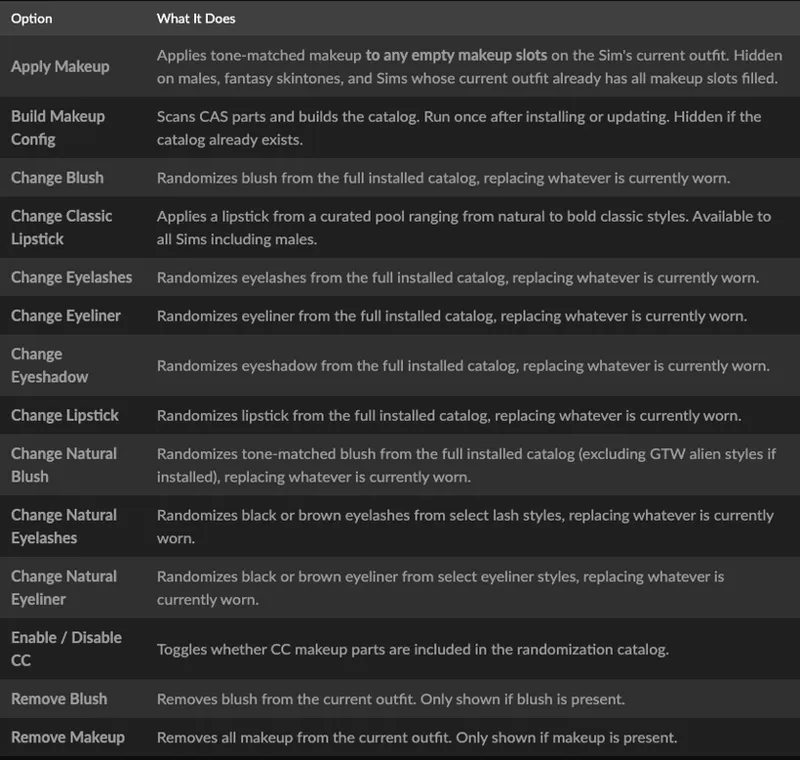
Click Menu Options
Click any Sim to open the Auto Makeup submenu:
Requirements
The Sims 4 (base game only, no packs required)
Recommendations
Essential Glam Kit (SP72) - Optional but strongly recommended for widest tone-matching style availability
EA Lash Remover (e.g., by Wightspider) - Highly recommended so your Sims' eyeliner and lashes display cleanly without chunky default meshes clashing.
Installation
Download and unzip deadlystingnyc_auto_makeup.zip
Drop the unzipped folder into your Mods folder: Documents/Electronic Arts/The Sims 4/Mods/
In-game, go to Game Options → Other and make sure Script Mods are enabled
Click any Sim and run Auto Makeup → Build Makeup Config to finish setup
⚠️ Both the .ts4script and .package files are required. The mod will not work if either is missing.
Configuration
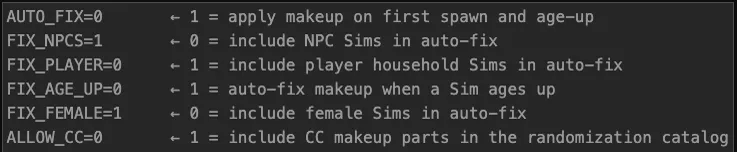
Create deadlystingnyc_auto_makeup.cfg in your Mods folder alongside the .ts4script to customize behavior. A 0 value means the option is OFF by default, a 1 means the option is ON by default:
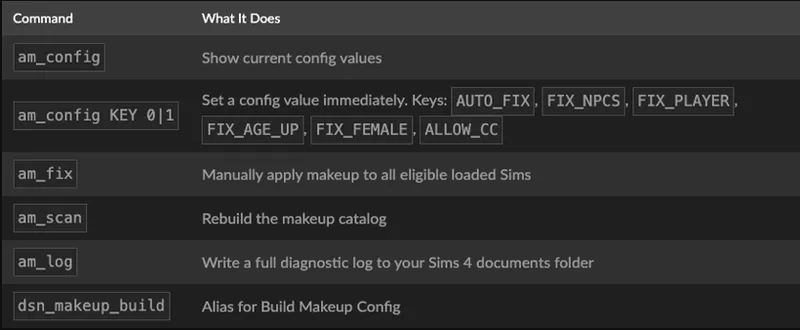
Config values can also be set in-game with console commands. This will automatically create the .cfg file and changes take effect immediately without restarting your game.
Troubleshooting
Open the cheat console with Ctrl+Shift+C, enter testingcheats true, then use:
Interactions not appearing? Make sure you've run Build Makeup Config first. Nothing works until the catalog has been built.
Having an issue? Leave a comment below with your setup and I'll help troubleshoot.
Compatibility
No tuning overrides. Patches Python directly, making conflicts with other mods unlikely
Compatible with CC makeup for randomization functions (toggle on via the menu or config file)
Auto-fix does not modify Athletic, Sleep, Bathing, or Swimwear outfits
🌐 Supported Translations:
French: French Translation by ElianasDiaries
Spanish: Spanish Translation by Monisims
Gallery Credits / Visual Recommendations
The clean look seen on the townies in the screenshot images is achieved using:
Skinblend: Lazarus by Grimcookies (Default Replacement)
Eyes: Oasis Eyes by Pralinesims (Default Replacement)
Lash Remover: EA Lash Remover by Wightspider
Also available on CurseForge if you prefer that platform.
© 2026 deadlystingnyc. Free for personal use. Do not redistribute or reupload without permission.
Comments (2)
I have a some suggestions for this excellent mod: would it be possible to have an option that treats teens differently? Maybe it applies eyelashes as usual but otherwise only lipstick and maybe blush on the formal and party outfits, and that's it? I didn't quite grok that it would override all of my female teens until after I'd played for a while...and it's not that I think female teenagers don't wear makeup, but in-game the teenagers are already so indistinguishable from young adults that I much prefer using makeup to help to differentiate them. And I think the makeup-heavy look this ends up giving most women also doesn't really suit young girls. Separately, I wouldn't mind an option to disable blush from the full randomization either...I find that now almost all the women in my save have sort of very pink cheeks, and it feels a bit odd to me that it's so consistent. I do have the essential glam kit. I love your mods that help townies generate consistently better, and I do like this one. Thank you. I've played with SimplyAnjuta's no makeup and accessories mod for so long that it was nice to have townies generate with makeup again. (I tried to leave this comment several times on Curseforge but it seems to refuse to let me comment there?)
Hmm, unsure why CF commenting isn't working, I haven't changed anything over there. I am currently working on configurable exclusions for parts like blush on the Apply Makeup interaction and the spawn/age up makeup application. Should be doable to add an extra age-based layer of config that people can set to their liking as well. Thank you for the suggestion! If you might be interested in testing a feature like this before it is ready for release, please stop by my Discord server!