
Copy To All Outfits
⚠️ Status: TESTED & COMPATIBLE with the September 22nd, 2026 Patch (PC/Mac: 1.128.90)
Your Sim has fingernails on only one outfit, but now you want them on all their outfits. You could take the time to go into CAS, or you could just click a button. Copy To All Outfits adds pie menu interactions that copy certain CAS parts from your Sim's current outfit to every other outfit slot in one go - with a few notable exceptions.
Why You Need This
Keeping a Sim's hair, nails, makeup, and facepaint consistent across their outfits is one of the most tedious parts of CAS management. Every time you make a change you have to go into CAS to copy a part to other outfits. And you can't even edit the Career outfit at all without mods. This mod handles it in a single click, without ever opening CAS.
How It Works
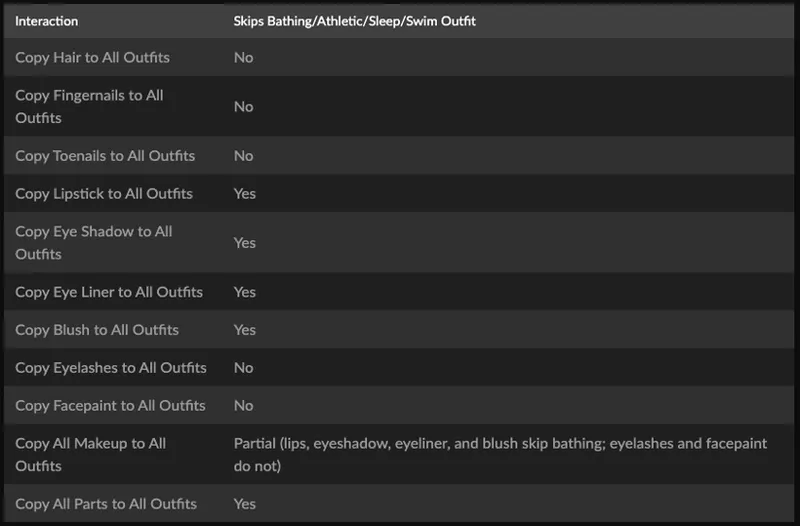
Click any Sim to see the Copy To All Outfits interactions in the pie menu. Each option reads the relevant CAS part from the Sim's currently worn outfit and writes it to every other outfit slot. An interaction only appears if that part type exists in the current outfit. For immersion purposes, blush, eyeliner, eyeshadow, and lipstick are not copied to outfits where it doesn't make sense: Athletic, Bathing, Sleep, and Swim. Eyelashes ARE copied to all outfits, as is Facepaint because many CC contact lens creators use that CAS slot.
Copy All Parts to All Outfits works a bit differently. It copies the entire current outfit including empty slots and pastes it to every outfit in the regular wardrobe categories: Everyday, Formal, Athletic, Sleep, Party, Swim, Hot Weather, and Cold Weather. If an outfit being replaced has parts that the pasted outfit does not have, those slots will be cleared of their items. If a Sim has multiple outfits under a category, they will all be replaced with the pasted outfit.
Requirements
The Sims 4 (base game only, no packs required)
Installation
Download and unzip deadlystingnyc_copy_to_all_outfits.zip
If you are upgrading and have a deadlystingnyc_copy_to_all_outfits.cfg in your installed mod folder, delete the new .cfg file from the new unzipped folder before step 3 below.
Drop the unzipped folder into your Mods folder: Documents/Electronic Arts/The Sims 4/Mods/
In-game, go to Game Options → Other and make sure Script Mods are enabled
⚠️ Both the .ts4script and .package files are required. The mod will not work if either is missing.
Configuration
An optional deadlystingnyc_copy_to_all_outfits.cfg file holds the following setting:
PIE_MENU=NORMAL
PIE_MENU controls where the interactions appear. NORMAL (the default) puts them on the regular click menu; SHIFT moves them to the shift+click menu, which keeps the regular menu uncluttered. Shift+click only works with cheats enabled (testingcheats true), so leave this on NORMAL or leave the config file out entirely want the default behavior. Takes effect the next time a lot loads.
Troubleshooting
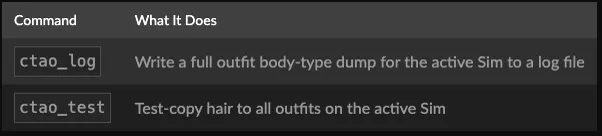
Open the cheat console with Ctrl+Shift+C, enter testingcheats true, then use:
Having an issue? Leave a comment below with your setup and I'll help troubleshoot.
Compatibility
No tuning overrides. Patches Python directly, making conflicts with other mods unlikely
🌐 Supported Translations:
French: French Translation by ElianasDiaries
Polish: Polish Translation by Aarathiel
Spanish: Spanish Translation by Monisims
Also available on CurseForge if you prefer that platform.
© 2026 deadlystingnyc. Free for personal use. Do not redistribute or reupload without permission.
Comments (2)
Would it be possible to have a version that doesn’t skip any categories? A lot of cc like natural lips goes under lipstick for example or natural contours under blush or something under god knows what because the creator put it in some weird category. Would be easier to manually delete that stuff where we don’t want it than to add it into those skipped categories every time, if that makes sense.
Never mind, I’m dumb and wrote that half way through reading the post 🤦🏼♀️🤣 The second option does what I was asking for, right?