

Horned Luuk Herssen is back!
Hoy hoy! It seems yesterday and today's morning were fruitful : I succeeded on fixing and polishing my Radiant Luuk Herssen mods. I know a lot of your asked me about it so I hope you won't mind this post notice landing in your mails.
Horns were fully restored thanks to sweaty efforts on reconstructing them! Those were destroyed because of a huge 3D model format change the game etablished with version 3.3. I had to re-mesh it from 0 so it's not 100% the same horn but still very close (97% may be?) and of course equally badass!
Some nearby hair locks' meshes have been improved thanks to recent skillups I've made in Blender. Polygons and vectors are less "torn" so reflections/shades will be far more pleasing around horn areas. I also corrected a little clipping possibility.
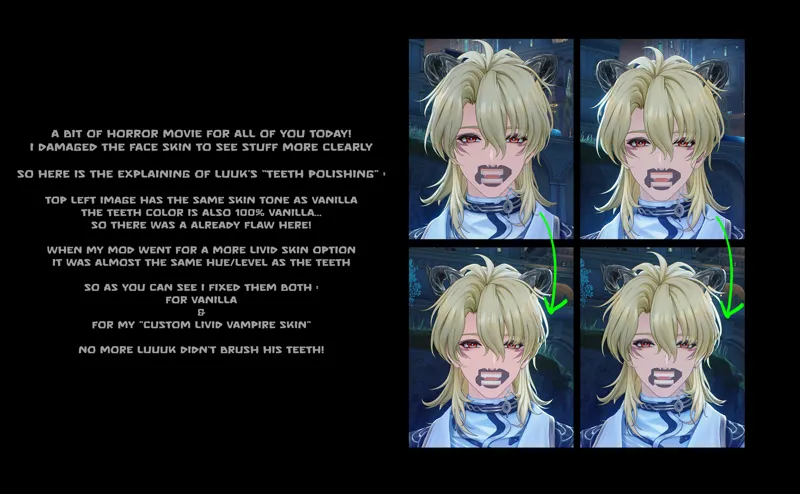
His teeth tones were adjusted. The problem was already existing in vanilla : Luuk Herssen had a questionable teeth color dure to a bad texture job from Kuro. It became really shocking with my new vampire skin which was almost equal in terms of hue/level. So now all teeth has been whitened back to a healthy state!
Now that I'm done fixing Luuk I'll try to do the same for Lynae's similar issue with her mask. And after that something that could be a pleasant surprise for everyone : I'll try to improve my toggleable options knowledge to give you an even better experience. I can't say much about it now but I had a goal a long time ago and now may be a new way to achieve it. Still not 100% sure but if this works it will be absolutely awesome for all my old and future mods!
I'll keep you updated, cheers and take care my dear humans!
Comments (4)
you fixed it so quick omg?? your work speed is always so jaw dropping- just a question though, is it all fully fixed or are there still some tweaks untouched? i hate to be that person but my luuk still can't change the eye colors at all 😭 rlly sorry if i sound like i am always complaining 😭😭😭
Yeah at that time I could make it fast because I took some real work job off. Now it's becoming much more complicated! No worries about your issues, I would feel bad to see one of my mods half working. About Luuk, I checked this morning since I saw your message before going to bed. And there is nothing wrong on my end. But I believe you. There are 2 things : First, there are those similar issues for a very few of users where mods miss a texture replace or two, I can't explain it but I have my hyopthesis. Like for some of them, there is a chance you could fix that on your end by checking, really checking! that everything about XXMI/WWMI is well set. You can follow the "Recommended Settings" in the "bonus tutorial" section after clicking on Collection. Also make sure your XXMI and WWMI are up to date, there was a sneaky update in 3.3 first half a month ago that was manual and mandatory. A lot of people didn't do it because they assume it's always automatic. Now if it's not solved after that, like I said there is a very small number in your case I don't want to let you down and I want to understand why, eventually find a way to fix it for you guys. My assumption is that your graphic settings could hook to some old hash or lower quality hashes in a way that it's not supposed to be possible (hence you must update your softwares). So now I'll ask you your graphic settings, it's kind of important. I'll try to set a computer exactly like yours So go in your game, settings (wheel), the picture icon and I know there are a lot of info here but tell me what your settings are. Ofc try to tell all the GPU operations/modificators related to your final general display (skip vegetation, blur, DMG numbers, Coop).
Oh and Hiyuki's mod have been fixed from the sneaky update of today! Even if it's not my fault, sorry for the inconvenience!
Awesome!