




Estadio Studio v1.0 For FM26
So that no two grounds in Football Manager 26 look the same
EstadioEstudio v1.0 · an FM26 mod + a desktop app · with Arcos Studio built in
FM26's stadium generator already knows how to make every stand different. The only thing missing is different data: that is why every generated ground comes out symmetrical, with the same proportions and the same feel. This mod feeds it that data, and the app is where you decide what it says.
What it is
Two pieces that work together:
• The mod (StadiumStyler). It hooks into the game's own generator and tells it how to build the ground: how much capacity, how to split it across the eight stands, which era the stand models come from, the roof, the seat colours, the city around it. No new artwork and no third-party stadiums: it uses the 66 stand models FM26 already ships.
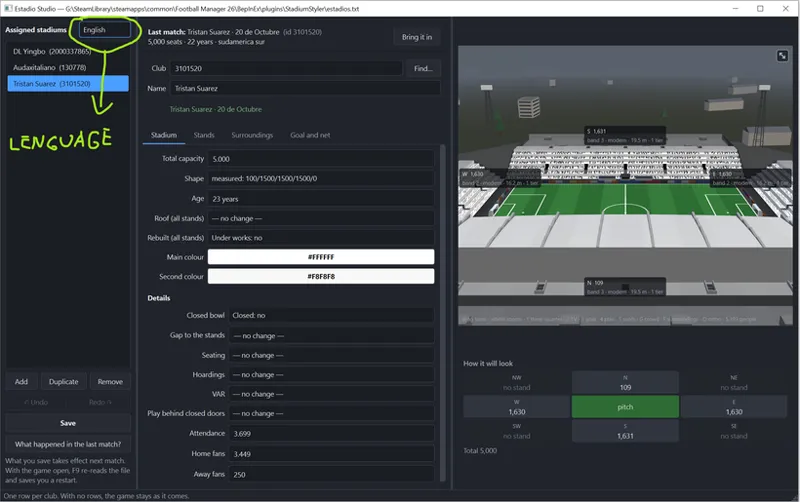
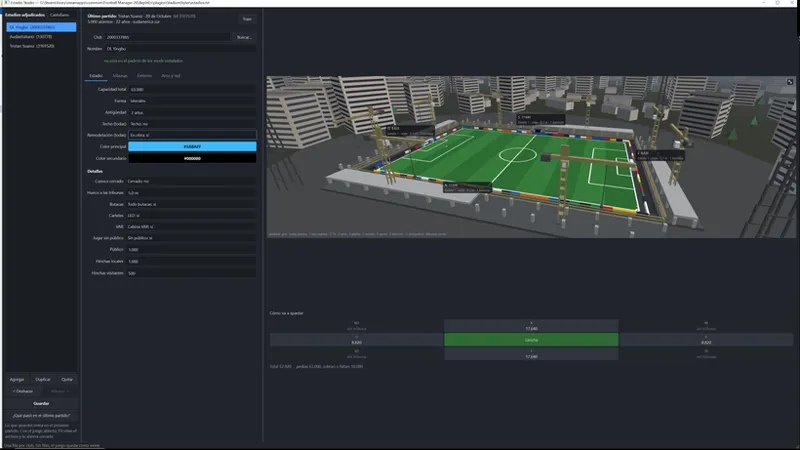
• Estadio Studio (the app). A desktop editor where you build the ground with a 3D model beside it that rebuilds as you move the sliders, and then you assign it to whichever club you like. No editing a text file blind.
Out of the box it changes nothing. The game's grounds stay exactly as they are. Every ground you build is one line that assigns that ground to a club; with no lines, the mod changes nothing. Nothing gets applied to you unless you ask for it.
Automatic mode: install it and you are done
If you would rather not build grounds one by one, a single line takes care of everything: with «auto», the mod picks a shape for every club.
• Always the same one for each club. The draw is seeded with the team's own number, so your lifelong rivals' ground has its own outline and does not change from match to match.
• It looks before it treads. The game ships some grounds with character of their own —one side unlike the other, or half a stadium in the corners. Those it recognises and leaves alone: overwriting them with a generic shape makes them symmetrical, which is the opposite of the point.
• And it chooses sensibly. A small ground goes english or flanks, because filled corners are rare down there; a big one goes bowl or classic; an old one goes to the shapes that grew in pieces.
• The app shows it in advance: the 3D model gives you the exact shape that will come out, before you play.
The shapes
You pick a total capacity and a shape, and the app does the splitting. Here is a 62,241-seat ground in each of the six shapes, stand by stand:
Everything you can touch
The ground
• Total capacity in seats, or keep the club's own and change only the outline.
• Age. This is where the era of the stand models comes from, and it matters: a 5-10k side is 16.2 m deep as a modern stand and 9.0 m if it is pre-1990. The app warns you when the age you set leaves the ground with no advertising boards at the edge of the pitch — the sort of detail that costs a match to find out.
• The two seat colours. The main one paints the seats and the roof beams; the second one, the stairs between sections and the edges.
• Roof and redevelopment. A stand under construction is not drawn: in its place go the lower tier, the half-raised frame and the scaffolding.
• Closed bowl, stand setback —close in tightens it, far out opens it up— LED boards or painted hoardings, the VAR stand, and seats everywhere or standing sections.
• The crowd: how many home fans and how many away, or play with no crowd at all — empty stands with the seats still in.
The eight stands, one by one
The four sides and the four corners, each with its own capacity, age, roof, whether it is being rebuilt and how many tiers it has. Whatever you set for the whole ground is the baseline and any stand can override it, so «roofs on everything except the big end» takes two steps.
• Untick one and it is gone. That is how you get one-, two- and three-sided grounds, with no special option: an english ground of four separate stands, a horseshoe, a ground with a single end.
• With shortcuts for the usual ones: only the four sides, only the flanks, a single end, or put all eight back.
The surroundings: the city outside
The coarsest knob of the lot. FM26 generates the city around the ground, and one word changes the buildings, the hamlets, the vegetation, the cars and the skyline on the horizon, all at once.
• The game's 29 regions, from Scandinavia to the Middle East, from the Caribbean to south-east Asia. Tested in a match: asking a Chinese ground for «south america» swapped its Asian blocks for houses and low flats, tripled its vegetation and put cars in the streets.
• Population, from hamlet to metropolis: it decides how dense the city is.
• Seed and landscape rotation. Changing the seed rebuilds the whole neighbourhood; the rotation moves where the skyline sits.
The 3D model
This is what makes it usable at all. Beside the form there is a stadium in three dimensions that rebuilds as you move the sliders: terraces stepped by tier, corners carrying the ring on, a cantilever roof with its ribs, the facade, the moat, the boards at the edge of the pitch, and the pitch itself with its mowing pattern and its regulation markings.
The proportions are not made up. The height, depth and tiers of every stand are measured from FM26's own 66 models. That is why an 85,000-seat end is 66 metres deep —because that is what the model the game will use measures— and next to a 3,000-seat side, which is 10, you can see the real difference. It even shows you the era that will actually be built when the one you asked for does not exist at that size.
• Labels over every stand: the compass point, the seats, the band, the era, the depth and the tiers.
• Four views on one key: three-quarter, TV camera, behind the goal and plan. Plus taking the roofs off to see the seats, turning the crowd on, showing the city around it, or switching to orthographic projection, which is how a drawing is done.
• And the city, with its skyline and its hills behind, so you see the ground in its neighbourhood and not floating in a void. It opens in a big window when you want a closer look.
It knows your clubs
No hunting for team IDs by hand, and no internet needed either:
• The club list is built by reading the mods you already have installed: 1,146 clubs, 891 of them named and 571 with their ground's name.
• Search by club name or ground name.
• The «Bring it in» button. While it builds the ground, the mod writes down what that club actually has: capacity, age, the real split across its eight stands, its colours, its region. «Bring it in» turns those measurements into a recipe, so you start from the real thing and tweak, instead of starting from nothing. And it brings the shape exactly as it measured it, not the closest of the six: forcing a name on it would strip the ground of its character.
• And it tells you what happened in your last match, reading the game's log: what was applied, what was not and why.
Custom goals and nets
Every goal in FM26 is the same goal: the stock net is a white crate, with the same mesh and the same frame, in every ground in the world. The «Goal and net» tab gives each club its own, and it works on the club you already have open in the list: no picking it again in another window.
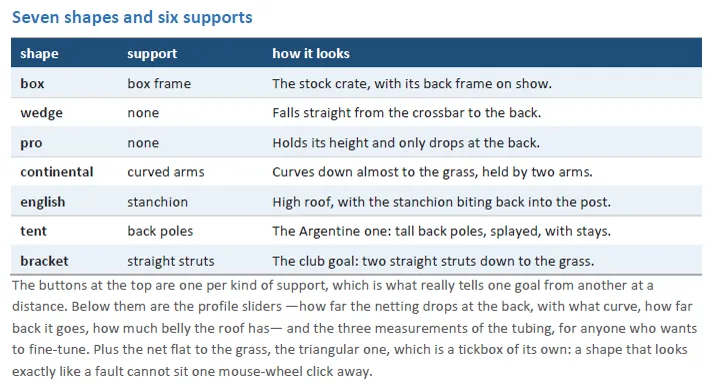
The supports do not exist in the game. FM26 ships a net and two posts, and that is all. The box frame, the curved arms, the english stanchion, the back poles with their stays and the straight struts are built from scratch, tube by tube, and hung on the goal. That is why a nineties english goal and an Argentine tent come out different, not merely similar.
Seven shapes and six supports
The net
• Mesh: square, diamond or hexagonal, with the thickness of the cord.
• Colour: the club's —it takes it from the mapping— or whichever you pick, with colour buttons rather than typing numbers.
• Stripes: two to four colours in six layouts —vertical, horizontal, diagonal, reverse diagonal, checkerboard and diamonds— with the width in centimetres.
• The club badge woven into the netting, with its height and its size.
• And the tubing painted whichever colour you like, or white as it comes.
Stripes do not break at the seams. The net's texture is unwrapped face by face: painting «a horizontal stripe» onto the image gave three loose stripes that never met each other. Here every point of the net is placed in metres —across the width of the goal and along the cord— so the stripe crosses the roof, turns and carries on down the back the way it does on a real net.
The app decides about the cloth
FM26's net is simulated cloth, and it is simulated with the cord lengths of the stock goal. A strong shape leaves it stretched: the simulation pulls to take up the slack, the net crumples and lifts off the support. It is the fault that frightens most, because it looks exactly like a broken mod.
So you do not have to decide it by hand: the app measures how far your shape sits from the stock one and chooses on its own. If it is close enough, the net goes on rippling with the ball —23 centimetres in a goal, measured— and if it is not, it is held rigid and exactly as you drew it. The mod runs the same sum on its side, so an old folder, or one downloaded from the internet, will not leave your net on the floor either. Nobody should have to know about cloth simulation to pick a goal.
While you build it
• A preview with the ghost: what the club has today is drawn in dotted grey behind what you are building. Looking at a preview the question is not «how does it look?» but «is it better than what it had?», and nobody remembers a curve.
• Your own models. A goal you have already seen on the pitch and liked is saved under a name and applied to any other club in one click, without overwriting its colours: a model is the shape, not the paint. With a search box, because the list grows.
• Ten complete combinations —shape, support, mesh, colours and badge— each with whatever keyboard shortcut you give it.
• Apply to several clubs at once. The shape is copied as is and the net is rebuilt for each one, so with «the club's colour» a whole league comes out in each team's own colours.
• And the «What the game says» panel: it reads the match log and shows you, in metres, what the mod made of what you applied. The goal on the pitch tells you something went wrong; the panel tells you what.
The club the mapping does not name
The goal and the net are kept in the club's folder, and the mod looks them up by the name the mapping gives that club. A club that is not in there has nowhere to keep them: you can write it to disk and the game will never look at it — that is the case for a good part of the Championship. That used to be the end of the road: a five-hundred-line file and Notepad.
Now there is a button. It shows you the exact row it is going to add, makes a copy of the mapping before touching it, writes the row and creates the folder. The advertising columns are left empty on purpose: the club keeps showing its league's boards, and all it gains is somewhere to look for the net. With FM26 open you have to restart it, because the mapping is read once per session.
This part needs AdboardInjector. What draws the goal on the pitch is the advertising-boards mod: Estadio Studio writes the shape and the net into «adboards/redes/<club>/» and AdboardInjector applies them in the match. Without it installed the rest of Estadio Studio works just the same, and the tab tells you what is missing instead of sitting there empty explaining nothing.
The comforts
• Undo and redo with Ctrl+Z, telling you what it is you are about to undo.
• Duplicate a ground you liked for another club.
• A check when you save, with the line number and a suggestion. Seven mistakes that used to pass in silence —an impossible capacity, a club twice over, a region that does not exist— now show up before you get into a match.
• Saving that cannot bite you. It writes alongside and only then replaces, so the game never finds half a file; and if you edited the file outside the app, it asks before overwriting your work.
• In English and in Spanish, with each language's thousands separator.
How you use it
1. Copy the mod's folder into BepInEx's plugins.
2. Open Estadio Studio, pick the club and build its ground watching the 3D model.
3. Save. What you saved goes in at the next match.
With the game open, F9 re-reads the file and saves you closing it. Rebuilding the ground mid-match is not possible —I tried, and it ends up closing the game— so the change goes in when the next one starts.
Before you download it
• You need Football Manager 26 with BepInEx.
• It shows on the grounds the game generates. If you have imported stadiums —a megapack, say— those replace the whole ground and this mod does not step in there. It works on generated grounds, which are the vast majority.
• It does not modify your save or the game's files: it only feeds data to the generator while the ground is being built.
LINK: https://drive.google.com/file/d/1qP-3qh6H-6hlgssmTiYBsufKv2oGzBUs/view?usp=sharing
Thanks as always for the support.
— MiguelFM
Comments (7)
works with fm27?
Only FM26
i take it this doesn't interfere with bassys stadium pack ?
Change the game's default stadiums
is there a way of adding clubs not listed so like i want to build hereford town a stadium in here but they don't show on the list how do i add them
Try playing a match with that club, exit the game, open the app, and tap at the top where it says “Bring it in”
this looks so good mate