


Chants & Anthems Editor
Add your team's chants to Football Manager 26 without touching a single text file. You pick the audio, type the club name, and the app does the rest: it normalises it, trims it, copies it where it belongs and writes the mapping for you.
It ships with the plugin that makes the audio play in-game, so you do not need to own any mod to use it.
1. What you need
· Windows 10 or 11, 64-bit.
· BepInEx (IL2CPP) installed in Football Manager 26. It is the game's mod loader and it is installed separately; without it, FM26 loads no plugins at all.
· Nothing else. No Python, no ffmpeg, no codecs: it is all bundled.
If you already own the Atmosfera 360 pack, the app detects it and works on top of what you have, without overwriting anything.
2. Installation
Extract the folder anywhere you like: Desktop, Documents, another drive. It does not matter.
Always keep Editor de Canticos.exe and the _internal folder together. Separate them and the app will not start.
Double-click Editor de Canticos.exe.
If Windows SmartScreen warns you, click More info and then Run anyway. This happens with any program without a paid code-signing certificate.
The app starts in your system language. You can change it any time with the Language selector, top right.
3. First run
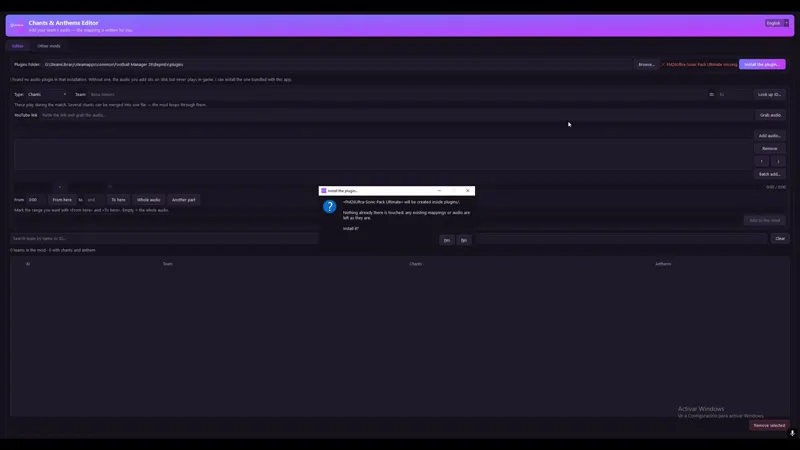
At the top there is Plugins folder. The app looks for your FM26 installation and fills it in; if it cannot find it, click Browse… and pick it yourself. It is usually at:
...\Football Manager 26\BepInEx\plugins
Next to it you will see the status:
If the "Install the plugin…" button appears
It means there is no plugin in your game able to play the audio. Without one, whatever you add sits on disk but never plays.
Click the button and that is it: the app installs its own, creates the folders and files it needs, and leaves anything already there untouched. Then close and reopen Football Manager so the game loads it.
4. Adding your first chant
Pick the type
Type has two options:
· Chants — they play during the match, every so often, while you play.
· Entrance anthems — they play once, when the stadium appears, before the teams come out.
Say which team it is for
Type the club name and its ID. The ID is a number Football Manager uses internally, and it is the only thing that really decides which team gets the audio: get it wrong and your chant plays for a different club.
If you do not know it, click Look up ID…, type the name and pick from the list.
Careful when picking: the women's side, the reserves and the youth teams usually show up too, with nearly identical names. Check the division shown beside each one.
Bring in the audio
Two ways:
· Add audio… — pick one or more files from your PC (mp3, wav, m4a, ogg, opus, flac…).
· YouTube link — paste a video link and click Download audio. It downloads and adds it for you.
You can add several files and they are joined one after another, in list order. To reorder, drag them or use the ↑ ↓ arrows on the side. The list order is exactly the order they will play in.
Listen and trim
Every file in the list can be previewed before saving, and you can mark the part you want:
Click the file in the list.
Hit play and listen.
When you reach the point where it should start, click From here.
When you reach the end, To here.
Whole audio undoes the trim. And with Another range you can take two separate pieces of the same track and join them.
This matters more than it looks for anthems: hardly any of them have the good part at the beginning, they usually open with a long instrumental intro. Anthems are capped at 38 seconds, so it is worth picking the chorus.
Save it
Click Add to the mod. The app does all of this on its own:
Joins the pieces you picked.
Normalises them to the same loudness as the rest of the mod, so your chant does not play quieter than the others.
Trims them if needed.
Copies the result into the correct game folder.
Writes the mapping line, taking a backup first.
When it finishes, restart Football Manager. The game reads the mappings at startup, so a change made with the game open will not show up until next time.
5. The "Already added" table
At the bottom is everything you have loaded, cross-referencing chants and anthems by team. It shows at a glance who is missing what.
The search box above filters by name or by ID.
Cell states:
Right-click a row to listen to what it has, open its folder, edit it or remove it.
Comments (3)
Amazing idea but unfortunately I've not managed to get it to work still
Increible miguel, gracias!
awesome... congrats