
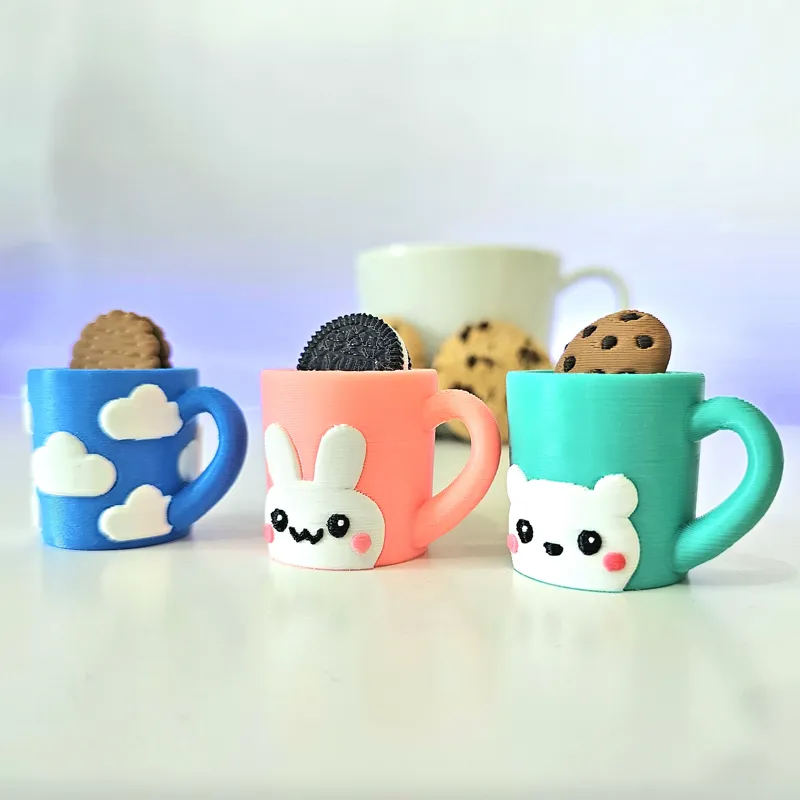


☕ Cookie Dunk Clickers – Kawaii Mug Edition 🍪
Some snacks are better when you dip them in milk or coffee.
So I turned that tiny moment into a clicker.
Introducing the Cookie Dunk Clickers – Mug Edition ☕🍪
Three adorable mugs, each with a different style:
☁️ Cloud Mug
🐰 Bunny Mug
🐻 Bear Mug
Inside the mug there’s a small base that looks like milk or coffee.
And that’s exactly where the click happens.
When you press it, the cookie moves like you’re dunking it into the drink.
⏬ DOWNLOAD
This design release has been archived on Patreon and can be purchased on my Cults3D. Active members save 50% — see the Discount Code post.
Even though they are archived, you can sell this design if you have an active paid membership.
🍪 Includes 3 Cookie Designs
All cookies are interchangeable between the mugs:
• Chocolate Filled Biscuit (Prince-style biscuit)
• Chocolate Chip Cookie
• Oreo-style cookie
Mix them however you like.
Different mug + different cookie = new combination.
✨ Model Details:
Designed to print without supports 🧩
Compatible with standard FDM printers. Bambu lab and others.
Includes 3mf files with parameters ready to download and print
Commercial license included for active members 🛠️
The click mechanism is hidden inside the mug, creating the dunking effect.
⏬ DOWNLOAD
This design release has been archived on Patreon and can be purchased on my Cults3D. Active members save 50% — see the Discount Code post.
🔗 Keychain Ready
The handle is used for the keyring chain or ring, perfect for:
• keychains
• bag charms
• desk click toys
• market items that people instantly want to try
⚙️ Recommended 3D Printing Settings
Layer height: 0.2 mm
Outer perimeter width: 0.33 mm
First layer extrusion width: 0.35 mm
Single wall first layer: True
Scale: 100 %
Dip the cookie.
Click the mug.
And suddenly everyone around you wants to try it.
Comments (3)
I love it!!! ❤️
Hi I don't see those settings on bambu can you screenshot what it looks like on bambu studio so i can print both pieces please
Hi, Shanni !!!! The 3MF file you downloaded contains the parameters for correct printing. Import it into Bambu Studio and that's it. Tip: It's recommended to lower the layer height to a maximum of 0.2mm.