
Stremize 2.6 - We focused on making the app easier to use.
Hi everyone,
Alongside all the feature requests, we kept hearing one important thing: the app should feel easier and more natural to use every day.
Stremize 2.6 focuses on improving two parts of the experience that received a lot of feedback:
Setting up Debrid add-ons on Android TV.
Managing large IPTV playlists.
Easier Add-on setup on TV
- Simply scan the QR code on your TV with your phone (iPhone or Android). If both devices are on the same local network, Stremize instantly detects your TV and installs the add-on. You can also open the local URL shown on your phone from a computer (eg 192.168.x.x:port), making it easy to paste long add-on JSON URLs.
- Stremize supports all Stremio add-ons, self-hosted add-ons, and Orion.
- You can still configure everything on our website with instant sync https://stremize.com/account/add-ons
IPTV Playlist organized
- Favorites are now available for Movies, TV Shows and Live Channels on both Mobile and TV, and individual channels can be pinned into My Channels for quick access.
- Playlists are now grouped more naturally into Recents, Favorites, and everything else. Mobile also gets a more useful long-press menu, while Search stays incredibly fast and now surfaces results based on what you actually watch.
New and Clean
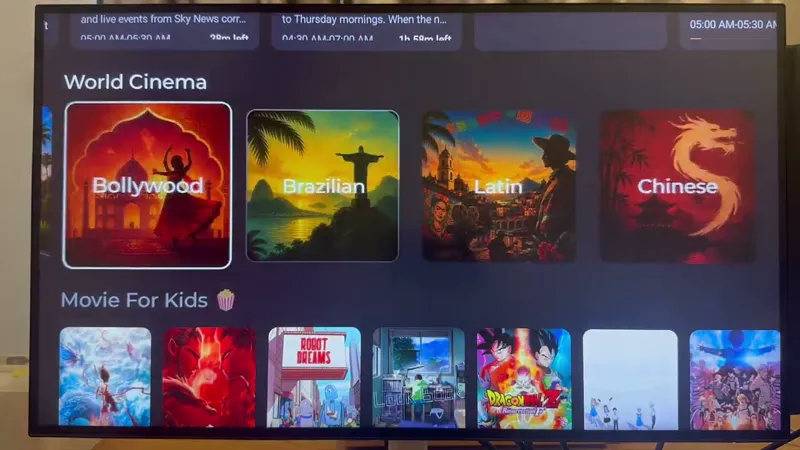
- New "World Cinema" Catalog: Hollywood, Bollywood, Brazil, Latin America (Spanish), France, Japan, Korea, Türkiye, the UK, China and Russia.
- Auto Disable Subtitles is back in Player Settings.
- New Referral Program, and S-Points can now be redeemed for Premium days or extra device slots.
We hope Stremize 2.6 makes the app feel simpler, faster, and more enjoyable to use on both Mobile and Android TV.
Download Stremize for Mobile & TV Android app on Google Play
FireTV or Sideload APK, use Downloader TV Code 8300665
Stremize 2 6 - Easier Add-on setup on TV & IPTV Playlist organized (YouTube)
Comments (2)
How do I use iptv
Please use IPTV Playlist mode and add a new playlist using either: M3U link, for example: http://example.com/get.php?username=YOUR_USERNAME&password=YOUR_PASSWORD&type=m3u_plus&output=ts Xtream Codes: Host: Username: Password: You can find free IPTV Xtream Codes online to get started, or subscribe to an IPTV provider for a more stable experience and a wider selection of channels. Full setup guide: https://stremize.com/how-to-set-up-livetv-playlist-mode-in-stremize