



Better Muscular Body 💪 [Sim Tutorial]
Ever wondered how I sculpt my Sims' bodies to look like they were carved by the gods themselves? Want to transform your own Sim into a muscular, Greek God–worthy hunks just like Sukuna and Toji in the thumbnail? Fret no more as I'll be sharing my very own beginner-friendly method of making my Sims like they were sculpted by the finest sculptor there is.
Before we begin, you will need to download two (2) essential mods for this entire process to work properly.
Classic Physique Default Top Replacement by Golyhawhaw (I'm using the Nip Version Backlower Default as it is the most natural-looking). Note that this Default Replacement is meant for muscular/bodybuilder Sims and will make your lean/twink Sims look a bit awkward or disproportionate. The good news is, you can just change their Tops thru WW Selector which we'll be tackling later. There should only be one Default Top Replacement in your folder or it will conflict! If you've already downloaded any of my Sims, there is no need to download this as this is already included in their CC folder. Otherwise it will duplicate.
Better Abs by thepancake1. My holy grail. This makes your Sims' abs perfectly defined. Warning: Better Abs should not go deeper than one (1) folder as it contains a script file!
Simply put both mods into your Mods folder and you're good to go.
Now without further ado, let's begin!
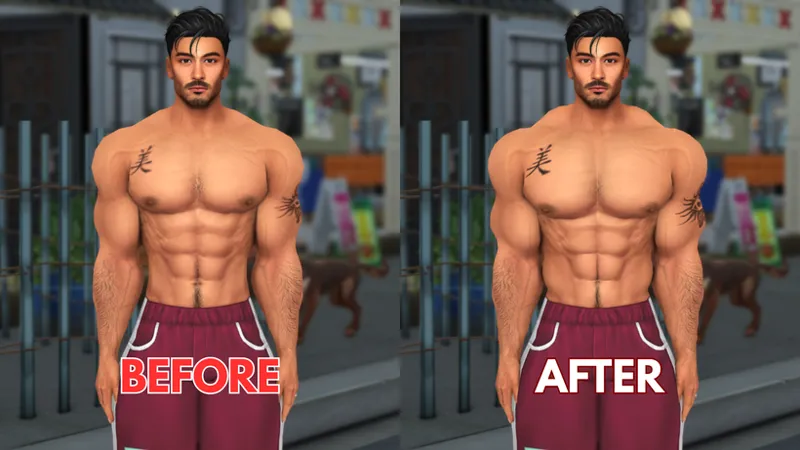
Here is Gary to help us demonstrate the whole tutorial. As you can see, he already has a pretty great physique. But there's still something lacking. His adonis belt is nowhere to be found, his trapezius could use a little more definition, and don't even get me started on those flat-ass abs that looks outright painted.
To solve these issues, the very first step is by clicking on your Sim.
Hover over the Wicked category > Personalization → Body & Clothing → Body Selector → And finally, Modify *your Sim's* Body Parts
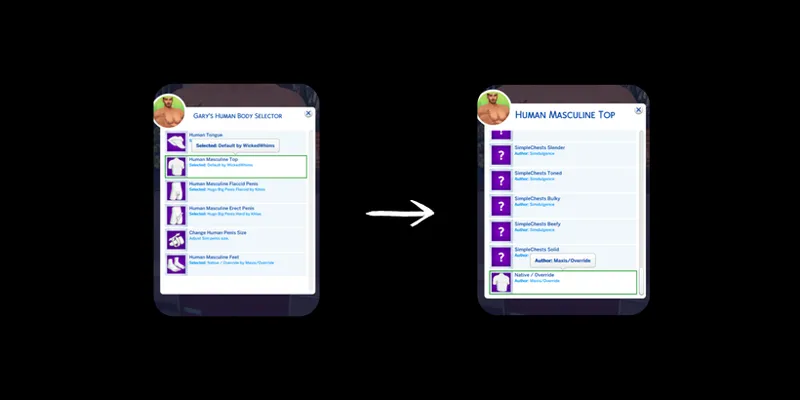
From here on, the Human Body Selector will appear. Click on Human Masculine Top → Then slide all the way to the bottom, and pick Native/Override
This ensures that the top your Sim uses is the Default Override we downloaded earlier. This is important because Better Abs only works with the default EA top, allowing the mod to function properly.
Now on to the next and final step, click on your Sim again. Go to Actions... → Abs Settings → And choose your desired Abs Definition from 25% to 100% (or 0% if ur not a fan of defined abs lol) You can also set it to Automatic so that it'll be based on your Sim's Muscle size Slider. I usually go with 100% because I like my men ripped as fck : P
And then voila! You can now enjoy your meaty Papi 'til your heart's content. 🤎
I hope I explained it clearly but if you had any trouble, don't hesitate to comment down below and I'll try my best to answer your questions. Happy Simming! <3
Comments (6)
Hey, amazing work with the bodies, they are insanely three-dimensional, but as I tried to make my own werewolf a big, burly hunk of meat I found myself lost on how to make him as beefy and well defined as yours. In this tutorial you spoke of using golyhaw and betterabs, but what comes before that, what shape/preset did you start with? Like, how did you get those legs? Big thighs and calves but narrow knees, he's built like a rugby player! My attempts always end up with straight, linear chicken legs...
Unfortunately, the Default Top Replacement only works on human Sims 😓 My workaround for my Werewolves to be as bulky is by making them wear the Top via CAS. As for the sliders and presets, I edited NarciCC Better Male Sliders and Fit Guy Sliders to work with LMM's Legs and Calves Sliders as they all conflict with each other. While the body preset are Golyhawhaw's Athletic Preset.
I've always been curious about how you managed to create such amazing sims, and omg-
🤎🤎🤎
All I need is the 2 guys in the thumbnail pls??
Soon 🫣