



Work in Progress. March 2026
Greetings!
Today's WIP post is about a new mini-game, the inventory and decor, and the updated mastery system.
New Mini-Game
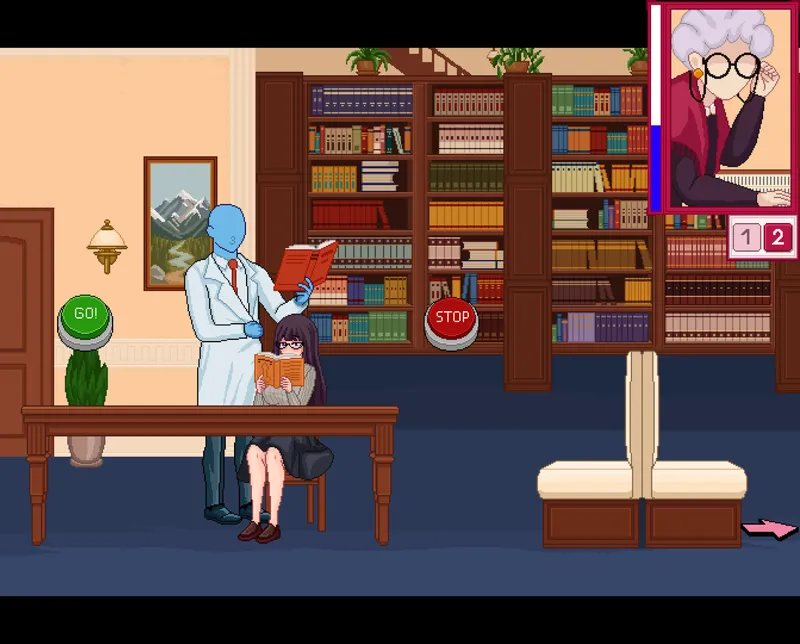
The new mini-game is a Start-Stop style game. Main goal is to help Hana practically study the "material" without drawing the librarian's attention!
To study the "material", you need to hold the GO button while the librarian isn't looking.
As soon as we catch her attention, you must quickly release the GO button, and hold the STOP button, and wait for her to look away again.
The most important thing is not to get caught, otherwise you'll lose very quickly. The visuals aren't final, and there will be changes.
Inventory
The first thing to notice is the side buttons. These are item categories. Clicking on one will display only items from that category. The large top button switches to the second inventory mode: Decor. This mode shows all items from the decor categories, but with a few tweaks.
Decor Mode
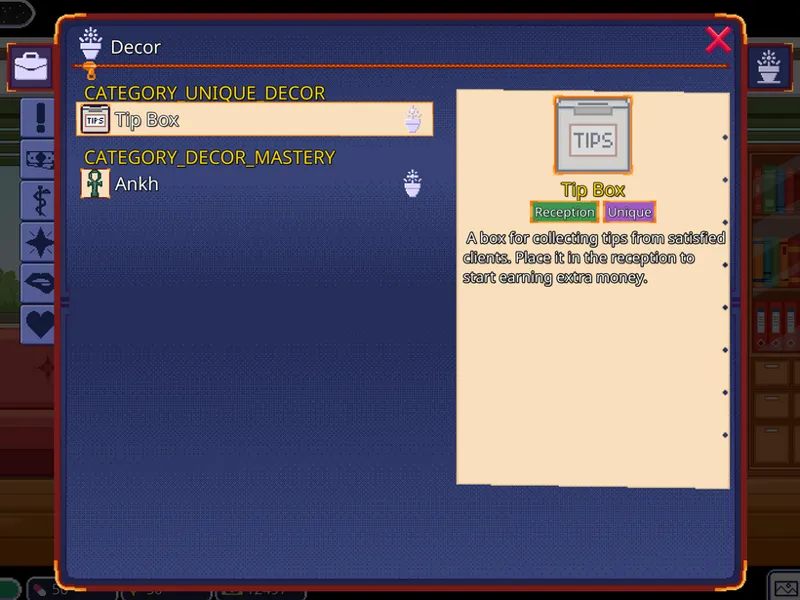
A new indicator appears in the item list. It shows the status of a decor item: if the indicator is present, the item is already placed; if missing, the item is ready to be placed. Decor items will have their own TAGS (under the name in the description). These briefly highlight the most important details about the items. For example, the Tip Box is a unique item (more on that later). Unique items have only one extra tag: the room where it needs to be placed. Meanwhile, regular items will show their placement slot (like a wall or a table) and what bonuses they give—for example, making mini-games easier or giving more money. On the left, there will also be category sorting. And on the right is a lone "Filter" button. It has 3 modes: show all decor (default), show only ready-to-place items, and show only placed items.
How it works
To place an item, you need to go to the inventory, switch the mode, select the item you want, and click the "Use" button. After that, spots in the room where it can be placed will light up. Once the item is placed, you can click on it to open a menu. The menu will have 3 buttons, and they'll differ slightly depending on the decor TYPE. There will be 2 types in the game: Regular and Unique.
Regular type:
Gives small bonuses.
Can be removed.
Can be placed in different rooms if the size allows.
Unique type:
Unlock unique game mechanics or Quest items.
Can only be placed in one specific spot in a specific room.
Cannot be removed.
Now back to the menu. For the regular type, the options are: Read description, Remove, and Close menu. For the unique type, they are: Use, Read description, and Close menu.
Here are a few examples of regular items: placing a painting in the reception area or an ankh in the office.
So what is Unique decor? Let's take the Tip Box as an example. Once you place it, clients who are happy with the service will leave small tips. These will pile up in the box, and you can collect them at any time.
The coffee machine, radio, mortar and pestle, and other items that used to appear automatically will move to the decor category, and you'll need to place them manually.
New Mastery System
Right now, mastery is a pretty basic stat that barely shows up in the game. With enough of it, mini-games get slightly easier, and that's it. The goal was to show the growth of the main protagonist's professional skills, and now, thanks to the library, it's finally happening!
How it works
A separate mastery bars will be added for each type of activity. Every bar will have 2 thresholds: at 50 and 100. When you reach a threshold, the bar will stop growing, and a special indicator will pop up with a hint: to unlock further growth, you need to visit the library and spend some time studying the right material.
After that, the growth will continue. Passing each threshold will give you bigger bonuses for those specific activities. But the standard mastery stat isn't going anywhere; it will show your average level across all skills. It will be balanced so you can easily skip at least one type of activity if you really don't like it.
PS. Well, this was the biggest post yet. Thanks for reading!❤️
With the amount of new content and some old mechanics reworked, this is going to be a pretty massive update. The Discord community knows that release dates are usually not announced, but as a one-time exception, here is a rough estimate: early April (1st week).
Oh, and one more quick announcement: an Android version is currently in development 🤖