



WatermelonDS 0.8.0.rc3 is here!!!
Hi everyone!
WatermelonDS 0.8.0.rc3 is now available, bringing lots of fixes for your games, more flexible controls, audio improvements, and the new WatermelonDS icon!
This update is all about making the everyday DS experience better, with many of these changes coming directly from your reports and suggestions.
Download and full release notes:
Get WatermelonDS 0.8.0.rc3 on GitHub
Highlights
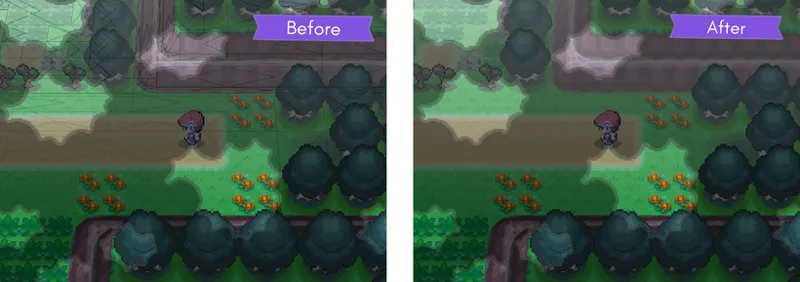
Vulkan graphics fixes for affected scenes in Pokémon HeartGold, Tales of Innocence, Solatorobo, Super Mario 64 DS, Phantom Hourglass, and other games.
Better touch and controller support, including multitouch fixes, independently customizable A/B/X/Y buttons, and two-button controller shortcuts.
Audio improvements, including reduced output delay in affected situations and original pitch preservation during fast-forward.
New DSi profiles, including per-game selection and fixes for importing and exporting DSi saves.
Improved save-state access and loading, plus a new screenshot shortcut and configurable screenshot folder.
RetroAchievements improvements, including stability fixes, better icon handling, and the ability to remove expired offline entries without clearing your app data.
A new WatermelonDS app icon! A fresh visual touch for this release.
Here are some examples of the fixes:
New Vulkan low-latency mode
There is also a new optional mode to improve touch responsiveness, especially useful in games like Phantom Hourglass.
The mode is disabled by default and can reduce smoothness in demanding games, but results may vary depending on your device and the game, so try it and see how it feels.
More games, fewer workarounds
This release also includes fixes for specific game issues:
Pokémon HeartGold: Fixes the affected black screen during DSi startup.
The World Ends With You: You can now progress through the introduction without needing the lid-closing workaround.
The complete list of fixes and options is in the GitHub release.
Thank you!
Thank you to everyone sharing reports, videos, and suggestions!
WatermelonDS 0.8.0.rc3 is still a release candidate, so your feedback remains valuable. Your device details, game settings, logs, and save files make a big difference when tracking down problems.
Let’s keep making WatermelonDS better!
- Sapphire 💙
Comments (5)
Update. Everything is all good now on LineageOS 24.0-11022026. The dual screen function now works on any emulators that supports it. Watermelon DS crashes when booting up a game due to the system drivers of lineage not being compatible. I imported the "Turnip_v26.0.0_R8" graphics driver and games boot right up. Side note: tested mrpurple t30 toasted graphics driver and it's unstable with Watermelon DS. I can boot games sometimes, but they crash on boot majority of my testing. For the most part dual screen gaming should be a smooth experience from now on in LineageOS. :)
Watermelon DS is working wonderfully on the base OS of AYN Thor. You've done such an amazing job on this. I recently tested Watermelon DS on Lineage OS 24.0 of AYN Thor and it keeps crashing when launching games. Probably due to how recent version 24.0 released. Compatibility for dual screen mode in other emulators are not functioning yet as well. This is a heads up for anyone trying to install Lineage OS for the AYN Thor.
Love this, but I'm hoping we get news on the Flycast dual screen VMU fork
Nice work! Time to get going with heartgold woot!
Thanks so much for your constant dedication to improving this! You probably said already, but just in case: is it better for you to get reports here or as GitHub issues?