


iiSU Alpha 0.0.3 Public Release
This marks the first public release of iiSU.
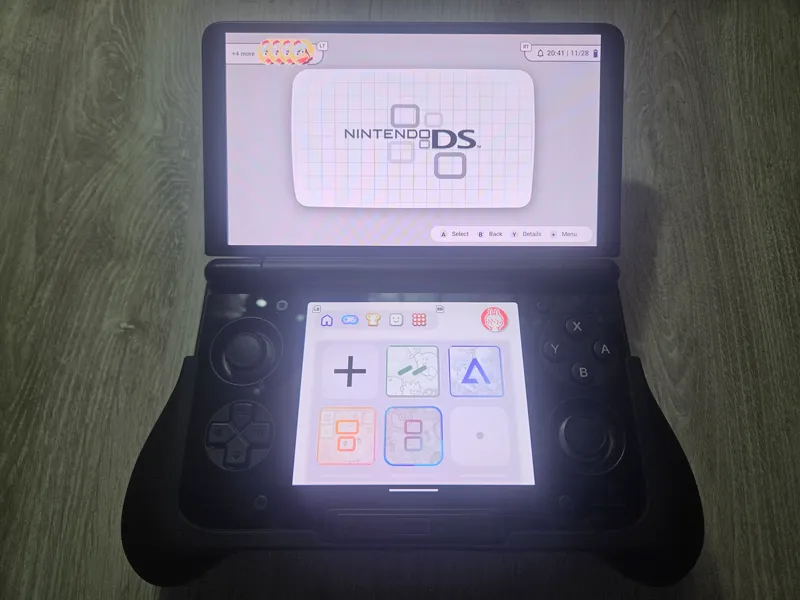
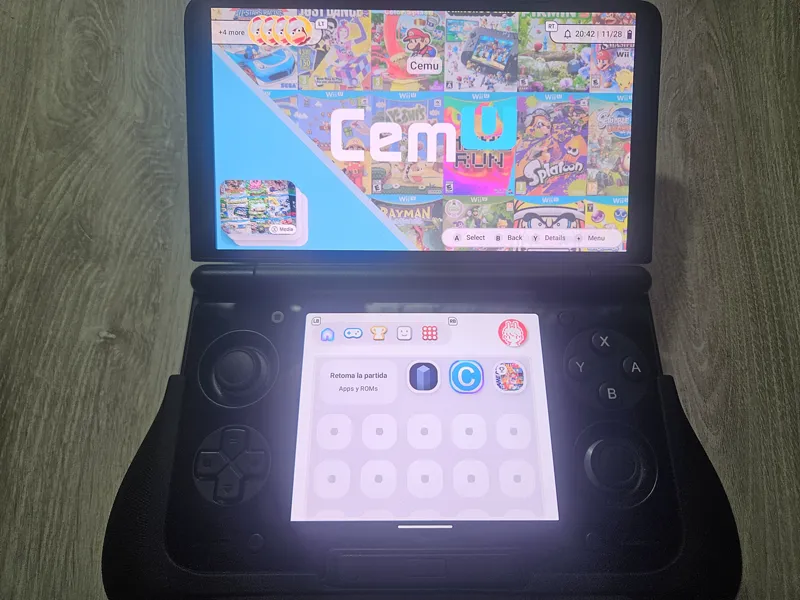
A dual-screen optimized Android launcher built for devices like the AYANEO Pocket DS, Pocket ACE, Pocket DMG, OneXPlayer Sugar, AYN Thor, and the RP5 with the RDS Add-On, aswell any other single screen handheld!
This version includes major UI upgrades, RetroAchievements integration, and a fully reworked navigation + layout system. A lot has changed since the last alpha.
All standalone emulators are supported.
If the emulator works as a normal Android app (standalone APK), you can add it without any problem inside iiSU.To switch to the single-screen wide mode, just tap the profile icon (or press the Start button), go to Home Design, and select Wide.
For dual-screen consoles, do the same steps and select Enable iiSU DS Mode. This will activate the dual-screen layout for supported devices.
Highlights
Global Context Menu Overhaul (Start button or Touch the Profile icon)
A unified menu that now covers Apps, ROMs, Tabs, and Consoles.
This replaces a lot of the old scattered dialogs and brings everything into one consistent interface.ROM Folder Browsing
Full directory navigation for ROM collections, including subfolder scanning, caching, and handling large libraries better.New App & ROM Layout Modes
Grid, List, Horizontal Carousel, Vertical Carousel, and Condensed List.
You can pick layouts per-tab, and the snap-to-grid behavior has been improved a lot.Dual-Screen Enhancements
Console hero layouts, wide dashboard modes, per-ROM screen targeting, companion app linking (open secondary apps on the other screen), and detailed views with background art + achievements.RetroAchievements Integration
Login with username + API key, background ROM hashing with indicators, trophy lists fetched per-ROM, fallback artwork when no icon exists, and a recently-played section.Console & Emulator Config Improvements
Multiple emulator package names, console folders, per-tab config, and updated built-in console definitions.UI & Performance Upgrades
New focus animations, improved scaling, layout polish and faster transitions/navigation overall.
Known Issues (Already Being Worked On)
SAF bug: Consoles that require SAF (Azahar, melonDS, etc.) can only be added when iiSU DS Mode is disabled. Otherwise the folder picker won’t open, please disable iiSU DS Mode, add the console, and then you can return to iiSU DS Mode!
Blur overlay bug: After creating a new console/tab, a blur overlay may stay on screen. Press B, Android back button, or gesture back to remove it.
HomeScreen activation: With iiSU DS Mode enabled, the Home Screen may look inactive on start. Tap the Home Screen to activate it.
If it turns gray, switch tabs manually to recover.
Download
You can download the public Alpha 0.0.3 here:
https://github.com/iisu-network/iiSU/releases/tag/0.0.3
Issues & Feedback
If you find bugs or want to request features:
https://github.com/iisu-network/iiSU/issues
Support & Early Access
If you want early access to future builds, help decide what comes next, or request features for iiSU DS:
https://patreon.com/SapphireRhodonite
(short link: https://tinyurl.com/SapphireLair)
Comments (74)
Hi I have a messaging stack that will enhance IISU's messaging feature. is there a email I can reach out as this is not really a feature request
yeah i run it on my ayn thor iisu crashes sadly but im super hyped to try it later on
i hope this could support Android 10 someday i sadly can't use it
Hey I was digging through the files for iiSU and noticed that you guys are using Mac OS. MacOS loves littering files especially the __MACOSX folder inside of the starter theme The .DSstore files and other litter files can collect and accumulate so much unwanted space so just want to bring that up Make sure you delete those
Will the project continue now ? I'm bit confused after some thins online
Yup, it will continue! We will release content bi-weekly for patrons and monthly for the public, wil make a post of this later
Your doing great, I hope this turns into a big thing. Great job Sapphire
iisu won't let me add any app ? Is there a fix ?
In which device are you, and where doesn't it let you add apps?
I accidentally turned on ds mode on my single screen emulator is there a fix for this? 😓
Sadly, no. Just erase all data as of right now. In the next betas, we will hide that option if there is no other screen connected.
Will iiSU be available on iOS devices with Sideload method in the long term ? (in short, an .IPA version of it)
And can you fix the switch ROMs I added them in but they are not appearing
Yup, the next alpha will fix most of the GitHub bugs! If it's not already up, please file a bug on GitHub!
So unfortunate i couldn't see how beautiful iiSU is because it doesn't work properly on a regular phone... Will an alpha for 1 screen devices release soon?
Yup, scrapping and wide mode plus, bugs fixing is on the track for the next release!
Can't seem to get media/icons to work. Someone mentioned RA autoscraping? I'd rather not have to rename all my roms, or even have to rescrape all my media. Preferably we could just point each system to it's own media directory that uses similar format to es-de
When you sing in RA, you have to hover ROM by ROM to let the system send petitions to start scraping ROMs. But yeah, we will add scraping and import media to the launcher in future updates!
how to install fortnite on the iisu emulator?
Fortnite? IISU is a launcher. If you had installed Fortnite beforehand, when you use IISU, it will show there!
This is cool but are you gonna support cia or cci files for 3ds
Yup!, in the next alpha
Yay, a new version. Thankyou very much. :)
Looks great so far, somehow my DS games all scraped by themselves but i can't get any other console to scrape?
Note to this comment: I'm aware it scrapes from retroacheivments, but the only console working with retroacheivments is NDS for me, GBA GBC GB N64 or GBA none of them recognise retroacheivments even though all the roms are the compatible hash and are recognised in retroarch and RA
If you could make a visual/video tutorial that would be very appreciated. The text guide is not doing it for me
Yup, we will make a better guide!
I'm glad to see that iiSU is still happening, despite... whatever it was that was going on the other day. I'm not sure what it was that happened, I was just confused when Usagi's stuff all went dark. But, nonetheless, I'm excited to see how this project ends up.
a couple questions I have now, on downloading it. So first, does it/do you guys supply emulators? second- do all the games have cover arts that they're supposed to come with? thanks for all your hard work! - David
Quick question, what is the naming convention to replace the floppy disk icon with a game marquee/logo. I’ve gotten the icon and background image I want. Can’t figure out the name for the game logo to replace the floppy disk icon on the top screen
Figured it out. For anyone else wondering, if you have a logo you want to place up top, look at balloon kid image for reference, use the naming convention Sapphire provided, but add _title to the end before .png (or .jpg)
Following the guide on GitHub to test the new version, I added a GameCube console and gave it an Emulators directory. How do I add my games? And should I instead download emulators individually and add them?
If you’re using the standalone Dolphin emulator, choose that in settings, then for the directory just point it to your roms
Hello!! I made a lot of custom icons in prep for iisu and wanted to know if there was a way to integrate them yet! I only did a bit of digging, but didn't wanna go too deep and break my apk. Its all good if there isn't!
Yup!, here https://github.com/iisu-network/iiSU?tab=readme-ov-file#21-paths-and-folder-structure
Gonna test it on my switch (bc it's the only android console i have now LOL) goona be right back with the review :O
This is so cool! Thank you very much. Looks great and works on my Retroid Pocket Mini V2 + Dual Screen Add-On. I can add systems and open apps on the correct screen so far and Retro Achievements is also connected. Quick question is it already possible to add/scrape artwork to the roms? Or is that not part of the Alpha yet? Thanks in advance!
Only for RA compatible ROMs, a proper scrapper will be available in the next alpha!
hey do you know when you might open the discord? I left because of the spam and nsfw when everyone got mad but now since the project is back on the rails i wanna rejoin.
They stated in a previous post that for the time being Patreon is gonna be the main source of contact
This is wonderful! So happy to see this project continue! 🎉 I know the focus is on DS mode, but I should mention that I am having issues on a single screen device. I can't see the main menu (the one with the pretty icons), so I tried to enable wide mode to see if that would help but nothing changed.
Yup, I will focus on wideScreen in the next Alpha
Can I use it without a controller because my controller doesn't work
Yup!!!
Thank you for all your work to the project the project. It looked like the project was going to end after the controversies but you have put faith in me, i'd just like to encourage you to keep on helping to this project and ignore the hate, thank you.
Thanks, it’s working on my Retroid Pocket with Dual Screen Adapter. Is It possible to switch screens? Currently the main screen is the bottom one, but on other dual screen handhelds the top one is the main one. Would like to change this also for my Retroid.
Open the context menu (start or touching the profile icon), and enable iiSU DS Mode!
Sapphire, I just want you to know, You are the real deal in this whole big project.
Plan on getting a ayn thor pretty soon just gotta save up but very excited to see where this project goes already love what has been done already!
Can I use it on one screen devices?
Yup! Enable widescreen, but it still needs more UI adjustments.
Is there a specific way to get the box art for the RA-compatible roms? I linked my RA account and the trophy icon is still slashed out and no box art is populating
It only gets RA scrapping if the ROM is compatible with RetroAchievements; we will focus on media scrapping in the next alpha!
where can i place metadata
metadata?
Waiting on my Thor to be delivered this week, look forward to giving it a go.
Congrats on the first of many releases! We’re all cheering for you!
Just downloaded it. Absolute bug fest but I already LOVE it!! It barely works for me right now but I'm so happy where it's at right now!
You the goat g happy to support this dope ass project. Thanks for keeping it alive despite the drama
thx for your hard work
Any way to make this work on bluestacks? When I try and open it on bluestacks it says "parsing error"
Try a higher Android version!
Not a thing has changed with Usagi's absence. https://bsky.app/profile/cochu.bsky.social/post/3m6ph6zmeak2k
best to give it no attention
How does scraping work on the app?
Yup, but only for RA-compatible ROMs; the next alpha will focus on that.
I'm so excited for this project!! Thank you so much for all of your hard work!! 😭💚
Keep up the great work Sapphire!!
The man of the hour 😁
Not sure if this only applies to the lg wing but it crashes immediately on launch for me
Yup, I am trying to get an LG Wing to add support for it; it has some strange behavior for dual-screen
LETS GOO
W
let's go.