

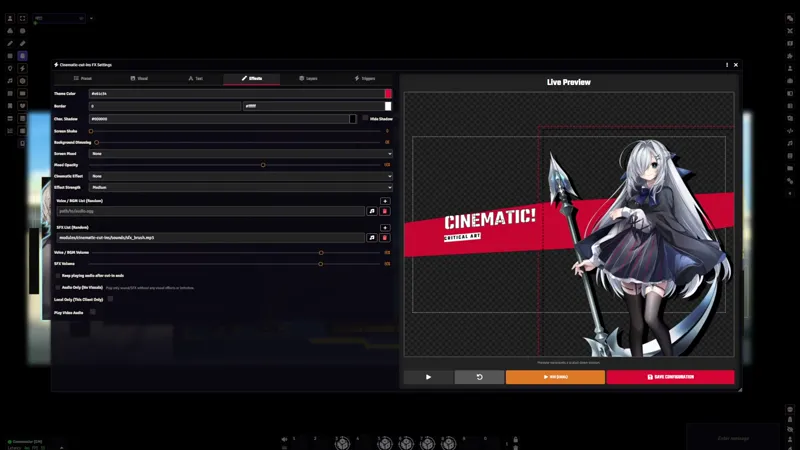
🎬 Cinematic Cut-ins v2.0.0: Cinematic Effects, Screen Moods & Drag-to-Position
v2.0.0 adds thirteen built-in cinematic effects, CSS screen mood filters, drag-to-reposition preview editing, and a minimal Blank theme. The effects and mood filters both work on personal cut-ins and All-Out Attacks.
This release requires GlitchSmith Library v0.9.0 or newer. Update and announcement notifications now go through the shared GlitchSmith Library notification board instead of the module's own update dialog, and the "Disable Update Notifications" setting keeps working under the same name.
💥 Cinematic Effects
Personal cut-ins and All-Out Attacks can now layer one of thirteen short effects over the scene: Debris Burst, Energy Sparks, Ember Storm, Victory Confetti, Petal Drift, Sparkle Shimmer, Lens Rain, Shockwave, Hero Flare, Film Burn, Blackout Cut, Speed Lines, and Shadow Mist.
Each effect has Low, Medium, and High strength, plays in the live preview, and can run together with a Screen Mood filter.
On personal cut-ins, particle effects render both in front of and behind the character, so the character sits inside the effect instead of under a flat overlay. All-Out Attacks play one shared effect across the whole montage.
Every effect is built from CSS and generated shapes, with no image assets and no WebGL renderer, so they add nothing to your asset load.
A per-player client setting, "Disable Cinematic Effects for Me", turns the effects off on low-end machines while cut-ins keep playing normally.
🌗 Screen Mood Filters
Personal cut-ins and All-Out Attacks can apply a screen mood overlay that tints and grades the whole cut-in.
The lighting moods are Night, Dusk, Dawn, Flashback, Vignette, and Dream.
Old TV, Lightning, and Monochrome Film are available as overlay-style moods for signal-screen, storm, and black-and-white looks.
An opacity control sets how strong the mood reads, and it applies in both the preview and playback.
🖱️ Drag-to-Position Preview
The preview now lets you drag elements to place them instead of typing offset numbers.
On personal cut-ins you can drag the character, the main and sub text, and custom layers. Grabbing empty scene space moves the whole cut-in through the Screen Position sliders, limited to the axes each theme actually supports.
On All-Out Attacks you can drag character portraits, participant text, the center text, and global layers.
Holding Ctrl and scrolling the mouse wheel over a draggable element changes its scale or text size.
Manual All-Out panel editing still uses drag for panel splitting while manual mode is on, so the two behaviors don't collide.
⬜ Blank Theme
Blank is a new personal cut-in theme that renders on a bare stage, with no background panels, decorative lines, paint shapes, or borders.
Actor artwork, main and sub text, and custom layers still appear, with a simple fade entrance.
It works as a clean starting point for building a look entirely out of custom layers.
Bug Fixes
Preview pause state: Changing the theme or character image while the personal cut-in preview was paused no longer resumes its animations.
Links
Module Wiki: Cinematic Cut-ins Wiki
Install Guide: How to Install Premium Modules

Comments (1)
Hello! There seems to be a bug where you cannot insert a Cut-in Image for your Scene Effects. It seems like it's locked? I'