
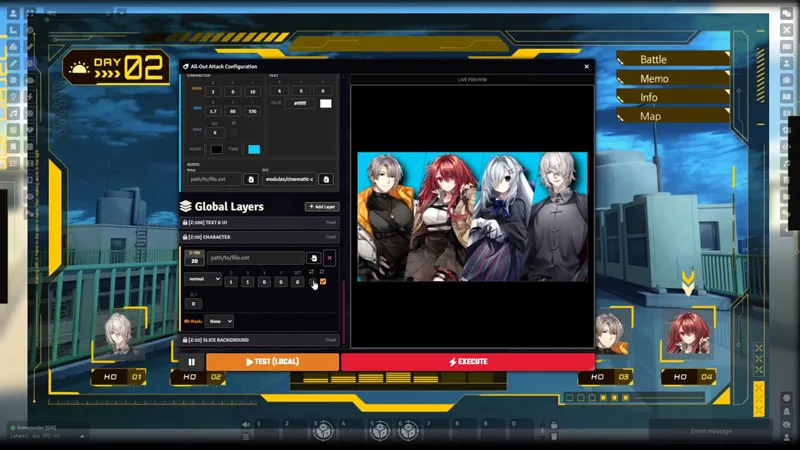

🎬Cinematic Cut-ins v1.7.0: All-Out Global Layers, Audio Only Mode & Actor Groups
v1.7.0 is a significant update focusing on versatility and workflow improvements. From "Audio Only" triggers for immersive soundscapes to a robust "Actor Group" system for easier management, this update gives you more control with less effort.
✨New Features
⚔️ All-Out Global Layers
Unified Visuals: Global layers are now fully supported in All-Out Attack mode, allowing for cohesive screen-wide effects during your ultimate moves.
Immersive Scale: Enhance the spectacle by layering environment effects (rain, embers, speed lines) behind your character's decisive strike.
🎧 Audio Only Mode
Sometimes, less is more. You can now configure triggers that play sound/SFX without any visual interruption.
No Visuals: No letterbox bars, no character art, no text overlay.
Pure Immersion: Perfect for environmental cues, invisible traps, or mental whispers where you only want the audio feedback.
🎭 Banner Mask Mode
Dynamic Shaping: Custom layers can now be masked to fit the shape of the theme's background container.
Perfect Fit: This is especially useful for "paint splash" or "torn paper" styles, ensuring your added images don't bleed outside the thematic borders.
Note: Some themes with skewed backgrounds (e.g., Blitz, Brush) may cause the masked image to appear tilted.
👥 Actor Groups & Default Presets
Managing large casts of NPCs just got easier.
Group Assignment: Assign actors to specific groups (e.g., "Goblins", "Guards").
Fallback Logic: If an actor doesn't have a specific preset for a trigger, it will automatically use the Group's Default Preset.
Bulk Management: Quickly assign groups to multiple selected actors from the Control Panel.
⚡ Enhanced Resource Triggers
Custom Max Value: You can now specify a static number or a property path for the maximum value in resource triggers.
System Agnostic: This unlocks support for systems with non-standard resource structures or custom attributes that don't follow the value/max pattern.
🛠️Improvements
Roll Keyword Compatibility: Restored and improved keyword detection for chat cards. It now scans more content sections, ensuring reliability across different system roll templates and custom descriptions.
🐛Bug Fixes
Image Mask Aspect Ratio: Fixed an issue where masked images would sometimes lose their proportions and appear square. The mask now respects the intrinsic ratio of your image.
Theme Defaults: Fixed a bug where default sound/SFX settings weren't applying correctly when selecting a theme (like Rebel) for the first time.
Comments (2)
Pretty dumb question, but while this supports pf2e and I believe this may be system agnostic, will the pf2e automated features for critical hits, low hp, etc work in pf1e?
Not a dumb question at all! To be more precise, there are some hardcoded triggers specifically for PF2e just to make the setup process easier, but those are just shortcuts. The module itself is designed to be system-agnostic, so you can definitely set up the same automated features for PF1e by configuring them manually. It might take a little more tweaking since there’s no pre-set shortcut for it, but it will work perfectly fine!