

Smartphone Widget v1.2.0 Patch Notes(🚨 IMPORTANT: Migration for Early Access Users)
Hello! We're excited to announce a major update for the Smartphone Widget module. This update includes not only bug fixes and new features but also significant structural changes to the module. Please read the critical data migration guide below very carefully, especially if you are an Early Access user.
🚨 IMPORTANT: Migration for Early Access Users
This section is only necessary for users who were previously using the smartphone-widget-beta module (Early Access tier). If you have only ever used the main smartphone-widget module, you can ignore this section and enjoy the new updates!
With this version, the -beta module is being retired, and some features have been moved to a new add-on. A data migration is required to move your settings correctly.
⚠️ Before proceeding, please back up your world as a precaution!
How to Migrate:
First, install/update the following modules: smartphone-widget (this new version) and the new smartphone-widget-scanner add-on. Do not uninstall the old -beta module yet.
Launch your world with all three modules active:
smartphone-widget (latest version)
smartphone-widget-beta (the old one)
smartphone-widget-scanner (the new add-on)
Log in to your world as a GM. The migration process will run automatically in the background. A confirmation pop-up will appear when it's complete.
After seeing the confirmation, you can safely shut down the world, then disable and uninstall the smartphone-widget-beta module. It is no longer needed.
✨ New Features
Time Control Action Sheet (GM Only): GMs can now click the clock in the widget's status bar to open an action sheet for quick time manipulation. Instantly set the time to presets like 'Morning' or 'Noon', or advance/rewind time by set increments.
Scene Lighting Integration: If 'Automatic Lighting FX' is enabled, you can now use the new time action sheet or the Calendar app to instantly apply the correct time-of-day lighting to your current scene with a single click.
Social App - Text-Only Posts: You can now create posts in the Social App with only text, without needing to attach an image.
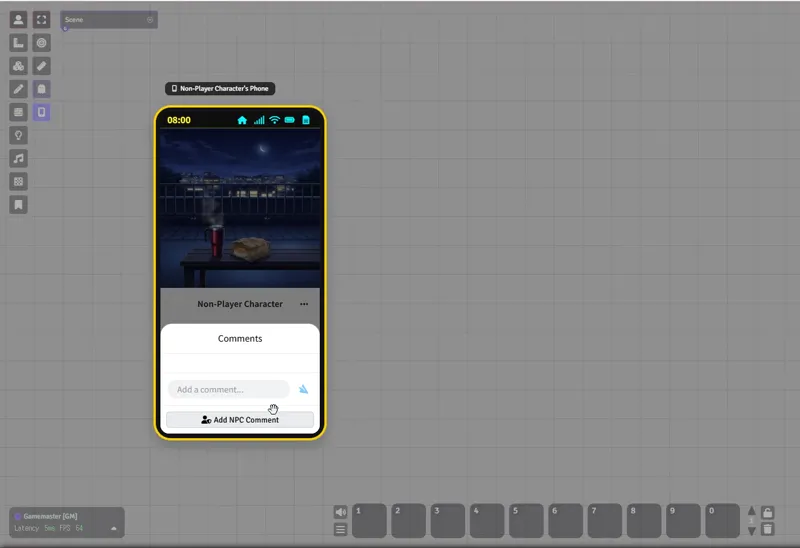
Social App - NPC Comments (GM Only): GMs can add comments to any post as a fictional NPC, allowing for more dynamic roleplay and storytelling.
Social App - Post Editing: You can now edit the text content and image of your own posts after they have been published.
Gacha Bonus System: You can now configure a "Pull N, Get M Bonus" rule for each gacha banner. For example, setting a "Pull 10, Get 1 Bonus" rule will display a 'Pull 10+1' button to players, granting them 11 items for the price of 10.
'No Device' Guide Screen: For players who do not have a smartphone device assigned, the widget will now display an informative screen guiding them to ask their GM for one.
🛠️ Improvements & Changes
Gacha App: After saving settings in the gacha pool editor, the window will now automatically close and return to the pool list for a better user experience.
Gacha App: The cursor now changes to a pointer when hovering over gacha banners on the main screen to indicate they are clickable.
Default Lighting Setting: The global 'Enable Automatic Lighting FX' setting in the time settings is now enabled by default for a more intuitive initial setup. This does not affect existing worlds, only new ones.
Add-on Structure: The Glitch Scanner and Data Archive apps have been moved to a separate add-on module named smartphone-widget-scanner. To use these features, you must install and activate this new add-on.
🐛 Bug Fixes
Messages App: Fixed a bug where messages with the exact same timestamp could appear in a confusing order when using "In-Game Time". A secondary sort based on real-world time has been implemented.
Messages App: Fixed an issue where message order could be incorrect when using "Real Time" due to client-side clock discrepancies. Timestamps are now authoritatively set by the server (GM). (Note: If you notice mixed-up orders in old chats after this update, we recommend deleting the conversation and starting a new one.)
Messages App: Fixed a bug where the notification badge would persist if a chat room with unread messages was deleted.
Social App: Fixed a bug where posts with identical timestamps could appear in the wrong order in feeds and profiles when using "In-Game Time".
Social App: Fixed a bug where if a GM edited a player's followers/following, it would appear to that player as if they had been logged out.
Gacha App: Fixed a critical bug in the gacha pool editor where all unsaved changes were wiped whenever a rarity was added or removed.
FoundryVTT v13+ Compatibility: Fixed an issue where the "Enable Automatic Lighting FX" checkbox was not visible in the Scene Configuration window in FoundryVTT v13+.
(Scanner Add-on) Fixed a bug where the sender would also receive a toast notification when sending a data packet message from the Glitch Scanner app.
Thank you for your support! As always, bug reports and feature suggestions are welcome.