
⚔️ Medieval Plumbobs Override
✨ WHAT'S INCLUDED:
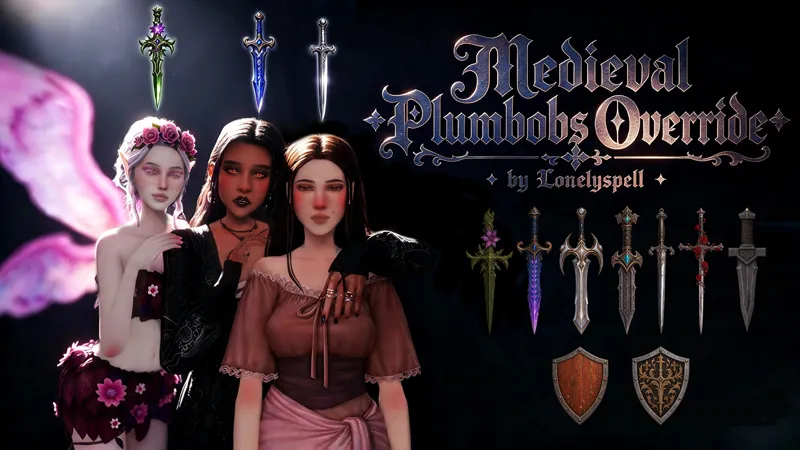
This override replaces all standard Plumbobs in The Sims 4 with a medieval-style Plumbob.
The replacement includes:
👤 Regular Sim Plumbob
🧙 Plumbobs for all occult types
👥 Group Plumbob
🏰 Club Plumbob
📦 FILES INCLUDED:
[LonelySpell] Medieval Plumbobs Override MERGED
— All Plumbob replacements are combined into one package file.
[LonelySpell] Medieval Plumbobs Override SEPARATED
— Each Plumbob replacement is provided as a separate package, allowing you to choose which Plumbobs you want to replace.
⚠️ Choose ONE version only. Do not install the MERGED and SEPARATED versions at the same time, as this will cause conflicts.
⚠️ IMPORTANT NOTES:
This is a default replacement and will conflict with any other Plumbob overrides.
The merged file already contains all the required replacements. Do not install additional Plumbob files from this set.
⚙️ INSTALLATION:
Place the .package file in your Override folder inside your Mods folder.
If the Override folder doesn't exist, create it.
Make sure Custom Content and Mods are enabled in your game settings.
👻 HOW TO MAKE PLUMBOBS TRANSPARENT
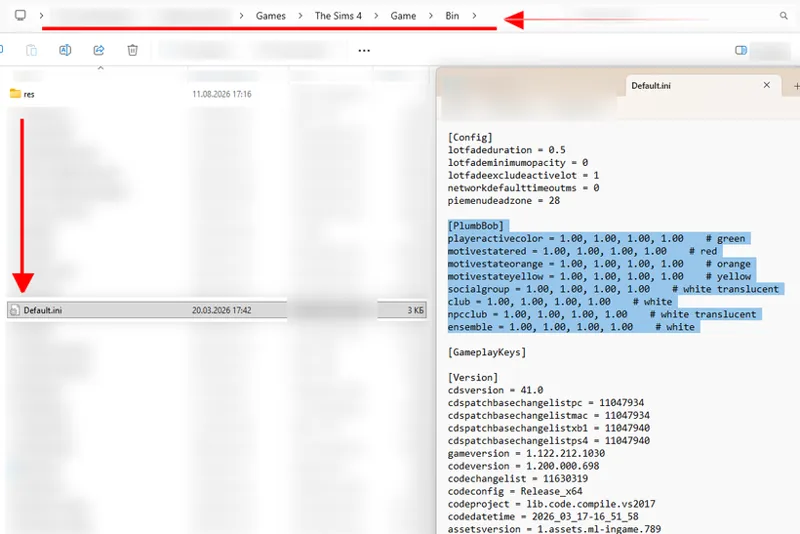
1. Find Default.ini
Go to:
The Sims 4 → Game → Bin → Default.ini
I recommend making a backup of the file before editing it.
2. Open Default.ini
Open the file with Notepad or another text editor and find:
3. Change the transparency value
Change the final value to 1.00 in the relevant Plumbob.
After saving the file, restart the game.
🏰 I hope this little override helps make your medieval and fantasy saves feel even more immersive!
More medieval & fantasy content coming soon! ⚔️✨
Comments (5)
Back and already posting THANK YOUUUUU <3333
Ohmygosh ;-; you just came back and youre already blessing us! Love this <33
Omg how fun!!!
Oooooomg! 10/10!
Holy crap so cool!!