




BAMBU LAB PRINT PROFILES
https://landing.kiarostudio.com/ (PT, GER, IT, TR)
Five ready to import Bambu Studio Process profiles are now available for our multipart FDM figures. You can choose the print profile that suit your needs the most.
Each profile adjusts multiple print parameters depending on its intended purpose, including print speed, support settings and distances, wall and infill behavior, cooling, and other process settings.
They are designed for Bambu Lab printers using a 0.4 mm nozzle and give you a clear choice between maximum detail, reliable everyday printing, fast drafts and very quick fit tests.
No code or scripts are required. Import the profiles once, open your existing plate, choose a CYBERPOP profile and slice. Your model placement, scale and plate arrangement do not need to be rebuilt.
DOWNLOAD + VISUAL TUTORIAL
https://landing.kiarostudio.com/#print-settings
CHOOSE YOUR PROFILE
0.08 mm Ultra Fine
Maximum surface quality and small-detail reproduction. This is the slowest profile and uses a denser support interface for cleaner supported surfaces.
0.12 mm Fine
High-quality results with a noticeably shorter print time. Recommended when you want a polished display print without using the slowest possible process.
0.16 mm Standard
Our recommended default. It prioritizes reliable adhesion, predictable printing, practical speed and supports that are easier to remove.
0.24 mm Rough
A fast draft profile. Visible layer lines and minor support marks are expected, but it is useful when time matters more than presentation quality.
0.28 mm Ultra Rough / Test Prototype
The fastest option for checking scale, fit and assembly. Surface quality is not the priority, and the supports are intentionally loose and easy to remove.
HOW TO INSTALL
1. Download CYBERPOP_Bambu_0.4mm_Print_Profiles.zip from this post or the tutorial page.
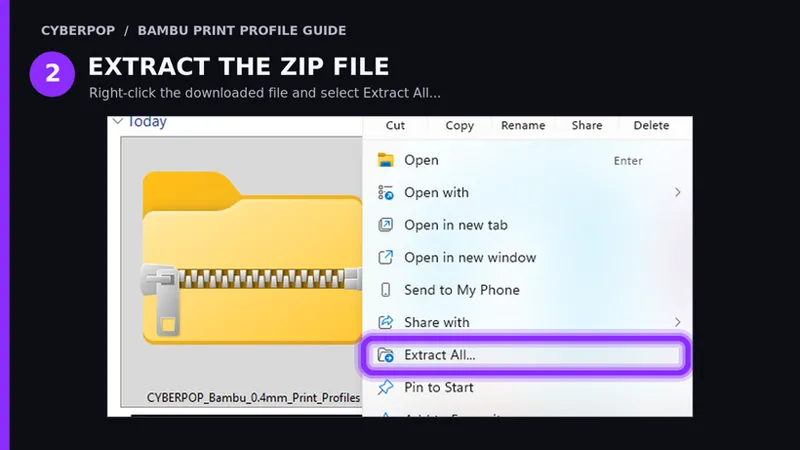
2. Right-click the ZIP file and choose Extract All…
3. Open Bambu Studio and go to File → Import → Import Configs…
4. Select all five JSON files together and click Open. The README file does not need to be selected.
5. Select your Bambu Lab printer with a 0.4 mm nozzle, open the Process preset menu and choose the CYBERPOP quality level you want.
The profiles remain available after importing them. For future models, simply open your existing plate, select a CYBERPOP profile and slice again. Save the 3MF normally if you want that profile to remain attached to the project.
IMPORTANT NOTES
• These are Process profiles, not filament profiles. Continue using the correct PLA filament preset for your material.
• Support generation is enabled by default and can be disabled for parts that do not require support.
• Always inspect the sliced Preview before sending a plate to the printer.
• If the profiles do not appear, confirm that a Bambu Lab printer with a 0.4 mm nozzle is selected. Restarting Bambu Studio may also refresh the preset list.
• Printer and filament limits can automatically reduce the requested speed.
• These profiles are reliable starting points. Very small contact areas, unusual materials or model-specific orientations may still need individual adjustments.
If you encounter a repeatable issue, send us your printer model, filament, selected profile and a clear photo of the result.
Thank you for supporting CYBERPOP
Comments (4)
This is great. Thank you for these. Would you happen to have a ready profile for 0.2mm layer height for the 0.4 mm nozzle?
Yes! The ''Rough profile'' is the one set up for 0.20 mm layer height with a 0.4 mm nozzle.
Would these profiles work on the Anycubic printers as well?
Hello! These files cannot be imported directly into Anycubic Slicer, but you can still use them as a reference. Until I publish the adapted Anycubic profiles in a separate post, you can open the CYBERPOP profiles in Bambu Studio and manually copy the relevant layer height, speed, wall, support, and support-distance values into your Anycubic slicer