





How to connect your Patreon to Discord
Mobile User
请使用网页浏览器打开patreon,不要用app来连接您的Discord帐户。
Please open Patreon in your browser, do not use the app to connect your Discord account.
Patreonはブラウザで開き、Discordアカウントをアプリで接続しないでください。
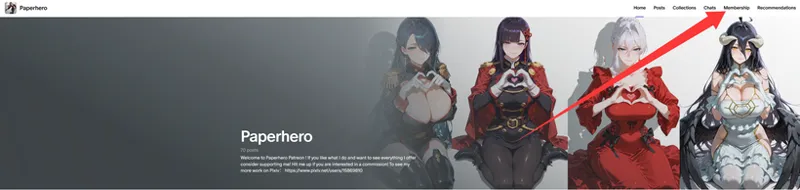
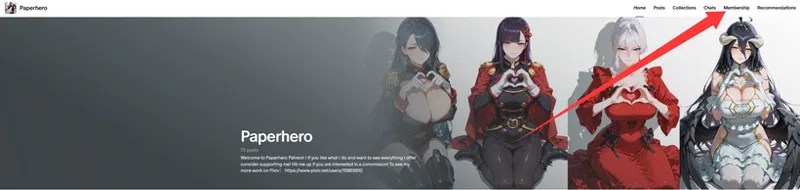
1、Find the membership tab
2、Scroll down to the bottom and find Quick links and connect to Discord
Old guide
如果上面的方法无法加入discord,请根据以下操步骤按顺序操作。
If the above method fails to link to the Discord channel, please follow the steps below in sequence.
上記の方法でDiscordチャンネルに接続できない場合は、以下の手順を順番に実行してください。
1、
2、
3、
4、
5、
相关订阅下载的资源已经全部转移至Discord频道内,请所有订阅者在订阅后关联Discord频道,如果不知道如何关联,请各位订阅者按照图片中的指示分步骤操作,操作完毕后,请再次刷新您的discord APP,即可加入成功,感谢支持~
仍旧处于订阅期间的用户,如果您发现在discord无法找到下载频道,请进行以下操作:
1、在您的discord中退出我的频道。
2、根据帖子内的操作重复一遍即可解决无法查看下载频道的问题。
(原因大概是最初加入我的频道时,您可能是通过我发布的邀请链接加入的,而不是通过patreon直接加入的,所以discord无法读取到您的会员信息,对您造成的不便我深感歉意。)
—————————————————————————————————————————
For some reasons, all resources related to subscription downloads will be transferred to Discord in the future, please connect all subscribers to the Discord channel after subscribing, if you don't know how to link, please follow the instructions in the picture to follow the steps, after the operation is completed, please open your discord APP again, you can join successfully, thank you for your support~
If you are still a subscriber and can't find the download channel on Discord, please do the following:
1、Leave my channel in your Discord.
2、Simply repeat the steps outlined in the post to resolve the issue of being unable to view the download channel.
—————————————————————————————————————————
何らかの理由で、サブスクリプションのダウンロードに関連するすべてのリソースは将来的にDiscordに転送されます、購読後にすべてのサブスクライバーをDiscordチャンネルに接続してください、リンク方法がわからない場合は、写真の指示に従って手順に従ってください、操作が完了したら、Discordアプリを再度開いてください、正常に参加できます、サポートに感謝します~
まだサブスクリプション期間中のユーザーの場合、Discord でダウンロード チャネルが見つからない場合は、次の操作を行ってください。
1、Discord で私のチャンネルを離れます。
2、 ダウンロードチャンネルが表示されない問題を解決するには、投稿に記載されている手順を繰り返すだけで済みます。
(原因は、Patreonではなく、私が投稿した招待リンクからチャンネルに参加されたため、Discordがあなたの会員情報を読み取ることができないためです。ご不便をおかけして誠に申し訳ございません。)
—————————————————————————————————————————
注意:首先,建议各位订阅者使用网页版patreon进行操作。其次,需要先注册discord账号,并与你的patreon关联后才能加入我的discord频道(详情请见最后一张图片中的红色箭头)
Note: First of all, we recommend that you use the web version of Patreon to do the above. Secondly, you need to register a Discord account and link it with your Patreon before you can join my Discord channel (see the red arrow in the last image for details)
注:まず、上記の操作を行うには、PatreonのWebバージョンを使用することをお勧めします。 次に、私の Discord チャンネルに参加する前に、Discord アカウントを登録し、Patreon にリンクする必要があります (詳細については、最後の画像の赤い矢印を参照してください)
Comments (3)
Discord indicates the connection is successful, but I’m still unable to locate your channel. How can I fix this?
Even though I followed the instructions, your server has not been added to my Discord. What should I do?
Can I not view the May releases anymore?