
📦 How to Install CHPacks (content packs)
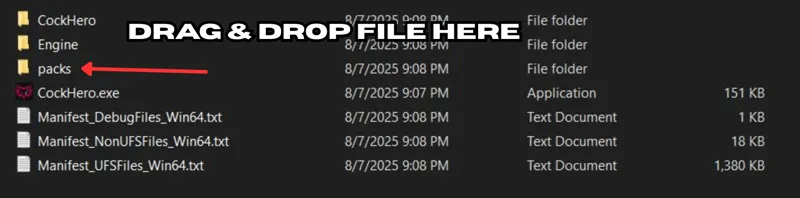
Download the .chpack file. Drag and drop the .chpack into the packs folder (located next to the game .exe). Launch the game — the pack will
Download the .chpack file.
Drag and drop the .chpack into the packs folder (located next to the game .exe).
Launch the game — the pack will automatically install and be ready to play!
This is separate from custom file importing, which can be done in-game via the "Imports" menu
Comments (16)
This isn't working for me, there wasn't a "packs" folder in the Windows directory next to the .exe. There was one in the CockHero subdirectory, but putting the extracted chpack files in there didn't put them in the store either
hi there I'm using v0.05 and I put the CHPacks file in the PACKS folder, now I can see the content in the media folder from Extracted folder, but when I launch the game, the pack is still locked cannot be un;ocked
what should I do now :(
Hello, if it's possible can you include all packs in 1 folder, so you don't have to manually go through each post to install each pack, and can do them all in one/pick and choose from a single list. Anyway, goated game
Bit confused, got a couple content packs with the instant access option and followed directions, nothing happened. extracted them into the Extracted folder and now they show up in the store but are still locked by Patreon Membership
dm'd you < 3
Should I see the packs in the Unlock store?
yup!
I'm confused af man lol
Im brand new to your stuff too. So I guess maybe im not understanding what's what between the diff collections maybe I only downloaded part of a bigger thing. I just grabbed like all the Friday packs ut are those just like dlc to a video game I was thinking they were like standalone vids or interactive somehow but maybe they're like versions of the what 6 or 7 games I saw. Lol. Explain like im ur cool grandpa bro cuz I could be lol. 39 I was 31 like a week ago wtf lol
downloaded some ch packs from discord and they didn't show up in game when I put them in the packs folder so i tried puting them in the extracted folder and now they work
you may have extracted them before < 3 - you can manually extract to the /Extracted folder if for some reason the auto-installer doesn't work - but usually putting in the .chpacks to the /pack folder should work < 3
Having trouble with this too...downloaded chpacks and dropped in packs folder as indicated, but when I boot the game they remain locked. Unsure if I'm missing a step. No error messages etc.
did you unlock them via points? can you see them in the store?
This does not appear to be working
Can you tell me a bit more? What system are you using? Is there any error messages, etc?