

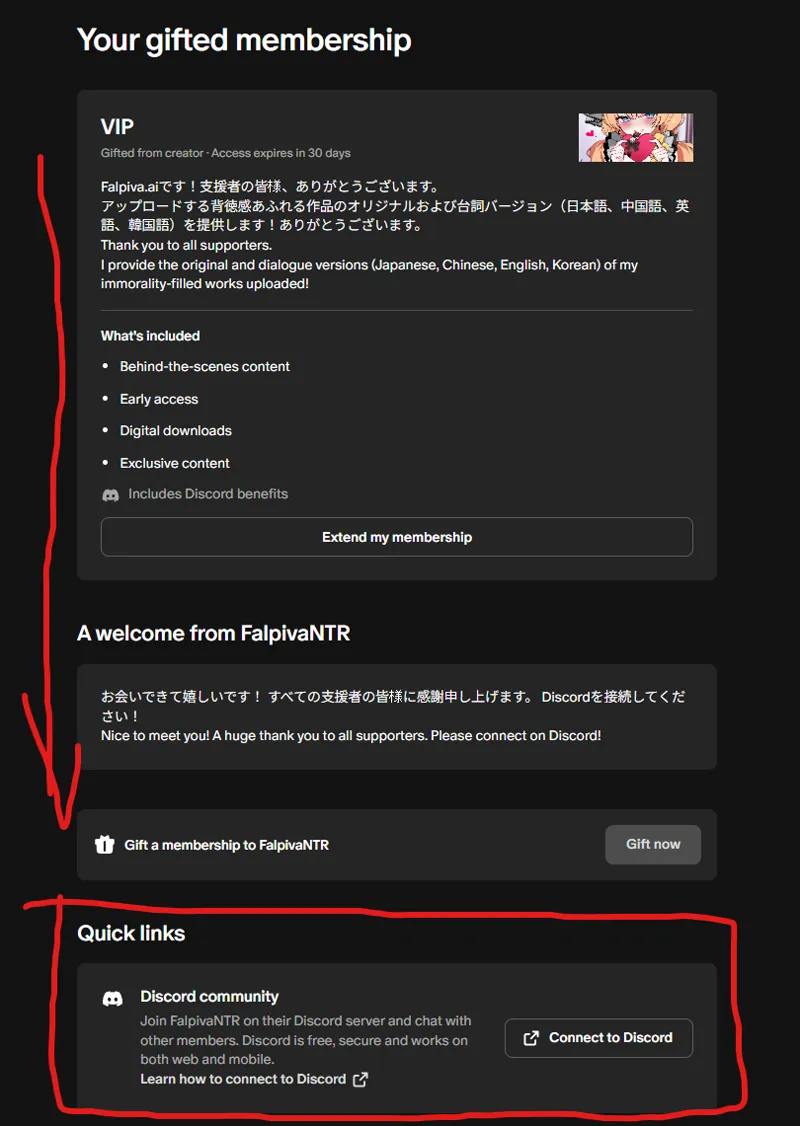

(!!Must Read!!) How to Join Discord and Download (PC only!)
ダウンロード可能なリストは「こちら」でご確認ください!
Please check 'here' for the list of available downloads!
上記のスクリーンショットのように、メンバーシップの一番下にあるDiscord接続を行ってください!
It’s only possible to connect from a PC...! Please connect to Discord from the membership section - it’s at the very bottom, as shown in the screenshot above!
https://www.patreon.com/settings/apps/discord
まず、カテゴリーにあるシリーズ名をクリックしてください。
次に、私がアップロードしたTXTファイルに記載されているリンクにアクセスして、パスワードを入力してください。
「welcome」にアップロードされている画像を確認すると役立つと思います!
First, click on the series name in the category. Then, access the link provided in the TXT file I uploaded and enter the password. Checking the images uploaded in the "welcome" section should be helpful!
Discordの左側のメニューをご確認ください。 ダウンロードしたいキャラクターのシリーズをクリックしてください。
Please check the sidebar on the left side of Discord. Click on the character series you want to download.
詳細なダウンロード方法は、Discord内の「welcome」をご確認ください。
For detailed download instructions, please read the "welcome" channel on Discord.
Comments (3)
大佬想问下在discord中无文本的篇章还会再上传吗,还是需要单独购买
您好,我想下载您的往期文件,但是跳转到您发的gigafile链接但是没有弹出下载的文件是为什么,是链接已经失效了吗
是的,GigaFile链接应该是已经过期了。 不过在下方应该还有一个 Proton Drive Link,里面也有相同的文件。 请试着从那里下载看看。