
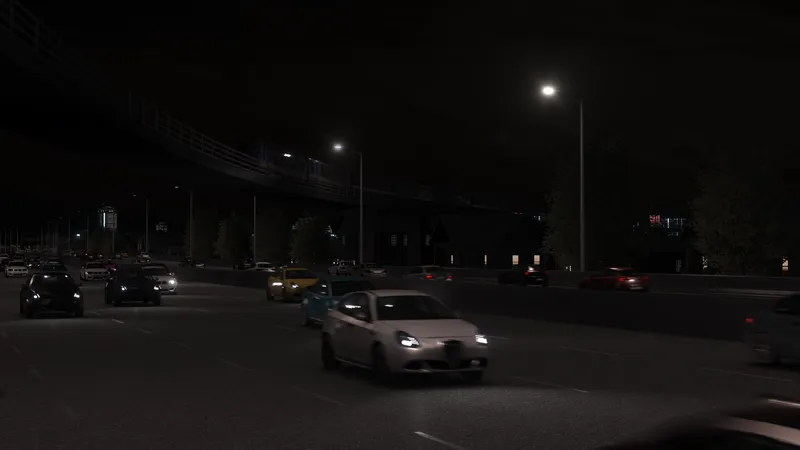
Miami Offline Traffic 🌎🚗
Hey everyone!
I’ve just finished working on single-player traffic for the Miami map. 🎉
Below is the file you’ll need to download so traffic shows up in the Traffic Planner.
I’ll upload a full video tutorial soon on how to install and activate the traffic, but for now you can follow these simple steps:
How to Install:
Download the file https://drive.google.com/file/d/13rMsCzSEtDXTBddZcpuH3Lz5l8YbY89D/view?usp=sharing
Drag and drop traffic.json into:
assettocorsa/content/tracks/af_miami/main_layout/dataOpen the Traffic Planner
Enjoy the single-player traffic! 🚗🌴
PS
The Miami map poll results are clear: the next update will focus on Miami Beach and the first part of the Strip.
Make sure to join the discord if you're having any trouble with the installation process.
Comments (58)
If ill drag and drop it into srp track file then can I get traffic in single player srp?
Nope that's not how it works, I think you need to download the SRP traffic file and then drop it in the SRP folder
great work. works flawlessly. anyone having trouble getting traffic working.. do you have the 2real traffic app?. no idea if this works with ai flood but works perfectly with 2real app
Hey, I installed traffic and everything works perfectly. Is there a way to remove the motorcycles? They are very annoying.
Hey, I think your traffic pack is what's causing the issue. Try to install a traffic pack without motorcycles
I hate to be annoying hahah but is there any chance you could make a traffic layout of the map so you can use 'track day' cars? thanks
Hey, I'll add that do the list, it shouldn't take that much time
To play on a LAN server, do I need to buy AI Fast Lane?
Nope, the map is locked you can't host it on a private server
Where can I get the traffic lane file?
There's a Google drive link where you can download the offline splines
Hi, works fine in practice mode ( it's meant to be played in practice mode, right ?) now I have to figure how to add more vehicles in traffic, coz I want a more dense traffic. Thank you for sharing your work :)
Hey, sorry for the late reply, I think the mobile app didn't send out some of the messages it was supposed to. I think the limit with offline traffic is 2000 cars, but that's pretty much peak hour traffic and the streets are flooded.
it didn't workt I did same as the tutorial
I thought I already replied you, join the Discord if you're still having trouble.
I maid sure i put every thing in the right spot i even watched the video but the traffic does not spawning PLEASE HELP
Hit me up on Discord, there not much more I can do here other than telling you to read all the comments to try all the different solutions
i got the file in the right location but traffic isnt spawning
Make sure to put the traffic.json file in the main_layout/data folder and not in the af_miami/data folder. If you're still having trouble, join the discord !
please optimize some of the map🙏 whenever im driving out of pits i get a lag spike that lasts 10 secs at least
Yep that part of the map is one of the most demanding part to run, but I honestly got a lot of feedback from players who said the map was running smoother than other big maps. Keeping the map playable for low spec PCs has always been my priority so I'll make sure to keep it that way for the next update. Thanks for the feedback 🙌
?
where is the download for the map
Just scroll down the patreon page
I looked at the tut and I dont have those files like alrdy made the af_miami the main layout can you make a vid showing how I add that pls
Okay, I'll make a tutorial video showing how to install the map. In the meantime you can try to just drag and drop the .7z file in content manager and install it
where can i join ur dc? cuz i really need help. i have no idea how to open the traffic planner
just click on the discord link above
i open traffic planner and nothing happens???
Join the discord server if you're still having trouble with the offline traffic setup
Where do I find the main layout for the map? I dont see where to install it?
If you already installed the map you already have the main layout folder, you just need to navigate to your assetto corsa track folder and find the af_miami folder
every time i download it and drag it to content manger it says noting is found
You have to follow the tutorial steps for the offline traffic
can you make a file its not letting me open it
You just need to drag and drop it in the data folder, there's no need to open it
hello, i dont have the main layout where do i get it?
did you install the map?
how do i get the online one??
You can join the Pushin P servers for online traffic, there's no fast_lane available for this map
can some help me im geting spawned under the map
I've never heard about this issue, hit me up on Discord and I'll try to fix it.
why isnt it a file its a note
Yep, that's a .json file. Just click on the download button and you should get the traffic.json file.
where do i download the map
Did You find it?
For some reason it makes my game super laggy and messes up the camera. I am on 4070 and ryzen 5 7600. The traffic spawns ok and has the correct behavior though.
Offline traffic can be quite heavy sometimes, but I have a 2060 and I can run the traffic fine even with 2000 cars. I'm not sure about the camera issue, I think you could fix it by cycling through cameras with F1. I would also try to adjust the LOD settings in the CSP Graphics adjustments tab to improve performances.
legend thanks
I placed the file in the data folder and then go and open traffic planner but theres still no traffic?
Hey, the tutorial video it's still in the making so make sure to join the discord for further support since I don't wanna flood this comment section with troubleshooting.
can some one help me im being spawned under the car
what do i do with the notepad
I just posted the tutorial video. Let me know if it worked for you.
wheres the dowmload
I've just edited the post to make it a bit more clear. You can either download the file from Google Drive or you can just click on the "traffic.json" blue icon here on Patreon.
🤩
Lfg